Websites for home care agencies
Home care agency websites that families trust
Families usually look for home care during a hard week: a parent home from the hospital, a fall, a diagnosis. They are reading on a phone, often late at night, trying to work out whether you can help, whether you are licensed, and how quickly someone can call them. A calm, clear site with a simple inquiry path earns that call.
Start a projectWhat the site needs to do
Personal care, companionship, respite, dementia care and live in care, each explained in words a worried family member understands.
Your license number, how caregivers are screened and trained, and your service area, where families can find them easily.
A short form that asks who the care is for and when it is needed, without collecting medical details the site does not need.
A separate path for job seekers with roles, requirements and an application, so hiring traffic does not crowd out families.
Many families would rather talk. A tap to call button on mobile matters as much as the form.
Mistakes I see most
- Collecting diagnoses and medication lists through a basic contact form
- License information missing or hard to find
- Mixing caregiver job applications with client inquiries in one form
- Stock photos that feel clinical or nothing like your real team
Related work

Guardian MindCare
A therapy practice platform that matches clients with in-network therapists, with role-based portals for therapists, supervisors, trainees, clients and admins.
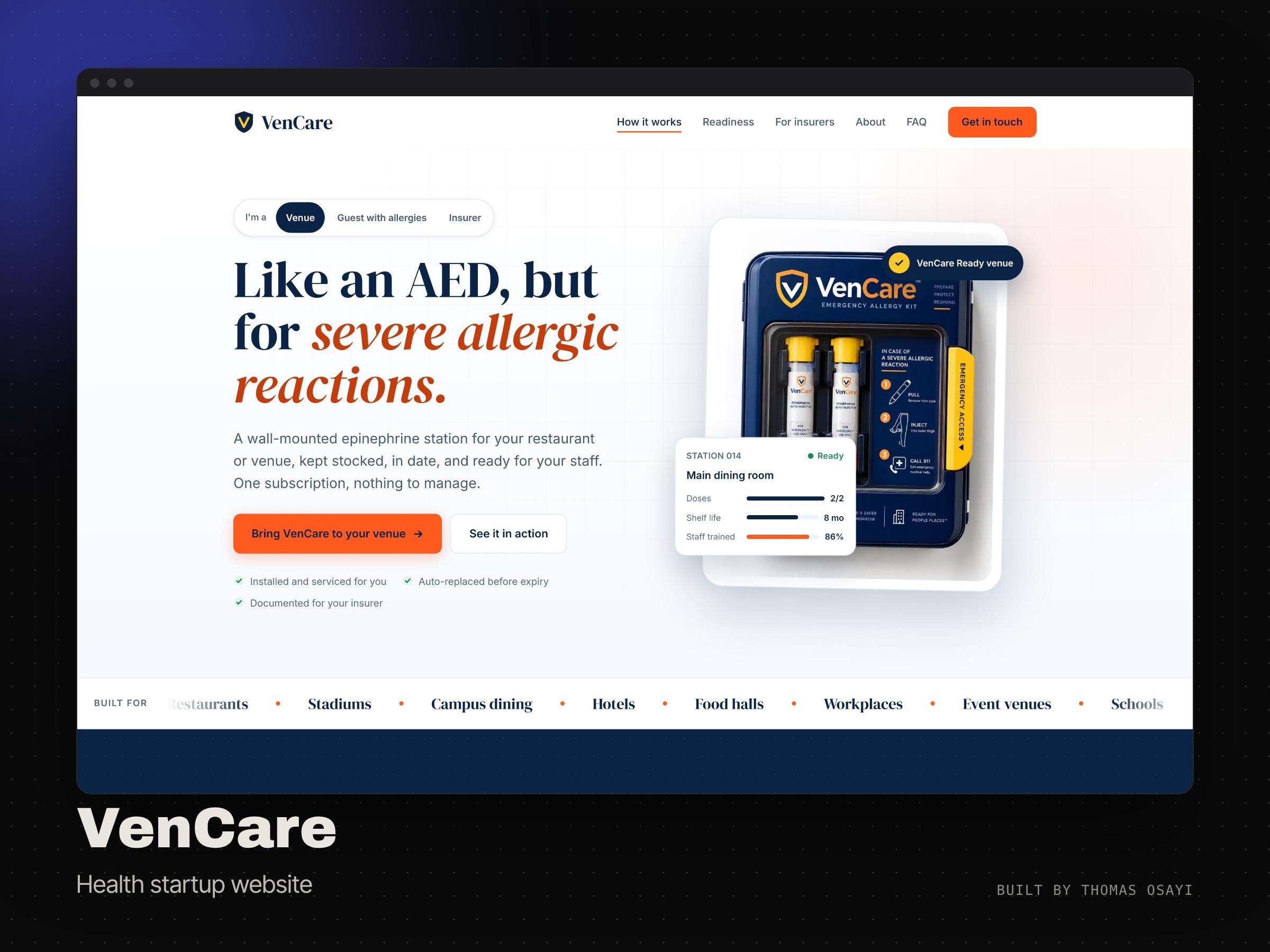
VenCare
Website for VenCare, a health startup placing wall-mounted epinephrine stations in venues, like an AED for allergic reactions.
Pricing
Most home care agencies fit the Business Site package. Several branches, a full careers portal or a family portal make it a Full Custom Build. See the Custom Next.js websites for businesses packages, or get a quick estimate with the website cost calculator.
What do families look for on a home care website?
Families look for three things first: whether you provide the kind of care they need, whether you are licensed and trustworthy, and how fast they can talk to someone.
The person reading is often an adult child organizing care for a parent, sometimes from another city. They are comparing several agencies in one sitting. Your homepage should say plainly what you do and where, show a phone number they can tap, and offer a short inquiry form for people who would rather write. Then answer the questions they are too tired to ask: what happens after they call, how quickly care can start, whether there is a minimum number of hours and how caregivers are matched.
A calm design helps. Real photos of your team, plenty of white space and readable type matter more here than animation or bold effects. Many readers are older, so use generous font sizes and strong contrast.
How should services be explained to a worried family?
Explain each service in plain language, with a short description of who it is for and what a typical visit includes.
Families do not always know the difference between companionship, personal care and respite. Give each a short section or its own page:
- Companionship: conversation, meals, errands, light housekeeping and getting to appointments.
- Personal care: help with bathing, dressing, grooming and moving around the home safely.
- Respite care: short term care that gives a family caregiver time off.
- Dementia and memory care at home: routines, supervision and patience from trained caregivers.
- Live in or 24 hour care: how shifts work and what the home needs.
Be clear about what you do not do. If you are a non-medical home care agency, say so, and explain that skilled nursing or therapy comes from a licensed home health agency or the client's doctor. That honesty prevents the wrong calls and builds trust with the right ones.
Do we need to show our California HCO license number?
Showing your license number clearly is a strong trust signal, and California law is strict about who may present themselves as a home care organization.
California Health and Safety Code section 1796.34 says no person may represent themselves as a home care organization by name, advertising or solicitation without a license from the California Department of Social Services. Section 1796.42 requires a licensee to post its license in its place of business where clients and aides can see it. The statute text I reviewed does not set out a specific website display rule, but putting your HCO license number in the footer and on the about page lets families and referral partners verify you quickly.
Next to the license number, explain how caregivers are screened: Home Care Aide Registry status, background checks, training and supervision. Rules change and the department issues its own guidance, so check current requirements with the California Department of Social Services before launch. This is general information, not legal advice.
Is a home care inquiry form a HIPAA risk?
It can be, so the safest design keeps the website form short and moves any health information into a secure system built for it.
HIPAA applies to covered entities and their business associates, and whether a non-medical home care agency is covered depends on things like whether it bills health plans electronically. Many agencies are not sure, and some families will type a lot of medical detail into any open text box. A HIPAA-aware form design protects you either way:
- Ask who the care is for, the city or ZIP code, the type of care, how soon it is needed and the best way to reach the family.
- Avoid fields for diagnoses, medications or medical history.
- Add a short note under the message box: "Please do not include medical details here. We will discuss care needs by phone."
- Send notifications without the message body, and keep the full record in a secure inbox or care management system.
If your agency is a covered entity, use a form provider that will sign a business associate agreement, and talk to your compliance advisor. My post "Are website contact forms HIPAA compliant? What health practices need to know" goes deeper.
What should the inquiry flow look like?
The inquiry flow should feel like a short, kind conversation: a few questions, one per screen on mobile, ending with a clear note about what happens next.
For Guardian MindCare, a therapy practice platform, I built a get matched intake that starts with one simple question about who the care is for, then narrows down from there. Home care inquiries suit the same pattern, because the first thing your coordinator needs to know is whether the family is asking for themselves, a parent or a spouse.
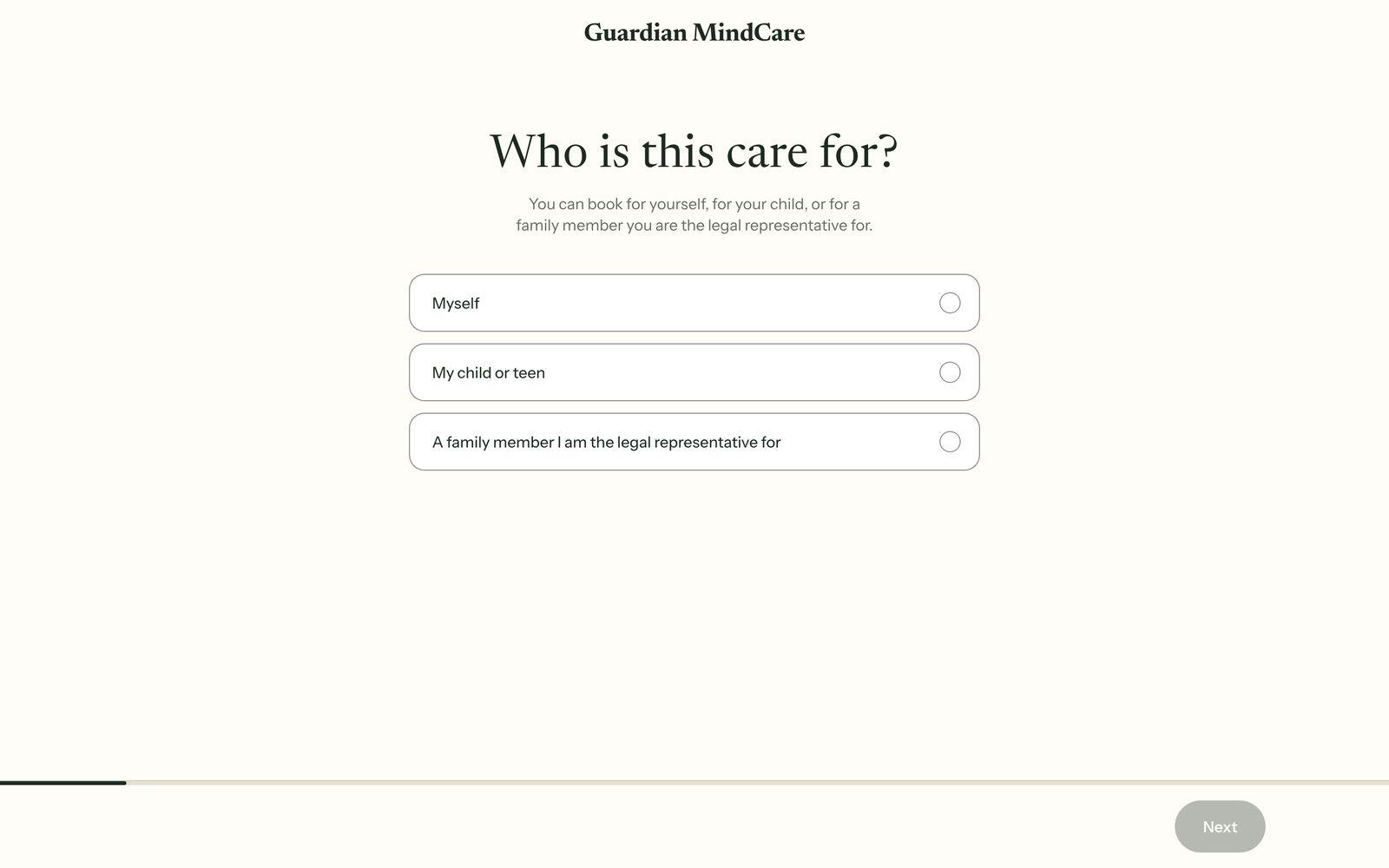
After the last step, show a confirmation that says when someone will call and give the phone number again. Send the family an email with the same details. On your side, alert the intake coordinator by email or text, and outside business hours route the alert to whoever is on call.
How do we recruit caregivers without confusing families?
Give caregivers their own careers section with a separate application, so job seekers and families never land in the same form.
Recruiting is constant in home care, and job seekers can easily outnumber family inquiries. If both use the same contact form, your intake coordinator ends up sorting job applications while a family waits. A careers page should list open roles, pay ranges if you share them, shifts, areas served, requirements such as registry status and transportation, and what training you provide. The application can collect contact details, availability and languages, then go straight to your hiring team. Keep the main navigation focused on families and put "Careers" in the header or footer where job seekers expect it.
How should a home care site handle reviews and local search?
Show real reviews with permission, set up your Google Business Profile carefully, and build pages for the cities you actually serve.
Families search for home care in their parent's city, not yours. A service area section, or short pages for the main cities you cover, helps you show up for those searches. Each page should say something true about that area, such as how quickly you can staff a case there, rather than repeating the same text with a new city name.
For reviews, ask families who are happy with the care and respect privacy: do not publish a client's full name, health details or photos without written consent. My "Local SEO checklist for a small business website" covers the Google Business Profile side.
The bottom line
A home care website earns trust by being calm, clear and careful. Explain services in plain words, show your license and how caregivers are screened, keep the inquiry form short and free of medical details, and give caregivers their own path. Most agencies fit the Business Site package. Multiple branches, a large careers portal or a family portal make it a Full Custom Build, and the website cost calculator can give you a range before we talk.
Questions
Should our California HCO license number be on the website?
Showing it clearly helps families trust you. California requires a license to advertise as a home care organization, so confirm current display requirements with the California Department of Social Services.
Is a website inquiry form HIPAA compliant?
It depends on whether your agency is a covered entity and what the form collects. The safest approach is to keep the first form short and move health details into a secure system.
Can families request care online after hours?
Yes. The form can send an instant confirmation and alert whoever is on call, so a family is not left waiting until morning.
Can we recruit caregivers through the same site?
Yes, with a separate careers section and application form that goes to your hiring team, not your intake coordinator.
Can the site be in more than one language?
Yes. Many families and caregivers prefer Spanish, Tagalog, Armenian or other languages, and each language can have its own pages.
What does a home care agency website cost?
Thomas Osayi builds home care sites on the Business Site package from $450, or a Full Custom Build from $1,200 for multiple branches or portals.
Building a site for your agency?
Six quick questions, then an intro call if you want one.
Start a projectOther industries
Restaurants · Therapy practices · Medical clinics · Salons and spas · Startups · Local service businesses · Dental practices · Law firms · Real estate agents · Gyms and fitness studios · Ecommerce brands · Print shops and manufacturers · Nonprofits · Coaches and consultants · Med spas · Physical therapy and chiropractic clinics · Event venues · Car washes and auto detailing · Accountants and bookkeepers · Tutoring and education businesses · Photographers · Architects and interior designers · Plumbers and HVAC companies · Roofers and general contractors · Cleaning services · Landscapers and lawn care companies · Moving companies · Pet groomers and veterinary clinics · Food trucks · Bakeries and cafes · Wedding planners and event pros · Insurance agencies · Tattoo studios · Churches and faith organizations · Auto repair shops · Property management companies · Florists · Daycare and childcare centers · Breweries and wineries · Funeral homes