Google AI Studio developer
Fix and launch the app you built in Google AI Studio
Built an app in Google AI Studio build mode and need it secure, stable and on your own domain? I fix Firestore rules, Gemini costs, Cloud Run deploys and GitHub sync.
Get it fixedWhat Google AI Studio builds
Google AI Studio build mode generates full-stack web apps from a prompt: a React frontend by default, a Node.js server runtime that keeps the Gemini key server side, optional Firestore and Firebase Authentication, and one-click deploys to Cloud Run, with two-way GitHub sync or a ZIP export.
Where Google AI Studio apps usually break
When you enable Firebase, the agent drafts and deploys security rules from your app logic. Google itself says to double-check them before sharing, and they are often looser than they look.
On Cloud Run the app calls Gemini with your key for every user. Without sign-in, rate limits or usage caps, one busy day or one bot can run up a real bill.
Exported code needs GEMINI_API_KEY and Firebase settings recreated on the new host. Missing variables mean blank screens and server errors.
The generated auth flow is Sign in with Google. Email login, password reset, roles and admin access usually have to be added by hand.
Apps publish to a run.app address. Custom domains, previews, environments and monitoring take setup the build mode does not do for you.
How I fix it
- Sync the app to a GitHub repository you own
- Review the server code, Firestore rules and Gemini usage
- Lock down data access and add limits on AI calls
- Deploy to Cloud Run or another host on your domain
- Test as real users and document how to keep building in AI Studio
Packages
One bug or error in an app that otherwise works, fixed and explained.
Up to three fixes plus one small feature or integration.
For apps whose core features already work: fix what blocks launch and ship it to production.
Apps I have shipped
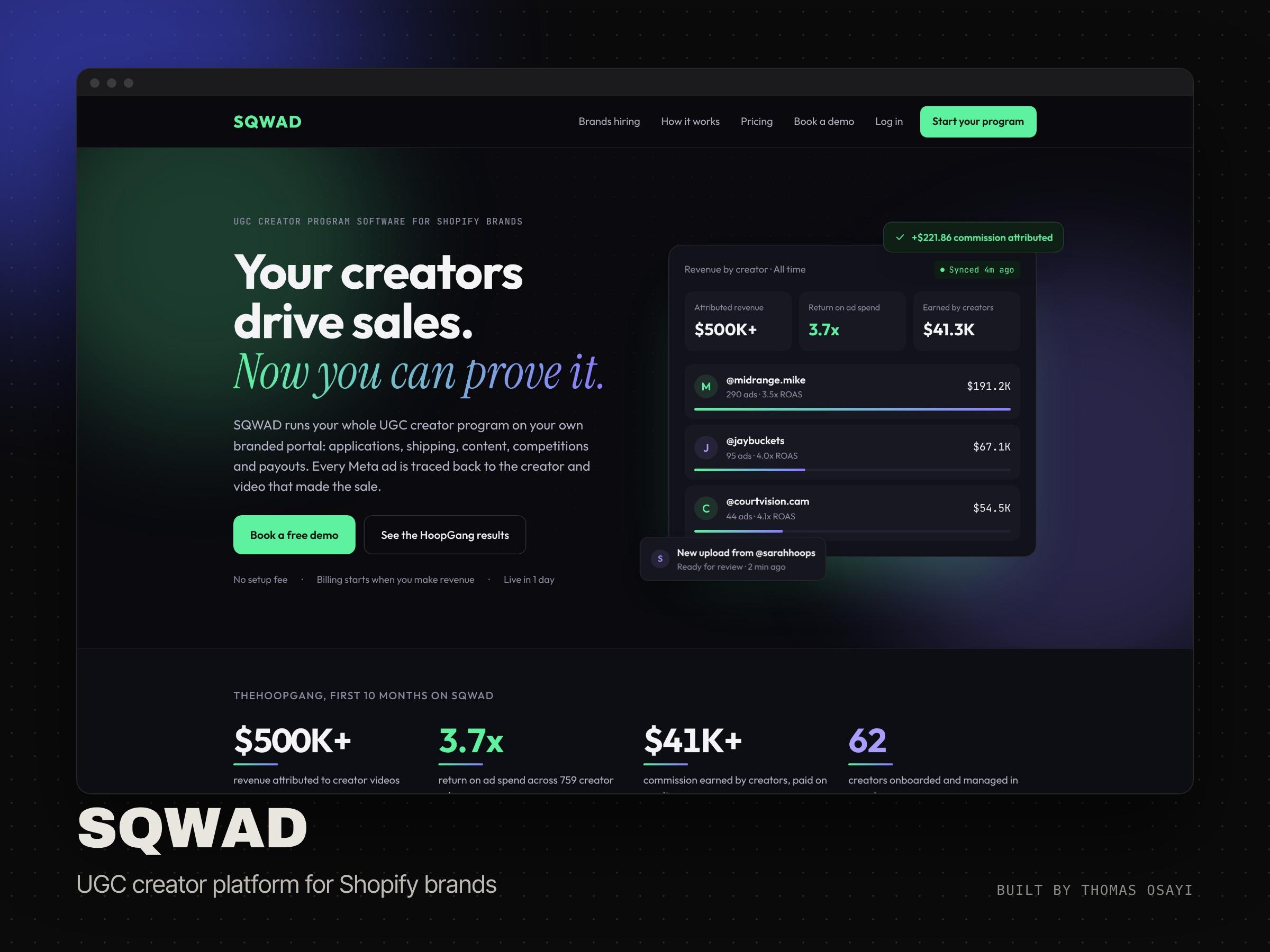
SQWAD
How I designed and built SQWAD, a SaaS platform Shopify brands use to run UGC creator programs, from applications to payouts.

Guardian MindCare
A therapy practice platform that matches clients with in-network therapists, with role-based portals for therapists, supervisors, trainees, clients and admins.
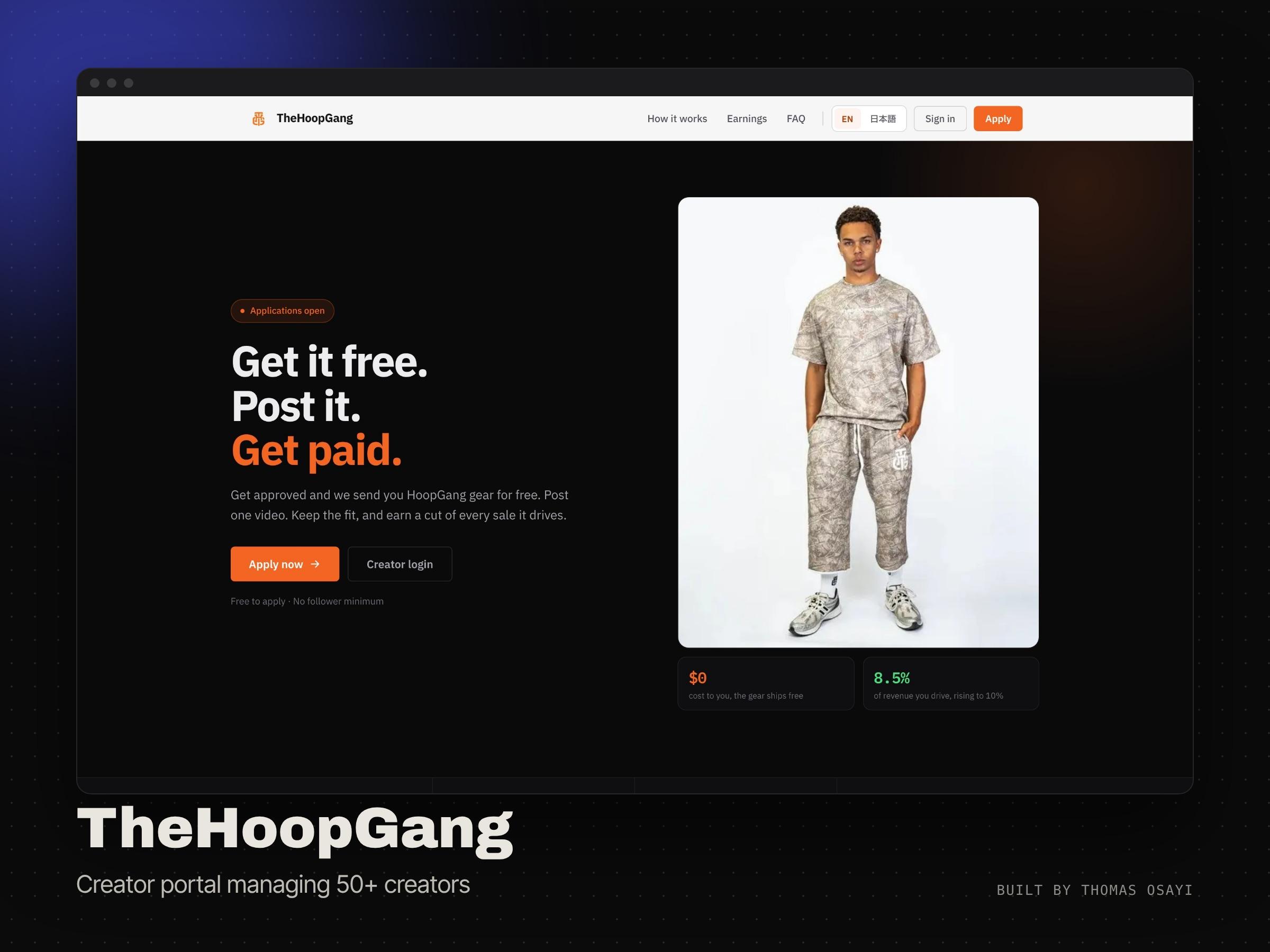
TheHoopGang
A creator portal for a basketball streetwear brand that manages 50+ creators, tracks content and runs refundable gear gifting.
What does Google AI Studio build mode actually generate?
A full-stack web app: a React frontend by default, a Node.js server runtime for API calls and database connections, and optionally Firestore and Firebase Authentication, deployed with one click to Cloud Run.
That is a bigger deal than it sounds. Earlier AI Studio apps were mostly single-page demos calling Gemini from the browser. Build mode now gives you a real server, so your Gemini key is set up as a server-side secret and, in Google's words, never included in client-side code. When you press Enable Firebase, the agent provisions Firestore, turns on authentication, writes a Google sign-in page and connects the app to the database.
So the starting point is better than most AI builders. The gaps are in the decisions the agent cannot make for you: who may read which data, how much each visitor is allowed to spend on Gemini, what happens when something fails, and how the app lives on your own domain with real users. Those are what I spend time on.
Is an AI Studio app safe to share with real users?
Not until someone has reviewed the Firestore rules and the Gemini usage, because those are the two places a prototype becomes a liability.
Firestore security rules
The agent drafts and deploys Firestore rules based on your app's logic. Google's own announcement adds that you should always double-check them before sharing or deploying. The pattern I look for is any rule that lets every signed-in user read a whole collection. With Google sign-in on, that means anyone with a Google account can create an account and read everything. I rewrite rules so each document belongs to a uid, add explicit rules for shared data and test as the owner, a second user and signed out.
Gemini spend
The Cloud Run deployment uses your key for every user's Gemini calls. If the AI feature is reachable without signing in, a bot or a single heavy user can generate a large bill. I put AI routes behind authentication, add per-user rate limits on the server and set budget alerts in Google Cloud.
Why does my app work in AI Studio but break after I export it?
Because the AI Studio environment supplies configuration that the exported code does not carry with it.
When you download the ZIP, Google's documentation says you need to set the GEMINI_API_KEY environment variable in your hosting environment yourself. The same applies to the Firebase configuration and any other secrets you added in the Secrets panel. If they are missing, the server starts but every AI call returns an error, and pages that depend on Firestore render empty.
The other usual causes:
- The new host runs a different Node.js version from the one the project expects.
- The start command or port does not match what the host looks for.
- Firebase Authentication rejects sign-in because the new domain is not in the authorized domains list. My article on Firebase auth/unauthorized-domain walks through that error.
- Code that assumed it was running inside AI Studio, such as relative URLs to the preview, needs updating.
None of this is hard once you know where to look. It is the kind of thing a Quick Fix covers.
Should I keep it on Cloud Run or move it?
For most apps, staying on Cloud Run is fine and simplest; move only when you need something Cloud Run does not give you easily.
Cloud Run scales to zero, bills per use and is already where AI Studio deploys, so there is no migration risk. What usually needs adding is a custom domain mapping, separate staging and production services so you can test before users see changes, and logging you actually read. Google notes that the Starter tier lets you deploy up to two full-stack apps without a credit card, and that you can upgrade to a billing-enabled project later with resources transferred. For anything public, I move clients onto their own billing-enabled project early so the app, the database and the bills all sit under an account they control.
Moving to another host such as Vercel makes sense when the frontend is the main product and you want preview deployments for every change. It means recreating every environment variable and checking that the Node.js server still runs where you put it.
How do I keep prompting in AI Studio once a developer is involved?
Use the GitHub sync, and agree on which areas each of you is changing.
AI Studio's GitHub integration works both ways: you can push changes with AI-generated commit messages, or pull in changes made elsewhere. That means I can work in the repository and you can still open the project in AI Studio and keep building. The risk is the same as with any AI builder: a broad prompt such as "clean up the app" can quietly rewrite a security rule or a rate limit I added. Pull my changes in before prompting, keep prompts specific to the feature you want, and tell me if you change auth, rules or anything that calls Gemini. My article on how to undo broken AI changes with git shows how to roll back when a prompt goes wrong.
What else usually needs adding before launch?
Auth beyond Google sign-in, an admin view, error handling, and the basic pages a real product needs.
The generated sign-in flow is Sign in with Google. That suits internal tools, but many consumer and business apps also need email login, password reset and roles, for example a regular user and an admin who can see everything. AI calls also fail more often than people expect, through rate limits, timeouts or blocked content, so the interface needs clear error states rather than a spinner that never stops. And a public app needs a privacy policy that mentions the AI provider and what data is sent to it.
How long does it take and what does it cost?
Most AI Studio fixes take two to ten days, and the price depends on how many separate problems there are, not the size of the app.
My fix packages:
- Quick Fix, from $60, about 2 days: one bug, such as a broken export or a failing sign-in on your domain.
- Fix Plus Features, from $200, about 5 days: up to three fixes plus one small feature, for example locking down Firestore rules, rate limiting Gemini calls and adding an admin page.
- Finish and Launch, from $600, about 10 days: for apps whose core already works, covering security, deploy on your domain, error handling and testing with real accounts.
If the app needs much more than that, such as payments, multiple roles and a full dashboard, I quote from my SaaS MVP packages instead after reading the code. Google Cloud and Gemini usage are billed to you by Google and depend on traffic.
The bottom line
Google AI Studio build mode gives you a real full-stack starting point with the Gemini key kept on the server. Before real users arrive, review the Firestore rules the agent drafted, put limits on every Gemini call, move the app into a billing project you own, and give it a proper domain. Sync it to GitHub and send me the repo if you want that done properly.
Questions
Is my Gemini API key exposed in an AI Studio app?
Not by default. AI Studio injects the key into the server-side runtime and keeps it out of client code, but every request your users make is billed to that key.
Can I keep using AI Studio after a developer works on the code?
Yes. AI Studio syncs both ways with GitHub, so changes pushed to the repository can be pulled back in and you can keep prompting.
Do I have to host on Cloud Run?
No. Cloud Run is the one-click option, but the exported code is a standard Node.js and React project that can run on other hosts with the right environment variables.
Can the app use a relational database?
Google announced Cloud SQL for PostgreSQL as an option alongside Firestore at I/O 2026, and you can ask the agent for a relational database explicitly.
What does it cost to fix an AI Studio app?
Thomas Osayi fixes one bug from $60, up to three fixes plus a small feature from $200, and launches an app whose core already works from $600.
Reading
- Supabase auth redirect URL not working? Fix localhost, preview and production redirects
Supabase confirmation or magic links sending users to localhost:3000 or the wrong page? Fix the Site URL, the Redirect URLs allow list, wildcards and emailRedirectTo.
- Environment variables undefined on Vercel? Every cause and fix
Works locally, undefined on Vercel? Fix missing NEXT_PUBLIC_ and VITE_ prefixes, wrong Production or Preview scope, the missing redeploy and build-time vs runtime mixups.
- How to fix a CORS error on a Next.js API route
Blocked by CORS policy calling your Next.js API? Read the exact error, handle the OPTIONS preflight, set headers in route handlers or next.config, or proxy instead.
Built with something else?
Lovable · Bolt · v0 · Replit · Cursor · Windsurf · Claude Code · Base44 · ChatGPT · Firebase Studio · GitHub Copilot · Rork · Emergent · OpenAI Codex · Figma Make · Kiro · Anything · Gemini CLI · Google Antigravity · Manus