November 25, 2026 · 9 min read · Thomas Osayi
WordPress vs Squarespace for a small business: costs, trade-offs and who should pick which
WordPress vs Squarespace for a small business: real plan prices, the work each one asks of you, SEO, switching later, and an honest pick for each type of owner.
If you are choosing between WordPress and Squarespace, you are really choosing between two ways of owning a website. One is a rented, finished product where the company handles the plumbing. The other is a flexible toolkit where you, or someone you pay, handle the plumbing in exchange for more control.
Neither is wrong. I have seen small businesses do well on both, and I have seen both turn into a headache when they were picked for the wrong reason. This post compares them for a typical small business: a salon, a contractor, a clinic, a cafe or a consultant who needs a site that brings in calls and bookings. If you are weighing a coded site against WordPress specifically, "Next.js vs WordPress for a small business website in 2026" covers that comparison on its own.
Which is better for a small business, WordPress or Squarespace?
For most owners who will update the site themselves and do not need unusual features, Squarespace is the safer pick, because it removes nearly all maintenance.
WordPress wins when the business needs something Squarespace cannot do, such as a specific plugin for memberships, a directory, a large multi-author blog, or deep control over where and how the site is hosted. It also wins when you already have someone, in house or on retainer, who knows WordPress and will keep it updated.
The deciding question is not which platform is more powerful. WordPress clearly is. The question is who will look after the site in month eighteen, when the person who set it up has moved on. If the honest answer is "nobody," pick the option that needs the least looking after.
How do WordPress and Squarespace actually differ?
Squarespace is a closed, all-in-one builder, while WordPress is open-source software that runs on hosting you choose.
With Squarespace, you pay one subscription. Hosting, security certificates, templates, updates and support are included, and you edit pages in a drag-and-drop editor. You cannot install arbitrary code libraries or move the site to another host, but you also cannot break it by updating the wrong plugin.
WordPress comes in two flavours that confuse a lot of people:
- WordPress.com is a hosted service run by Automattic. You pay a plan, and the hosting is handled for you, which makes it feel closer to Squarespace.
- Self-hosted WordPress, often called WordPress.org, is the same core software installed on hosting you rent from any provider. You get full control and full responsibility.
In both flavours, the site is built from a theme plus plugins. That is where the flexibility comes from, and also where most of the maintenance comes from, because themes and plugins come from many different developers on different update schedules.
The options, one at a time
Each option fits a different kind of owner, so here they are with the trade-offs laid out plainly.
Squarespace
- Best for: owners who want a polished site they can edit themselves, with services, a contact form, a gallery and maybe a small shop.
- Cost range: at the time of writing, Squarespace lists Basic at $19 a month, Core at $29, Plus at $49 and Advanced at $99 when billed annually, with higher prices when billed monthly. The Basic plan shows a 2% transaction fee on online store sales; Core and above show none.
- Pros: almost no maintenance, strong templates, built-in hosting and security, one company to call when something breaks.
- Cons: limited to the features Squarespace offers, harder to build custom workflows, and you cannot take the site to another host.
WordPress
- Best for: businesses that need a specific plugin, publish a lot of content, or want full control over hosting and code.
- Cost range: at the time of writing, WordPress.com lists Personal at $4 a month, Premium at $8, Business at $25 and Commerce at $45 when billed annually, and its pricing page lists plugin installs on these paid plans. Self-hosted WordPress has no license fee, but you pay for hosting, which varies widely by provider, plus any premium themes or plugins.
- Pros: huge plugin library, works for almost any kind of site, many developers know it, you can move hosts.
- Cons: regular updates for core, theme and plugins, more security exposure if it is neglected, and quality varies a lot between plugins.
A custom build, the third option
- Best for: businesses whose site is really a tool, such as online ordering, a quote calculator or booking with deposits.
- Cost range: my packages run from $150 for a one-page Starter Site to $450 for a Business Site and $1,200 and up for a Full Custom Build.
- Pros: the site does exactly what the business needs, loads fast, and you own the code.
- Cons: changes beyond editing content usually need a developer, and it costs more up front than a builder plan.
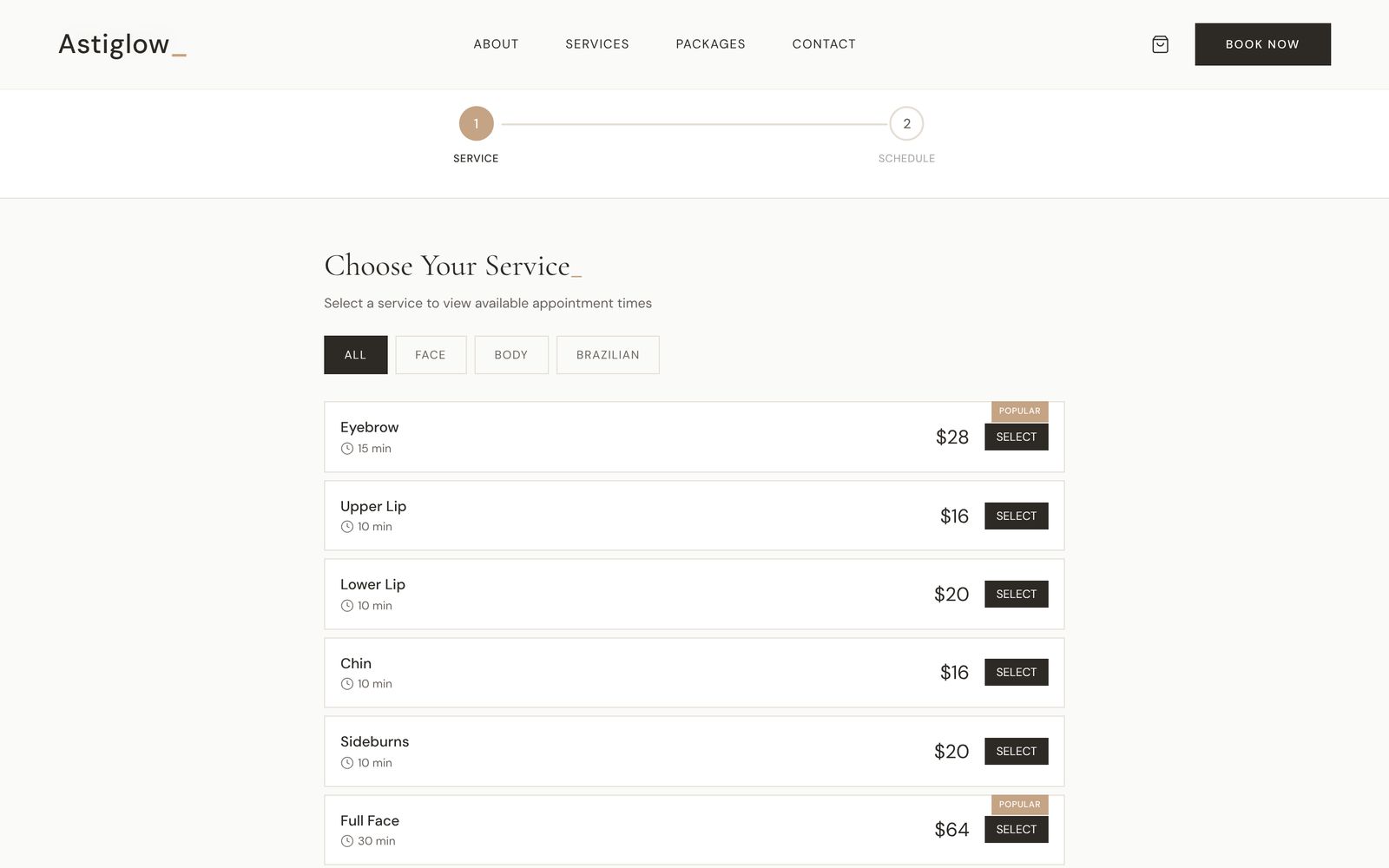
A booking flow is a good example of where custom earns its place. For Astiglow, a waxing studio, I built a flow where clients choose a service with its price before picking a time, which is hard to shape exactly right inside a template.
What does each one cost over a year?
Plan prices are the smallest part of the bill; the real difference is how many extras and how much of your time each option pulls in.
Here is an illustration, not a real client. Picture a made-up mobile dog grooming business that wants five pages, a booking request form, a gallery and its own domain.
On Squarespace, it would likely sit on Basic or Core. The domain, hosting and templates are bundled, so the yearly bill is mostly the plan itself, plus professional email if the owner wants it.
On WordPress.com, it could start on a lower plan, but a booking plugin, a form plugin and a better theme can push it toward a higher plan or add separate yearly fees. WordPress.com's own cost article, at the time of writing, notes that a .com domain is usually free for the first year with an annual plan and then runs about $13 to $25 a year, and that professional email is extra at about $2 to $7 a month.
On self-hosted WordPress, the software is free, but hosting, backups, a security plugin and update time all go on the list. If the owner pays someone for maintenance, that monthly fee often outweighs the hosting itself.
For a custom version of the same site, my Business Site package starts at $450, and the website cost calculator on this site lets you test what different features add.
Which is easier to run day to day?
Squarespace is easier for almost everyone, because there is one editor, one bill and nothing to update.
On Squarespace, changing opening hours or adding a new service is a matter of clicking the block and typing. Templates keep spacing and fonts consistent, so it is hard to make the site look broken. Support is a chat window away.
WordPress has a gentler learning curve than it used to, thanks to the block editor, but the day-to-day experience depends heavily on how the site was built. A site built with a heavy page builder plugin and a dozen add-ons can be confusing to edit. A site built cleanly with a modern block theme can be very pleasant.
The part owners underestimate is the update screen. Plugins publish updates often, and occasionally an update conflicts with another plugin or the theme. Most of the time nothing happens. When something does happen, it is usually the week you are busiest. Someone needs to own that, keep backups, and know how to roll back.
If you want to edit your own site after a developer builds it, "How to update my own website after a developer builds it" walks through what to ask for at handoff, whichever platform you choose.
Which is better for SEO?
Neither platform has a built-in ranking advantage for a small local business; what you publish and how fast it loads matter far more.
Both let you set page titles, meta descriptions, clean URLs, image alt text and headings. WordPress has well-known SEO plugins that add extra controls and checklists, which some owners like. Squarespace has its SEO settings built in, which means fewer knobs but also fewer ways to misconfigure things.
The SEO problems I see on small business sites are rarely about the platform. They are thin service pages, a homepage that never says which city the business serves, missing contact details, slow images, and a Google Business Profile that does not match the website. Fix those and either platform will do the job. "Local SEO checklist for a small business website" lists the checks in order.
Speed is where the platforms can differ in practice. A WordPress site loaded with plugins and a heavy theme can be slow, and so can a Squarespace site with oversized images and many embedded widgets. Test your own pages rather than trusting a general claim.
Can you switch between them later?
Yes, you can switch either way, but you will rebuild the design and need to redirect old URLs to keep your rankings.
Content such as page text and blog posts can be exported and imported with some cleanup. The look of the site, the layouts, the forms and any store setup usually do not carry over in a usable form, so plan to rebuild those.
The part that protects your search traffic is the redirect map: a list of every old URL and the new URL it should point to. Skip it and pages that ranked for years can drop out of Google while the new URLs start from zero. "How to move from Wix or Squarespace without losing your Google rankings" covers that process step by step.
Because switching has a real cost, it is worth picking based on what the business will need in two or three years, not just what it needs this month.
Which should you pick?
Pick based on who will maintain the site and what it must do, not on which platform has the longer feature list.
- Solo owner, simple services site, wants to edit it personally: Squarespace.
- Business that publishes a lot of articles or needs a specific WordPress plugin: WordPress, ideally with someone responsible for updates.
- Owner on a tight budget who is comfortable learning: WordPress.com on a lower plan, upgrading only when a feature requires it.
- Small online shop with a handful of products: Squarespace Core or above, so you avoid the Basic transaction fee.
- Business whose site needs ordering, quotes, deposits or a client portal: a custom build, because both builders will feel like a workaround.
- Team with an existing WordPress developer: stay on WordPress; familiarity is worth a lot.
If you are still split, build the homepage and one service page on a Squarespace trial first. If you hit a wall within an afternoon, that tells you something useful.
The bottom line
WordPress vs Squarespace is less about features and more about maintenance. Squarespace trades flexibility for a site that mostly looks after itself, which suits most small businesses that just need to be found and contacted. WordPress trades simplicity for nearly unlimited options, which suits businesses with specific needs and someone to keep it updated. If neither fits because the site has to run a real workflow, that is the point where a custom build starts to make sense.
Questions, answered in one line
Is WordPress or Squarespace cheaper for a small business?
WordPress.com has the cheaper entry plan at the time of writing, but once you add a business-level plan, premium plugins and maintenance time, the yearly totals often land close to Squarespace.
Is Squarespace bad for SEO?
No. Squarespace lets you edit titles, descriptions, URLs and image alt text, and a well-written Squarespace site can rank as well as a WordPress one for local searches.
Can I move from Squarespace to WordPress later?
Yes, but expect to rebuild the design and set up redirects from old URLs to new ones, because the template and many page settings do not carry over.
Do I need a developer for WordPress?
Not to start, but many owners end up paying someone for updates, backups and fixes once the site has several plugins or takes payments.
What does Thomas Osayi charge if neither builder fits?
Thomas Osayi builds a custom Business Site with up to five pages, a booking or quote form and local SEO from $450 in about 14 days, and a Full Custom Build with CMS or admin tools from $1,200 in about 21 days.
Sources
- Squarespace pricing Squarespace
- WordPress.com pricing WordPress.com
- How Much Does a Website Really Cost? Year One vs. Year Two WordPress.com
Related articles
- How much does a restaurant website cost in 2026?
- How to take restaurant orders online without third-party fees
- Toast vs Squarespace vs a custom website for restaurants
- Google Business Profile vs website: do you need both?
Custom Next.js websites for businesses
Custom Next.js websites for small businesses, clinics, restaurants and startups. Fast, SEO-ready, built from scratch with booking, ordering or quote tools. Based in Los Angeles.
See the service