November 22, 2026 · 9 min read · Thomas Osayi
How to take restaurant orders online without third-party fees
How a restaurant online ordering system on your own site works, what it costs compared with delivery app commissions, and how to set up direct pickup ordering.
Every order that comes through a delivery app carries a commission. For a lot of restaurants, that commission is now one of the biggest line items after food and labour, and the guest who placed the order belongs to the app, not to you.
The fix is not to quit the apps. It is to give your regulars a better place to order: your own website. This guide covers how a direct ordering system works, what it really costs compared with commissions, what to build first, and the mistakes that make guests go back to the app.
Why do restaurants pay so much in third-party fees?
Because marketplace apps charge a percentage of every order, and the percentage is highest on delivery.
At the time of writing, DoorDash publishes three Marketplace plans for US merchants: Basic at 15 percent commission on delivery, Plus at 25 percent and Premier at 30 percent, with a 6 percent commission on pickup orders on every plan. Other apps use similar tiered models.
Those fees pay for real things: the app's audience, drivers, customer service and marketing. For a new guest who has never heard of you, that can be worth it. The problem is the regular who orders the same dish every Friday. You pay the same percentage on that guest's fiftieth order as on their first, even though the app did nothing to bring them back.
That is the order you want on your own site.
What is a direct online ordering system?
A direct ordering system is a page on your own website where guests build an order from your menu, choose a pickup time and pay, with the order going straight to your kitchen.
The basic flow has five steps, and every extra step loses guests:
- Browse the menu by category, with prices and photos.
- Add items to a cart, with modifiers such as size, spice level or extras.
- Choose a pickup time from slots the kitchen can actually hit.
- Pay online or choose to pay at pickup, depending on how you want to work.
- See a confirmation on screen and by email or text, while the kitchen gets a notification.
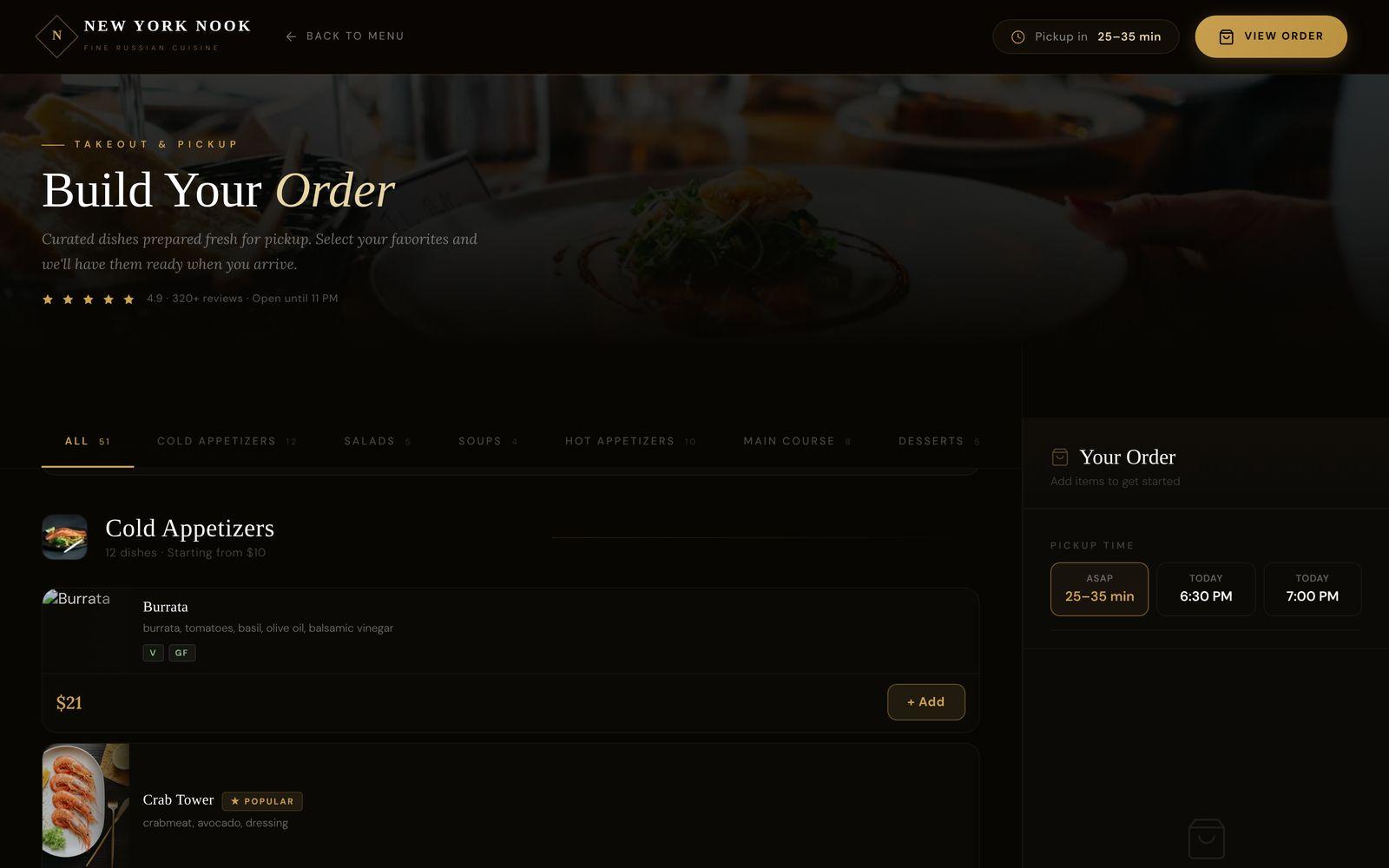
On New York Nook, a Russian restaurant in Hollywood, I built pickup ordering into the restaurant's own site. The order page shows menu categories, a cart and pickup time slots in one view, so a guest can order without leaving the page.
How much does direct ordering really save?
Direct ordering saves the marketplace commission, but you still pay card processing, so the saving is real but smaller than the headline percentage.
Stripe's standard US rate is 2.9 percent plus 30 cents per successful card charge at the time of writing. On a $30 order, that is $1.17. On the same $30 order placed as pickup through a marketplace at 6 percent, the commission is $1.80. On a $30 delivery order at 25 percent, it is $7.50.
Here is an illustration with made-up numbers. A family restaurant does 400 pickup orders a month at an average of $28 through a delivery app. At 6 percent that is about $672 a month in commission. If 250 of those guests switch to the restaurant's own site and pay by card, processing on those orders is about $278, against $420 they would have paid in commission. The restaurant keeps roughly $140 a month on pickup alone.
That number is modest. The bigger effects are elsewhere: guests who used to choose delivery because the app was easier start ordering pickup from you, you get their email for your own promotions, and your menu prices no longer need to carry an app markup.
Should I build pickup ordering or delivery first?
Build pickup first, because delivery needs drivers or a paid delivery service, and pickup does not.
Pickup is simple to run: the kitchen makes the order, the guest walks in, staff hand it over. All the system needs to do is take the order cleanly and say when it will be ready.
Delivery from your own site means either employing drivers, with insurance and scheduling, or paying an on-demand delivery service per trip. Some marketplaces also sell commission-free ordering tools for your own site. DoorDash, for example, lists Online Ordering by DoorDash as commission-free on all plans at the time of writing, with payment processing fees. Those can be a good bridge, but read the terms on who owns the guest data and what the guest pays.
For most independent restaurants, the right order is: pickup on your own site now, keep delivery on the apps, and revisit in-house delivery once direct pickup volume proves guests will use it.
What are my options for setting up direct ordering?
There are three broad routes, and each trades control for convenience.
Your POS company's ordering module
Best for: restaurants already using a POS like Toast or Square that offers its own online ordering.
Pros: orders land straight in the POS and kitchen display, and menus stay in sync.
Cons: monthly add-on fees, and the ordering page looks like the vendor's, not yours. Toast, for example, lists online ordering as an add-on with pricing given by quote at the time of writing.
A restaurant ordering platform
Best for: owners who want ordering, a site, marketing emails and an app in one subscription.
Pros: little setup, built-in marketing tools.
Cons: higher monthly cost. Owner.com lists a Flex plan at $249 a month plus a 5 percent restaurant fee per order, and a Flat plan at $499 a month, with guests paying a 5 percent order support fee on both, at the time of writing.
Custom ordering on your own site
Best for: restaurants that want ordering to match the brand, no per-order platform fee, and full control over the flow.
Pros: one-time build cost, only card processing per order, and you own the code and data.
Cons: you need a developer to build it and to make larger changes later, and kitchen integration with your POS may be limited or need extra work.
What does a good ordering page need?
A good ordering page is fast on a phone, honest about timing and impossible to misread.
- Real-time availability. If the kitchen runs out of a dish, staff need a simple switch to mark it sold out.
- Clear modifiers. Required choices, such as a side, should be required in the form, not left to a notes field.
- Realistic pickup slots. Limit how many orders each slot accepts, so a Friday rush does not create a 50 minute wait.
- A confirmation that removes doubt. Order number, items, total, pickup time and address, on screen and by email.
- A kitchen notification that someone actually sees. Email works for a small room. A busier kitchen needs a tablet or printer.
- Hours enforced by the system. The page should not accept a 10pm pickup if you close at 9.
If you take payment online with Stripe, the order should be marked paid only after Stripe confirms the payment through a webhook, not when the guest lands on a thank you page. I explain why in "Stripe payment went through but your app did not update? Fix the webhook".
How do I get guests to order direct instead of through the app?
Make your own ordering link the easiest one to find, then give regulars a reason to use it.
- Google first. Many guests find you on Google Maps. Google's Business Profile help says owners can add custom links where customers can order and can mark preferred ordering providers for pickup and delivery. Put your own ordering page there.
- Instagram bio and posts. Link the ordering page, not the delivery app.
- In the bag. A small card in every app order with a short line about ordering pickup direct next time.
- Your homepage. An "Order takeout" button in the first screen, next to "Reserve a table" and "View menu".
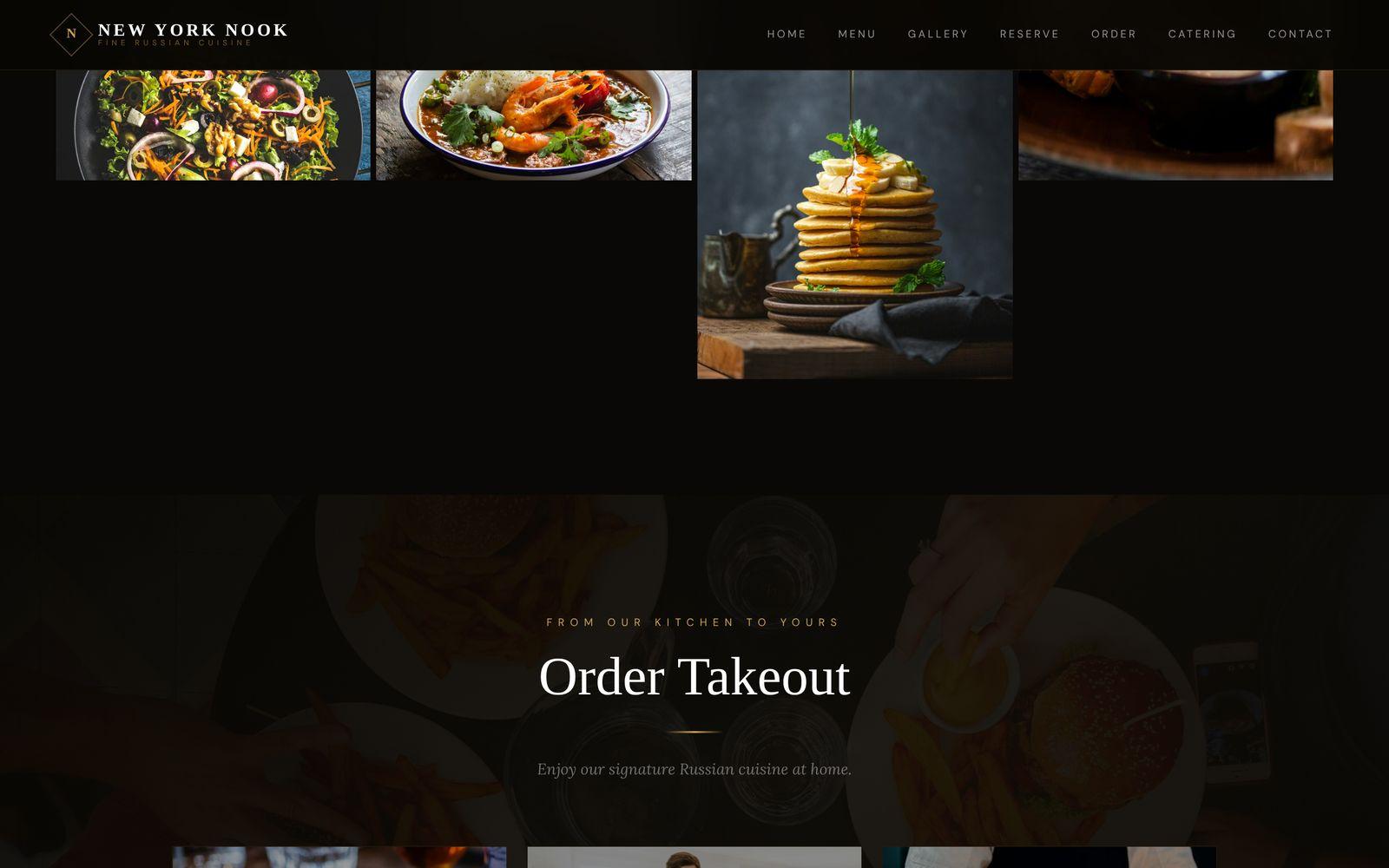
On New York Nook, the homepage includes a dedicated order takeout section, so guests scrolling the site meet the ordering option without hunting for it.
Avoid charging more on your own site than on the apps. Guests notice, and it trains them to use the app.
What mistakes make direct ordering fail?
Most direct ordering systems fail because of operations, not code.
- No one watches the orders. If orders arrive by email and nobody checks during the rush, the guest arrives to nothing and never orders direct again.
- The menu drifts. The site still lists a dish that came off the menu last month. Give staff a simple way to edit items and availability.
- Too many steps. Forced account creation before checkout is the classic one. Let guests check out as a guest.
- Payment confirmed too early. Marking orders paid on the redirect page, not on the payment webhook, creates paid orders that never reached the kitchen or unpaid orders that did.
- Slow pages. An ordering page full of heavy images and scripts loses guests on mobile data.
How long does it take to build and what does it cost?
A custom pickup ordering system on your own site typically takes around three weeks and sits in a full custom build, from $1,200 on my packages.
The time goes into a few predictable pieces:
- The menu data model: categories, items, prices, modifiers, required choices and sold-out flags. Getting this right first makes everything else simpler.
- The guest flow: menu, cart, pickup time, checkout and confirmation, designed and tested on a phone.
- Payments, if you take them online: a Stripe checkout, a webhook that marks the order paid, and receipts.
- Kitchen notifications: email at minimum, or a simple orders screen staff can keep open on a tablet.
- An admin screen so staff can change prices, hide sold-out items and adjust pickup windows without calling anyone.
If you only want a lighter start, a multi-page site from $450 can link out to your POS ordering page and still put the "Order takeout" button where guests see it. You can bring ordering in-house later without redesigning the site.
Whichever route you choose, run a soft launch first. Turn on direct ordering for staff, friends and a few regulars for a week, watch every order reach the kitchen, and fix the rough edges before you print the link on bags and menus.
The bottom line
You can take restaurant orders online without third-party commission by putting pickup ordering on your own website and sending guests there from Google, Instagram and every bag that leaves your kitchen. You still pay card processing, so the per-order saving on pickup is modest, but the bigger value is owning the guest relationship and moving regulars off high-commission delivery. Start with pickup, keep the apps for discovery and delivery, and make your own ordering page the fastest, clearest option a guest can find. If you want to see how this fits a whole restaurant site, "How much does a restaurant website cost in 2026?" covers the full budget.
Questions, answered in one line
Can a restaurant take online orders without paying commission?
Yes, by taking pickup orders on its own website, where the main cost is card processing rather than a percentage commission to a marketplace.
What does a restaurant online ordering system need?
It needs a structured menu with modifiers, a cart, pickup time slots, order notifications to the kitchen, a confirmation for the guest and, if you take payment online, a payment integration.
Should I stop using DoorDash and Uber Eats?
Usually not, because those apps bring new guests and handle delivery, but repeat pickup guests are worth moving to your own ordering page.
Can I add my own ordering link to Google?
Yes, Google lets Business Profile owners add custom links where customers can order and mark preferred ordering options for pickup and delivery.
How much does Thomas Osayi charge to build pickup ordering?
Thomas Osayi builds custom restaurant sites with features like pickup ordering in his Full Custom Build package, from $1,200 and about 21 days.
Sources
- DoorDash Merchant Pricing DoorDash
- Stripe pricing Stripe
- Manage online ordering options Google Business Profile Help
- Owner pricing Owner.com
Related articles
- How much does a restaurant website cost in 2026?
- Toast vs Squarespace vs a custom website for restaurants
- Google Business Profile vs website: do you need both?
- New business website checklist: everything to do before launch
Custom Next.js websites for businesses
Custom Next.js websites for small businesses, clinics, restaurants and startups. Fast, SEO-ready, built from scratch with booking, ordering or quote tools. Based in Los Angeles.
See the service