November 27, 2026 · 10 min read · Thomas Osayi
Website terms and conditions for a small business: what to include and how to get agreement
Website terms and conditions for a small business: when you need them, the usual clauses, deposit and refund terms, and why clickwrap beats a footer link.
Most small business owners only think about terms and conditions when something goes wrong: a client disputes a deposit, a customer wants a refund on a custom order, or someone copies the photos off the site. A terms page will not prevent every argument, but it puts your rules in writing before the argument starts, and it gives you something specific to point to.
This is the general walkthrough I give clients when we build a site with booking, deposits or checkout. I am a developer, not a lawyer, so treat everything here as general information, not legal advice. For anything that carries real money or risk, have a lawyer licensed in your state review the final wording.
What are website terms and conditions?
Website terms and conditions are the rules a visitor or customer agrees to when they use your site or buy from you through it.
You will also see them called terms of service or terms of use. The names are mostly interchangeable; what matters is the content.
It helps to separate terms from the other documents that usually sit in the footer:
- A privacy policy explains what personal data you collect and what you do with it. It is about the customer's information.
- Terms and conditions explain the deal between you and the customer. They are about the relationship.
- A refund or cancellation policy is often a section inside the terms, and sometimes also a short page of its own so people can find it quickly.
For a small business, terms set expectations before money changes hands and give you a written basis when a dispute comes up.
Does a small business website need terms and conditions or a privacy policy?
Most small business sites need a privacy policy first, and they need terms once the site takes bookings, deposits, payments or user accounts.
A privacy policy is triggered by collecting personal information, which almost every site does the moment it has a contact form. I covered that side, including when a cookie banner comes in, in "Do I need a privacy policy and cookie banner on my website?", so I will not repeat it here.
Terms are different. There is no general rule that every brochure site must have them, and a one-page site with a phone number and a contact form can usually get by without a full terms page.
The picture changes when the site starts doing business on your behalf:
- It takes appointment bookings, especially with deposits or cancellation fees.
- It sells products or gift cards online.
- It sells packages, memberships or prepaid sessions.
- It lets people create accounts, upload files or post content.
In each of these cases, the terms are where your cancellation window, refund rules and limits live. Without them, you are relying on whatever the customer remembers from a text message.
What clauses do small business terms and conditions usually include?
Most small business terms cover the same core set of clauses, adjusted for what the business actually sells.
Here is the list I see most often, in roughly the order they appear:
- Who you are: legal business name, location and contact details.
- Acceptance: that completing a booking or purchase means agreeing to the terms.
- Services or products: what you offer, and that descriptions, photos and availability can change.
- Prices and payment: currency, when payment is taken, taxes, and that prices can change before an order is confirmed.
- Bookings, deposits, cancellations and refunds: the rules that cause most disputes, covered in the next section.
- Intellectual property: that your logo, photos and text belong to you and cannot be reused without permission.
- Disclaimers and limitation of liability: what you are not responsible for, such as outages or third-party services.
- Governing law and disputes: which state's law applies and how disputes are handled.
- Changes to the terms: that you may update them, with a date at the top showing the last update.
The disclaimers, liability limits and dispute sections are where a lawyer earns their fee. Wording that looks strong in a template can be unenforceable in your state or against consumers, so do not copy those parts from a large company and assume they hold for you.
How should I write booking, deposit and refund terms?
Write booking, deposit and refund terms as plain, specific rules with numbers in them, because vague wording is what turns a cancellation into an argument.
"Deposits may be non-refundable in some cases" helps nobody. "Your $40 deposit is applied to your service. Cancel or reschedule at least 24 hours before your appointment and we refund it in full. Cancel with less notice or miss the appointment and the deposit is kept." That is a rule a customer can follow and you can apply consistently.
For appointment businesses, cover:
- How much the deposit is and what it is applied to.
- The cancellation and reschedule window, in hours.
- What happens with no-shows and late arrivals.
- How refunds are paid, usually back to the original card, and roughly how long that takes.
- What happens if you cancel, which should be a full refund.
For product sellers, cover the return window, the condition returned items must be in, who pays return shipping, and exceptions such as custom or final sale items. Some states have rules of their own. In California, for example, the Attorney General's consumer page explains that retailers who do not offer a full refund, credit or equal exchange within seven days must clearly display their policy, and it lists exceptions such as food and custom orders. That page describes posting at registers, on tags or on order forms, so ask a lawyer how it applies to your online checkout.
The mechanics of collecting deposits are in "How to take deposits online to reduce no-shows". The terms are the written half of that system.
What is the difference between clickwrap and browsewrap?
Clickwrap means the customer takes a clear action, like checking a box or clicking a button that says they agree, while browsewrap means the terms are only linked somewhere on the page and simply using the site is supposed to count as agreement.
This distinction can matter more than the wording itself. In Berman v. Freedom Financial Network (Ninth Circuit, 2022), the court described clickwrap agreements as ones courts routinely enforce, and browsewrap agreements as ones courts are more reluctant to enforce. It set out a two-part test: the site must give reasonably conspicuous notice of the terms, and the consumer must take some action, such as clicking a button or checking a box, that unambiguously shows agreement. In that case the notice was in fine print, the link was not readily apparent, and clicking a large continue button was not enough to show agreement.
An earlier Ninth Circuit case, Nguyen v. Barnes and Noble (2014), went the same way for a site that linked its terms at the bottom of every page without asking users to agree. The court said that a link placed near the buttons people click is not, by itself, enough notice.
The practical takeaway: a footer link is fine for general browsing, but for anything that takes money, ask for explicit agreement at the point of purchase.
How do I add a terms checkbox to a booking or checkout flow?
Add an unchecked checkbox right next to the pay or book button, with a short sentence and a visible link to the terms, and do not let the form submit until it is checked.
On sites I build, the pattern looks like this:
- A checkbox that starts unchecked. A pre-checked box weakens the argument that the customer chose to agree.
- Label text that says what they are agreeing to, such as "I agree to the booking terms, including the 24-hour cancellation policy."
- A link to the terms that looks like a link, in a readable size and a color that contrasts with the surrounding text.
- A one-line summary of the key rule, like the cancellation window, right on the screen.
- A disabled button, or a clear error message, until the box is checked.
On the back end, I store a record of the agreement with the booking: the time, the last-updated date of the terms, and the booking or order ID. If a dispute reaches a payment processor, being able to show that this customer agreed to this version on this date is far more useful than a screenshot of today's terms page.
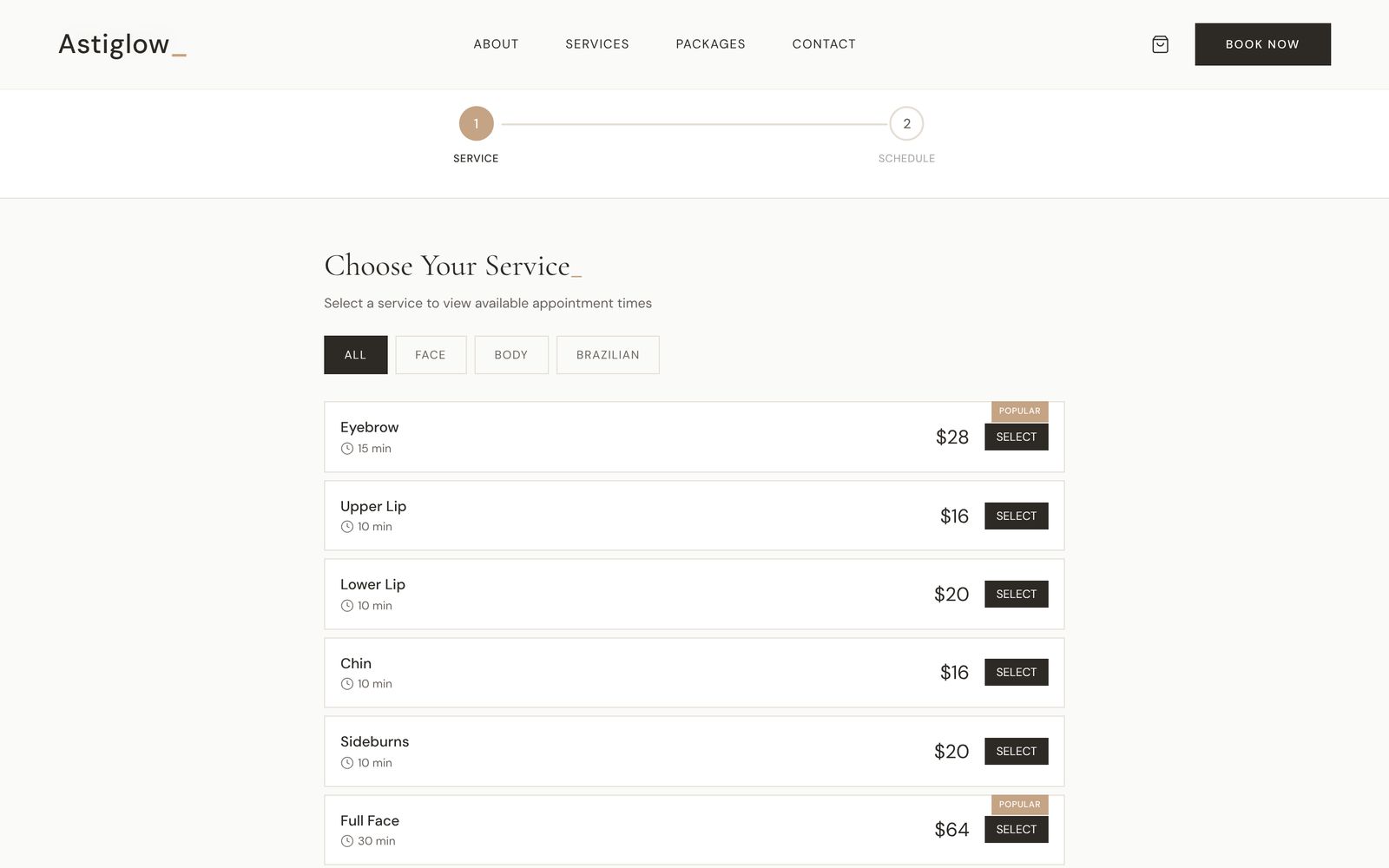
Here is where that checkbox fits in a real flow. The first step of the booking flow I built for Astiglow is choosing a service with its price, and an agreement checkbox belongs on the final confirm step, next to the button that commits the booking.
Hosted booking and checkout tools usually have a setting for this. Check that it is on and links to your own terms.
Can I use a terms and conditions template or generator?
A template or generator is a reasonable starting draft for a low-risk small business, but you have to edit it to match how you actually operate and have the risky parts reviewed.
Generated terms often describe features the business does not have, name the wrong state for governing law, or copy liability language written for a software company. The most common problem is contradiction: if the terms say 48 hours and the booking widget says 24, you have created your own dispute. Whatever your terms say, every screen and every email has to say the same thing.
A sensible approach: use a reputable template for structure, write the business-specific sections yourself, and pay a lawyer to review the final document once. For a business that takes large deposits, sells across state lines in volume, runs subscriptions or hosts user content, I would go to a lawyer first rather than last.
A worked example: terms for a small event rental business
Here is an illustration using a made-up business. Picture a two-person company in Los Angeles that rents backdrops and lounge furniture for parties. Customers book online and pay a 30 percent deposit, with the rest due a week before the event.
Their terms would include, in plain language:
- A booking is confirmed only when the deposit is paid and a confirmation email is sent.
- The remaining balance is charged seven days before the event date.
- Cancellations more than 30 days before the event get the deposit back in full. Cancellations inside 30 days keep the deposit.
- One free date change if requested more than 14 days out, subject to availability.
- The customer is responsible for damage beyond normal wear, with examples of each.
On the site, the booking form shows a one-line summary of the cancellation rule and an unchecked checkbox. The confirmation email repeats the rule and links to the version of the terms they agreed to.
Where should the terms live on my website?
Put the full terms on their own page at a simple address like /terms, link it in the footer of every page, and link it again at every point where someone pays or books.
Put a "Last updated" date at the top, keep older versions as dated files in your records so you can show what a past customer agreed to, and use short headed sections so people can find the refund part quickly.
When we build a Business Site, which starts from $450 and includes a booking or quote form, adding the terms page, the checkbox and the agreement record is a small part of the build. You supply the wording, ideally reviewed by a lawyer, and I wire it in so the site actually asks for agreement. "New business website checklist: everything to do before launch" covers the rest of the pre-launch list.
The bottom line
Website terms and conditions set the rules of the deal between your business and your customers. A privacy policy comes first for almost every site, and terms become important the moment the site takes bookings, deposits, payments or accounts. Keep the clauses specific, especially cancellation and refund rules, and make sure every screen and email repeats the same numbers. Ask for agreement with an unchecked checkbox at the point of payment rather than relying on a footer link, and store a record of who agreed to which version and when. This is general information, not legal advice, so have a lawyer review the final wording for your state and your business.
Questions, answered in one line
Is a privacy policy the same as terms and conditions?
No, a privacy policy explains what personal data you collect and how you use it, while terms and conditions set the rules of the transaction, such as payment, cancellations and refunds.
Are terms and conditions legally required for a small business website?
There is no general rule that every small business site must have terms, but they become important once the site takes bookings, deposits or payments, and some state rules, such as refund policy posting rules, can apply to what you sell. Check with a lawyer for your state.
Is a link to my terms in the footer enough?
A footer link is fine for general browsing, but courts have been reluctant to enforce terms that are only linked, so ask for agreement with an unchecked checkbox or clear button text at the point of payment.
Can I use a free terms and conditions generator?
A generator can give you a starting structure, but you need to rewrite it to match how your business actually works and have a lawyer review the liability, dispute and refund sections.
Can Thomas Osayi add a terms checkbox to my booking form?
Yes, the Business Site package from $450 includes a booking or quote form, and wiring in a terms page, an unchecked agreement checkbox and a stored agreement record is part of that build, using wording you supply.
Sources
- Berman v. Freedom Financial Network LLC, No. 20-16900 (9th Cir. 2022) Justia
- Nguyen v. Barnes & Noble Inc., No. 12-56628 (9th Cir. 2014) Justia
- Refund Policies California Attorney General
Related articles
- How much does a restaurant website cost in 2026?
- How to take restaurant orders online without third-party fees
- Toast vs Squarespace vs a custom website for restaurants
- Google Business Profile vs website: do you need both?
Custom Next.js websites for businesses
Custom Next.js websites for small businesses, clinics, restaurants and startups. Fast, SEO-ready, built from scratch with booking, ordering or quote tools. Based in Los Angeles.
See the service