November 25, 2026 · 8 min read · Thomas Osayi
Should my business website have a blog? When it pays off and when to skip it
Should your small business website have a blog? When articles bring in customers, when they are a waste of time, what to write, how often, and what it costs.
Almost every owner I talk to has been told they need a blog. Usually by someone selling blog posts. Sometimes it is good advice. Often it is not, and the business ends up with a page called "News" whose last entry is a holiday greeting from two years ago.
So here is the honest version: what a blog does for a small business, when it is worth the effort, when to skip it entirely, and what to write if you go ahead. I am writing this as someone who builds sites and also writes for my own, so I know how much time a decent post takes.
Should my business website have a blog?
Your business website should have a blog only if you have real questions to answer and a realistic plan to keep publishing; otherwise, skip it and invest in your service pages.
A blog is not a checkbox. It is a commitment to publish useful pages over months and years. When it works, it brings in people who are researching a problem before they are ready to call anyone, and it gives you pages to send customers when they ask the same question for the tenth time.
When it does not work, it is worse than nothing. A visible blog with three posts from long ago tells visitors the site is not looked after, and some will wonder whether the business is still operating.
The middle ground is perfectly fine. Plenty of businesses do well with no blog at all, just clear service pages, a solid FAQ and one or two in-depth guides that never really go out of date.
What does a blog actually do for a small business?
A blog lets your site answer the questions people search before they choose a business, which your service pages are usually too focused to cover.
A service page is built to convert someone who already knows what they want: "water heater replacement in Pasadena." A blog post can meet someone a step earlier: "tankless vs tank water heater for a small house" or "how long does a water heater last." That person is not ready to book yet, but if your post is the one that helped, you are the name they remember.
A blog also does a few quieter jobs:
- It gives your service pages something to link to, which helps both visitors and search engines understand what you know.
- It gives you pages to share in follow-up emails, on social media and in replies to common questions.
- It shows your experience in a way a short service page cannot, with photos, real prices and real decisions.
- It gives AI answer tools more of your own text to draw from when someone asks about your field.
None of this happens quickly. A new post often takes weeks or months to settle into search results, and plenty of posts never bring in much traffic at all.
When is a blog worth the effort?
A blog is worth it when customers ask the same research questions over and over, and someone at the business can explain them well.
Good signs you should have one:
- Customers compare options before buying, such as materials, treatments, packages or methods.
- Your prices or processes need explaining, and people ask about them before booking.
- Your service has seasons or deadlines that people search about, such as permits, tax dates or weather.
- You or someone on the team enjoys writing, or will happily talk through a topic for someone else to write up.
- You sell to other businesses, where buyers often read several pages before they reach out.
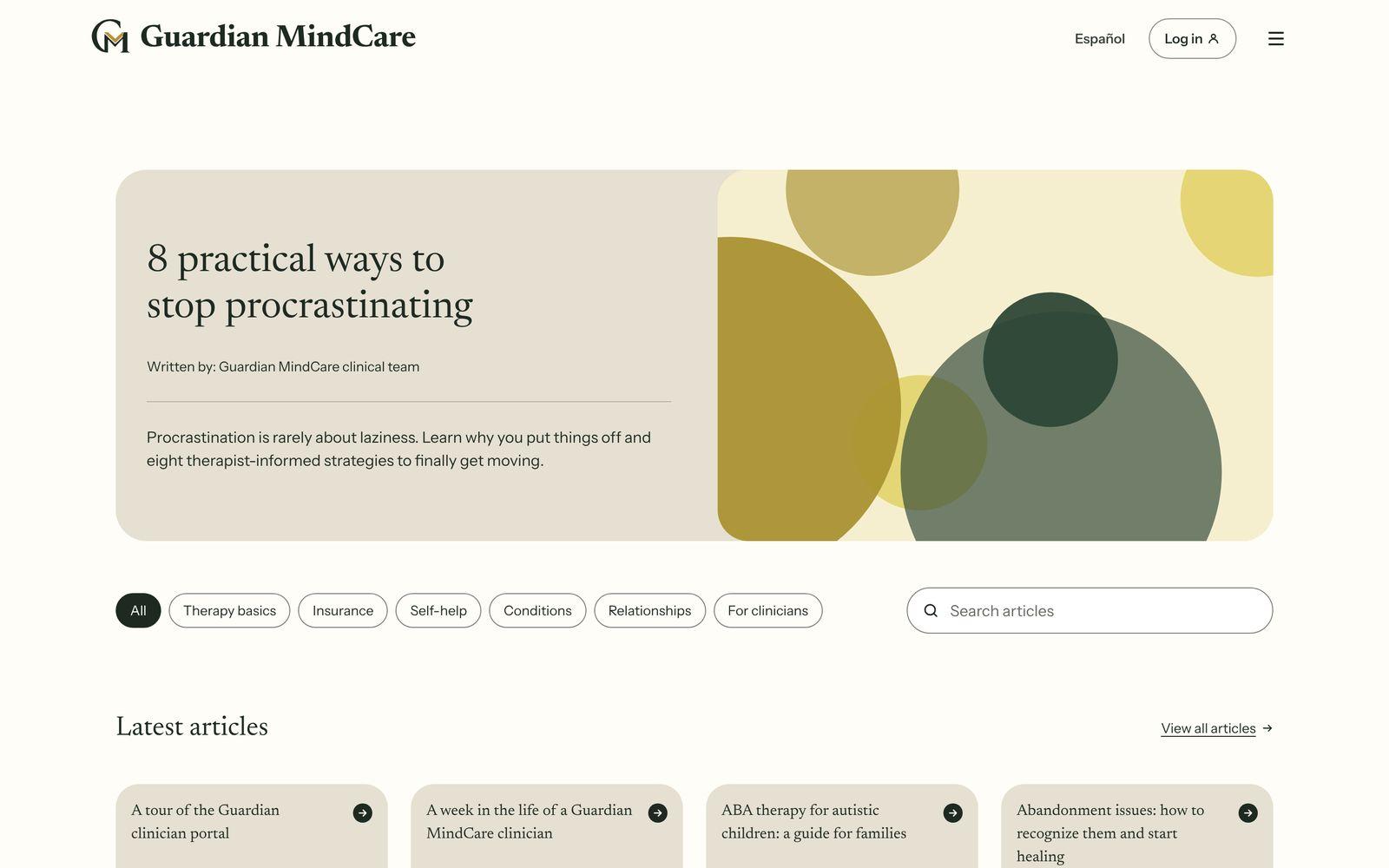
A therapy practice is a clear example. People research types of therapy, insurance and what a first session looks like long before they book. Guardian MindCare, a practice platform I built, has a blog index with category filters so readers can find posts by topic instead of scrolling a single long feed.
When should you skip the blog?
Skip the blog when nobody will write for it, when your customers decide quickly, or when your service pages are still thin.
Some businesses are mostly found through urgent searches. Someone with a locked car or a burst pipe is not reading articles; they want a phone number. For them, every hour spent on a blog is better spent on a fast, clear service page, a complete Google Business Profile and more reviews.
Other reasons to wait:
- Your service pages are a paragraph each. Fix those first; they are the pages that bring in buyers.
- You would be paying for generic posts nobody at the business has read. Those rarely add anything a searcher cannot find elsewhere.
- You plan to publish a burst of posts at launch and then stop.
If you skip it, do not leave an empty "Blog" link in the menu. Remove it, and put your best answers into an FAQ section or a single guide page instead. "What pages does a small business website need?" covers which pages to build first.
Does a blog help SEO and local rankings?
A blog can help your site appear for question searches, but for local "near me" and city searches, service pages and your Business Profile usually matter more.
Think of it as two kinds of searches. Local buying searches, like "dentist in Torrance" or "deck builder near me," are mostly won by the business's Google Business Profile, its reviews and a service page that clearly matches the search. Informational searches, like "how often should I seal a deck," are where blog posts can show up.
Google's own guidance on helpful content is worth reading before you write anything. It asks whether content clearly demonstrates first-hand expertise and a depth of knowledge, and whether it is primarily made to attract visits from search engines. Those two questions alone rule out most of the filler that businesses are sold.
Google's spam policies also describe scaled content abuse: producing lots of pages mainly to manipulate rankings rather than help people. Fifty thin posts written to hit keywords is the wrong strategy for a small business, whether a person or a tool writes them.
What should a small business write about?
Write about the questions customers actually ask you, answered with the details only someone who does the work would know.
The easiest source of topics is your inbox and your phone. Keep a running list for a month of every question a customer asks before buying. Most businesses end up with twenty or more, and many of them make good posts.
Topics that tend to work:
- Cost explainers with your real price ranges and what changes them.
- Comparisons between two options customers often weigh.
- What to expect at a first appointment, inspection or consultation.
- Preparation guides, such as how to get ready for a move or a treatment.
- Local specifics, such as permits, rules or seasonal timing in your area.
- Short write-ups of real jobs, with permission and photos.
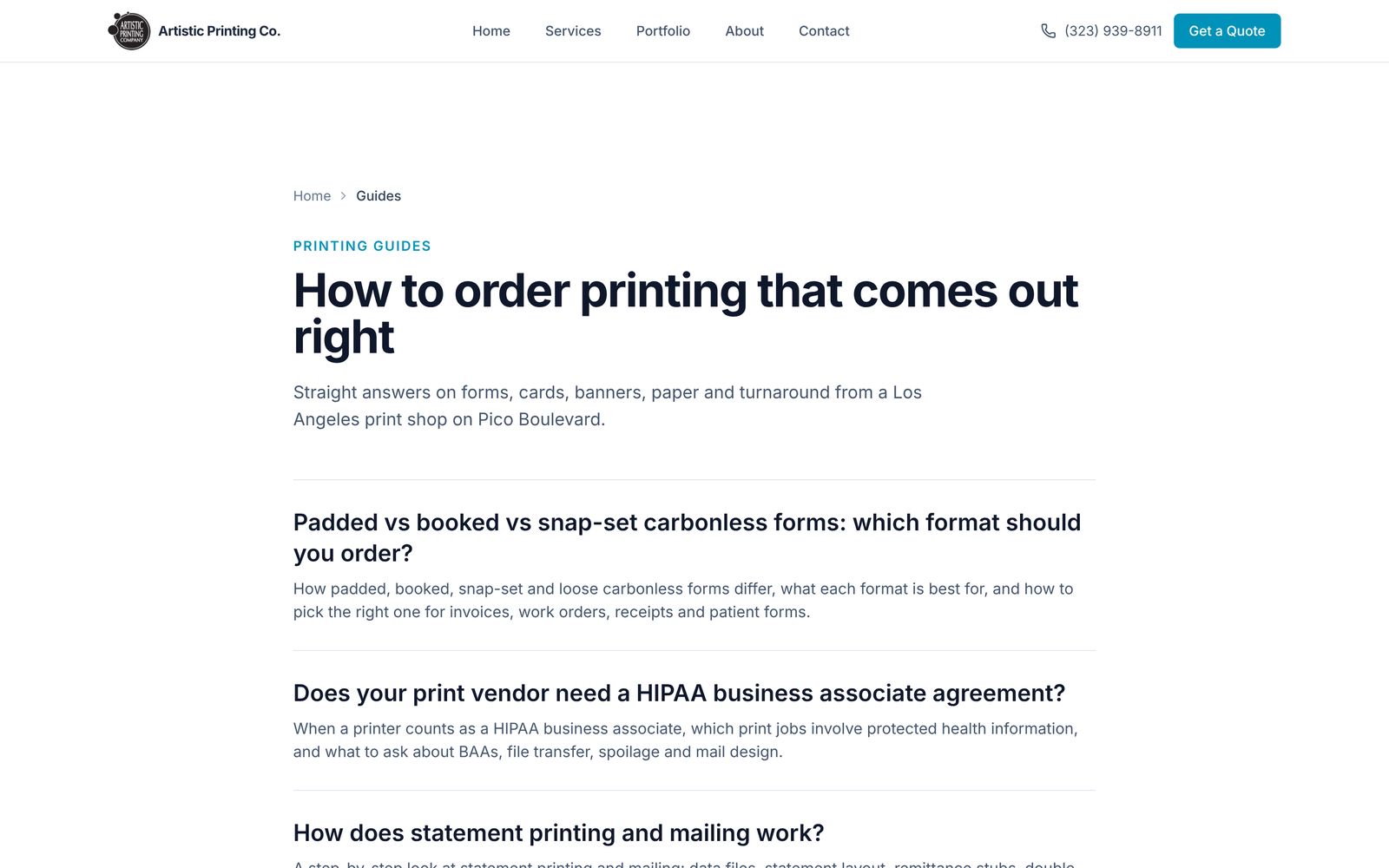
A commercial printer is a good fit for this. For Artistic Printing, I built a printing guides section that works as a content hub, so practical guides sit together instead of being lost in a dated news feed.
How often do you need to post?
There is no required posting schedule; consistency and usefulness matter far more than frequency.
A pace you can keep for a year beats an ambitious one you abandon. For most small businesses, that might be one or two posts a month, sometimes less. A single excellent guide every month is better than four rushed ones.
A few habits help more than frequency:
- Update your best posts when prices, rules or your process change, instead of always writing new ones.
- Only change a post's date when you have genuinely revised it. Google's helpful content guidance specifically asks whether dates are being changed to make pages look fresh when the content has not substantially changed.
- Merge posts that cover the same question so you have one strong page instead of three weak ones.
- Link each post to the matching service page, so a reader who is ready can take the next step.
If you are unsure whether posts are bringing anything in, set up lead tracking first. "How to track website leads with Google Analytics 4: forms, calls and UTMs" explains how to see which pages lead to inquiries.
A worked example
Here is an illustration, not a real client: a made-up pool cleaning company in the San Fernando Valley deciding whether to start a blog.
The owner keeps a list of customer questions for a month. The repeats include green pool recovery, how often filters need cleaning, what to do before a heat wave, and the difference between salt and chlorine systems. That is four strong topics from real conversations.
Before writing anything, the owner fixes the site: separate service pages for weekly cleaning, green pool recovery and equipment repair, each with the areas served and a quote form. Then one post a month goes up, each with the owner's own photos and a short note on what the job usually costs. Every post links to the matching service page.
After six months the company has six posts that answer real questions, a handful of which may start appearing in search. If none do, the owner still has pages to send to customers, which saves time on the phone.
What does a blog cost to add and run?
The setup cost is modest; the real cost is the ongoing writing time, whether that is yours or someone you pay.
On Squarespace, WordPress and similar builders, a blog is included in most plans. On a custom site, it needs a way for you to add posts without a developer. My Full Custom Build, from $1,200, includes CMS or admin tools for that. A Business Site, from $450, covers up to five pages, which suits a business that wants strong service pages and maybe one guide rather than an ongoing blog.
The writing is the bigger investment. A useful post with your own photos and examples takes real time to draft and edit. If you hire a writer, budget for your time too, because they will need your knowledge to say anything worth reading.
The bottom line
Should your business website have a blog? Only if you have real questions to answer and a pace you can keep. Fix your service pages first, collect the questions customers actually ask, and write the answers only you could write. If that sounds like a chore nobody will do, skip the blog without guilt and put your effort into the pages that bring in buyers.
Questions, answered in one line
Does a blog help a local business rank on Google?
It can help you appear for question searches and give your service pages more to link to, but strong service pages and a complete Google Business Profile usually matter more for local searches.
How often should a small business blog post?
There is no required schedule; publish as often as you can write something genuinely useful, and keep a steady pace rather than posting in bursts.
Can I use AI to write my business blog?
You can use it to outline and edit, but posts should carry your own experience, prices, photos and examples, because generic text adds little that searchers cannot find elsewhere.
Should I delete old blog posts?
Update posts that are still useful, merge posts that cover the same topic, and redirect any URL you remove to the closest relevant page.
Can Thomas Osayi add a blog to my site?
Thomas Osayi includes CMS or admin tools in the Full Custom Build, from $1,200 in about 21 days, which is the package that fits a site with a blog you edit yourself.
Sources
- Creating helpful, reliable, people-first content Google Search Central
- Spam policies for Google web search Google Search Central
Related articles
- How much does a restaurant website cost in 2026?
- How to take restaurant orders online without third-party fees
- Toast vs Squarespace vs a custom website for restaurants
- Google Business Profile vs website: do you need both?
Custom Next.js websites for businesses
Custom Next.js websites for small businesses, clinics, restaurants and startups. Fast, SEO-ready, built from scratch with booking, ordering or quote tools. Based in Los Angeles.
See the service