November 17, 2026 · Updated November 22, 2026 · 10 min read · Thomas Osayi
Shopify vs a custom Next.js store: when does custom make sense?
When a brand should stay on a Shopify theme, when to go headless with Next.js, and what each option costs in time and money.
Shopify is excellent at the hard parts of ecommerce: checkout, payments, taxes, inventory and order management. The question is not whether to use Shopify. It is whether the storefront your customers see should be a theme or custom code.
Most of my Shopify work is on the software around the store, and I am the founder of SQWAD, which Shopify brands use to run creator programs. My view from that seat is that custom storefronts are right for fewer brands than the internet suggests, and that many of the brands who do want custom need something smaller than a full rebuild.
Should a new store start on Shopify?
Yes, most new online stores should start on a Shopify theme because checkout, payments and inventory work on day one. Those are the parts of ecommerce that are expensive to get wrong. Shopify handles card payments, tax calculation, shipping rates, order emails, refunds and stock counts, and it keeps them working as rules change.
Building those yourself is possible with Next.js and Stripe, and it can be the right call for a store with a handful of digital products or one simple item. For a physical product brand with variants, shipping zones and returns, you would spend weeks rebuilding what Shopify gives you on a monthly plan. So for nearly every product brand, the real comparison is not Shopify against custom. It is a Shopify theme against a custom storefront that still runs on Shopify.
When is a Shopify theme enough?
A theme is enough for most stores that are still finding their customers. If you are launching, have under a few hundred products and your brand fits a well-made theme, stay on a theme. You will launch in days and can spend your budget on product photos and marketing instead.
What themes do well
Current Shopify themes are built from sections and blocks that you rearrange in the theme editor without code. You can change the home page for a sale, add a product page layout or build a landing page yourself in an afternoon. Thousands of apps install in a click because they are designed to plug in to themes.
What a developer can still do inside a theme
Staying on a theme does not mean accepting it as shipped. A developer can edit the theme's Liquid templates, add custom sections, remove unused app scripts and build a product page that looks nothing like the default. That work is far cheaper than going headless and fixes a large share of the complaints brands have about their store.
When does a custom storefront make sense?
Custom makes sense once the theme is holding the business back in a way that cleanup and theme edits cannot fix. The usual signs are these.
- The theme plus apps has made the store slow on phones
- You need a feature no app does well, such as a product builder, a membership area or a creator program
- The brand needs a look and feel themes cannot match
- You want content pages, landing pages and the store in one fast site
What those look like in practice
A product builder is a good example. If customers configure an item across several steps, with options that depend on each other and a live price, a theme and an app can get you part of the way and then fight you on every detail. In code it is an ordinary form with rules.
Content is another. A brand that publishes guides, lookbooks and campaign pages often finds the theme's blog too limited. A Next.js site can hold the store and the editorial content in one design, with pages that load quickly because they are pre-built.
What is not a good reason
Wanting the store to feel more premium is usually a design problem, not a platform problem. A strong designer working inside a theme will get you there for much less.
How does headless Shopify with Next.js work?
Headless means Shopify stays the back office while a custom site becomes the shop window. The Next.js site reads products from Shopify through its API and shows them in a fully custom design. When a customer checks out, they go to Shopify's checkout. Orders, inventory and payouts stay in the Shopify admin you already know.
The moving parts
- Storefront API: Shopify's GraphQL API for public store data, which Shopify offers only in GraphQL, with no REST version. The site uses it to fetch products, collections, prices and availability.
- Access token: created in the Shopify admin through the Headless channel or a custom app, and stored as an environment variable in the hosting account.
- Cart: the site creates a cart through the API, adds line items to it and receives a checkout URL back.
- Checkout: the buy button sends the customer to that URL, which is Shopify's own checkout, usually on a subdomain of your store.
- Webhooks: when a product changes in the admin, Shopify notifies the site so the affected pages are rebuilt and prices stay current.
What your team notices
Day to day, very little changes for whoever runs operations. Products are still added in Shopify. Orders still arrive in Shopify. Discounts, shipping and taxes are still set in Shopify. What changes is that page design now lives in code or in a CMS, not in the theme editor.
Shopify also offers its own React framework for this, called Hydrogen. Next.js is the more common choice when the brand wants the store, the content site and other tools in one codebase.
What do you give up by going headless?
You give up the convenience of the theme ecosystem. Custom costs more to build and needs a developer for design changes. Some theme apps will not work on a custom storefront and need a replacement. In exchange you get speed, control and features built around your business.
Apps
Apps fall into two groups. Apps that work in the admin, such as shipping, inventory, accounting and email tools, are unaffected. Apps that inject a widget into theme pages, such as reviews, upsells, size charts, subscription selectors and popups, do not appear on a custom storefront. Each one needs either the vendor's API, if they offer one, or a custom component. List every storefront app you rely on before you commit, because this is where headless budgets grow.
The theme editor
Your marketing team can no longer drag a new section onto the home page. If they need that freedom, the build has to include a CMS with flexible page sections, which adds to the scope.
Tracking
Analytics and ad pixels that a theme sets up through app installs have to be wired by hand on a custom storefront: page views, add to cart and the handoff to checkout. It is routine work, and it has to be tested carefully, because broken tracking costs ad money quietly.
What does each option cost in time and money?
A theme costs little and launches in days, a custom storefront costs more and takes weeks, and the monthly Shopify plan is the same either way.
- Theme, set up yourself: the Shopify plan, a free or paid theme, and your own time
- Theme, customized by a developer: the same, plus a few days of development
- Headless storefront: the Shopify plan, a custom build measured in weeks, hosting for the Next.js site, and a developer for later design changes
For a sense of scale from my own pricing, a multi-page site with custom features starts from $1,200 and takes about 21 days. A headless store sits at that level or above, depending on the size of the catalog, the number of page templates and how many storefront apps need replacing.
The cost that does not show on an invoice is attention. A rebuild takes weeks of your team's time for reviews and testing. For a brand with steady revenue and a clear problem to solve, that is a fair trade. For a brand still looking for its first reliable sales channel, it is time taken from the thing that matters more.
Is there a middle path?
Yes, and it is the one I know best. Many brands keep the theme for the store and add custom Next.js tools beside it, such as a creator portal or a wholesale order form, connected to the same Shopify data. That is how I built tools for TheHoopGang and SQWAD.
The store stays on its theme, with every app still working. The custom tool lives on its own address and does one job that no app did well.
TheHoopGang is a basketball streetwear brand that gifts gear to creators. The portal I built lets creators sign up, claim gear, submit their content and get refunded once they post, and it manages more than 50 creators.
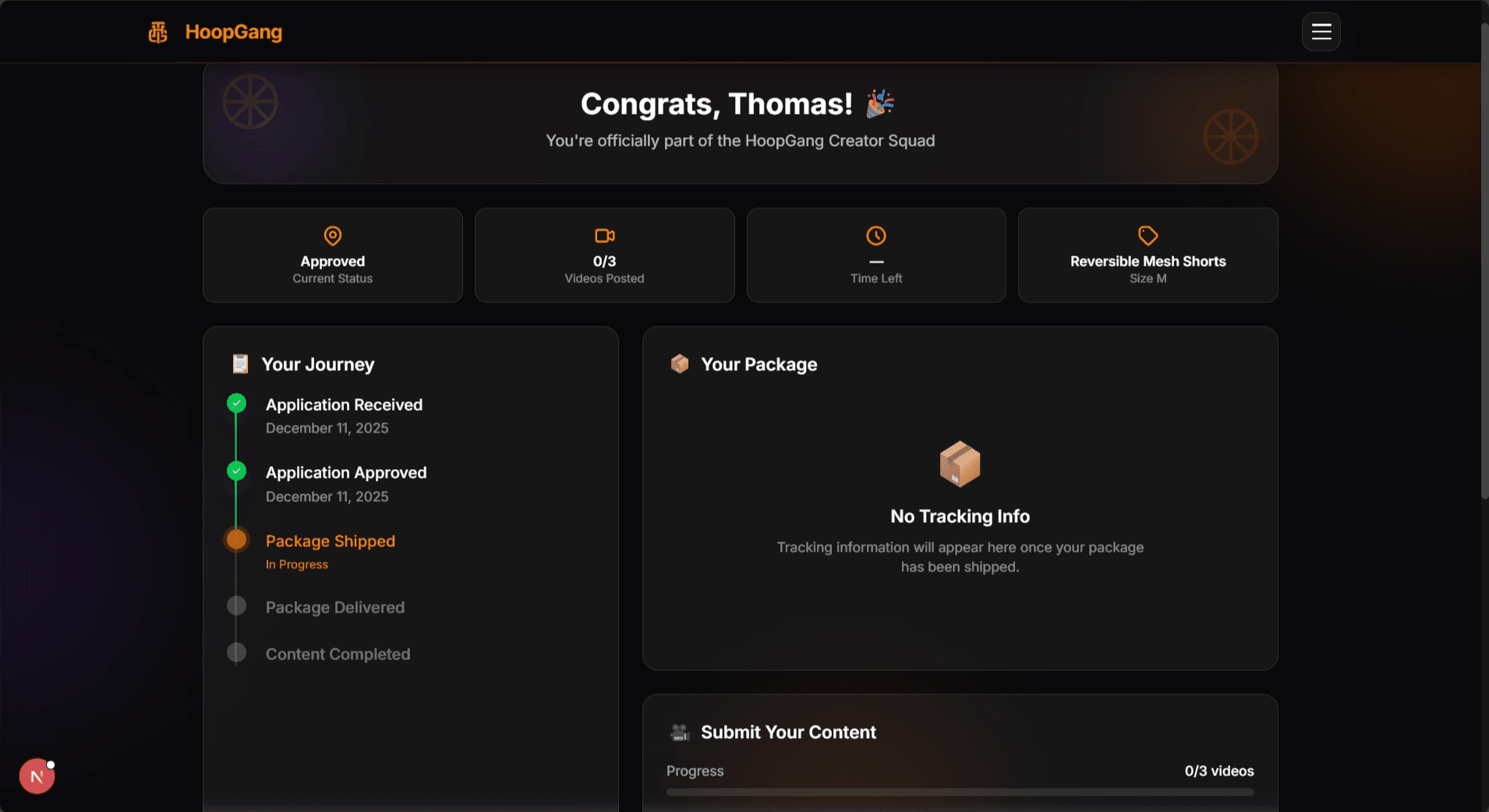
SQWAD does a similar job as a product that any Shopify brand can use. Each brand gets a branded portal for applications, shipping, content, competitions and payouts, and sales are traced back to the creator whose content drove them. SQWAD's published TheHoopGang case study reports more than $500K in revenue attributed to creator videos.
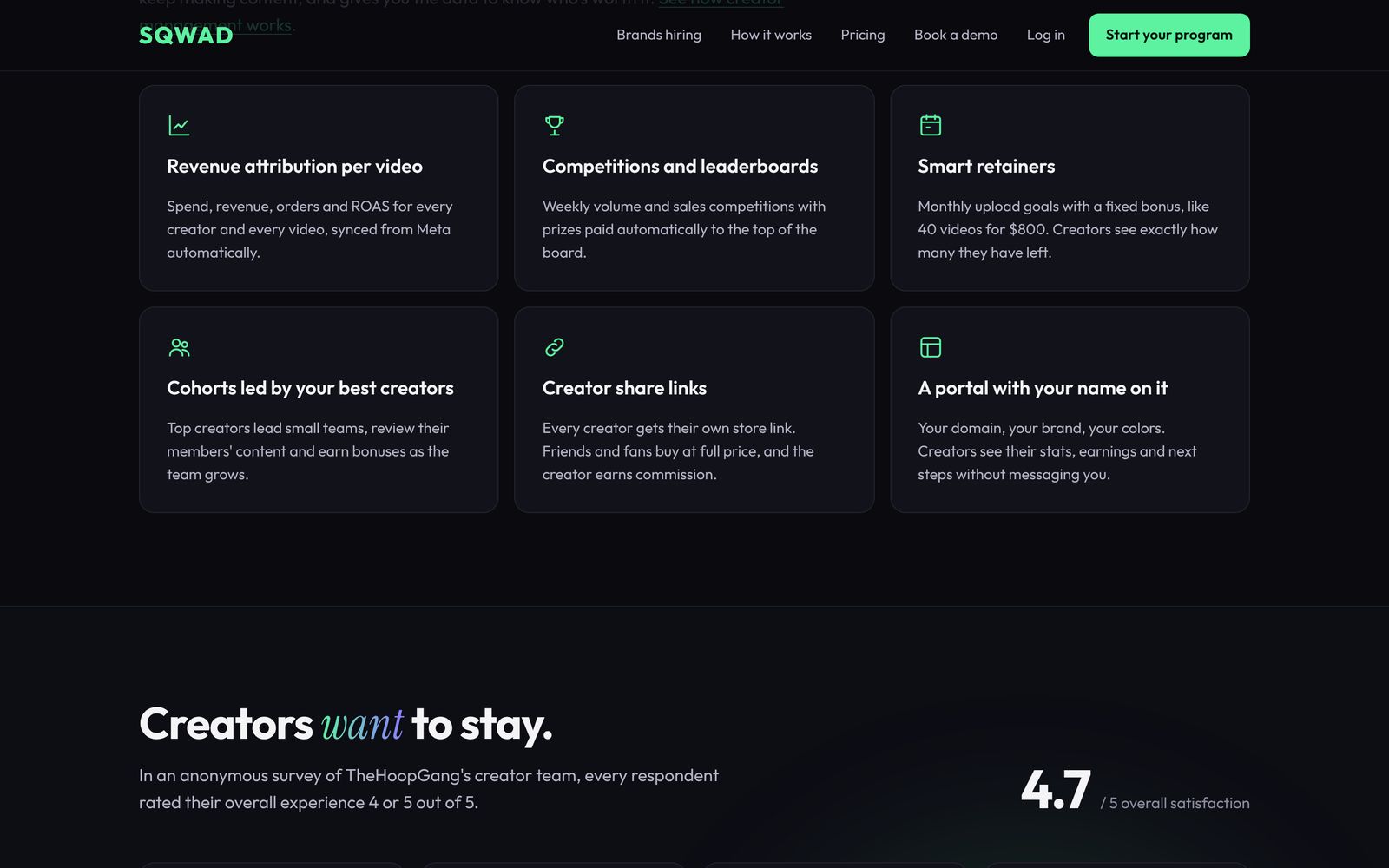
Other tools that fit this pattern include a wholesale order form with customer-specific prices, a returns portal, a quiz that recommends products, and an internal dashboard that pulls orders into one view. Each can be built and launched without touching the storefront.
How do you decide?
Decide by naming the specific problem, then choosing the smallest change that solves it. These questions sort most cases.
- Is the store slow? Audit apps and scripts first. Go custom only if it is still slow after cleanup.
- Is a feature missing? Check whether a theme customization or a separate tool beside the store would cover it.
- Is the design the issue? Try a designer and custom theme sections before a rebuild.
- Do content and commerce need to live in one fast site? That is a real case for headless.
- Does your team rely on the theme editor every week? Then budget for a CMS in the custom build, or stay on the theme.
- Is revenue steady enough that a few weeks of rebuild will not hurt? If not, wait.
If you answer these and still land on custom, you will also have most of the brief a developer needs.
What does one custom product page actually involve?
A custom product page is one query for the product, one design for its options and one call to add it to a cart. Walking through it shows where the build time goes.
The page asks the Storefront API for a product by its handle: title, description, images, price, and each variant with its size, color and availability. Next.js builds the page ahead of time from that data, so it loads fast, and a webhook rebuilds it when the product changes in the admin.
The design work is the part a theme normally gives you for free. Size and color selectors have to show which combinations are sold out, the price has to update when a variant with a different price is picked, and the images should switch to the chosen color. Then the add to cart button creates or updates a cart through the API and keeps its ID in the browser, so the bag survives a page reload.
I built the same front-end pieces, with a Firebase admin in place of Shopify, for LACEUP, a basketball apparel storefront with colorway filters and custom product pages. The brand asked for a showcase store first, so checkout is a demo flow for now and the bag is structured so payments can be added later.
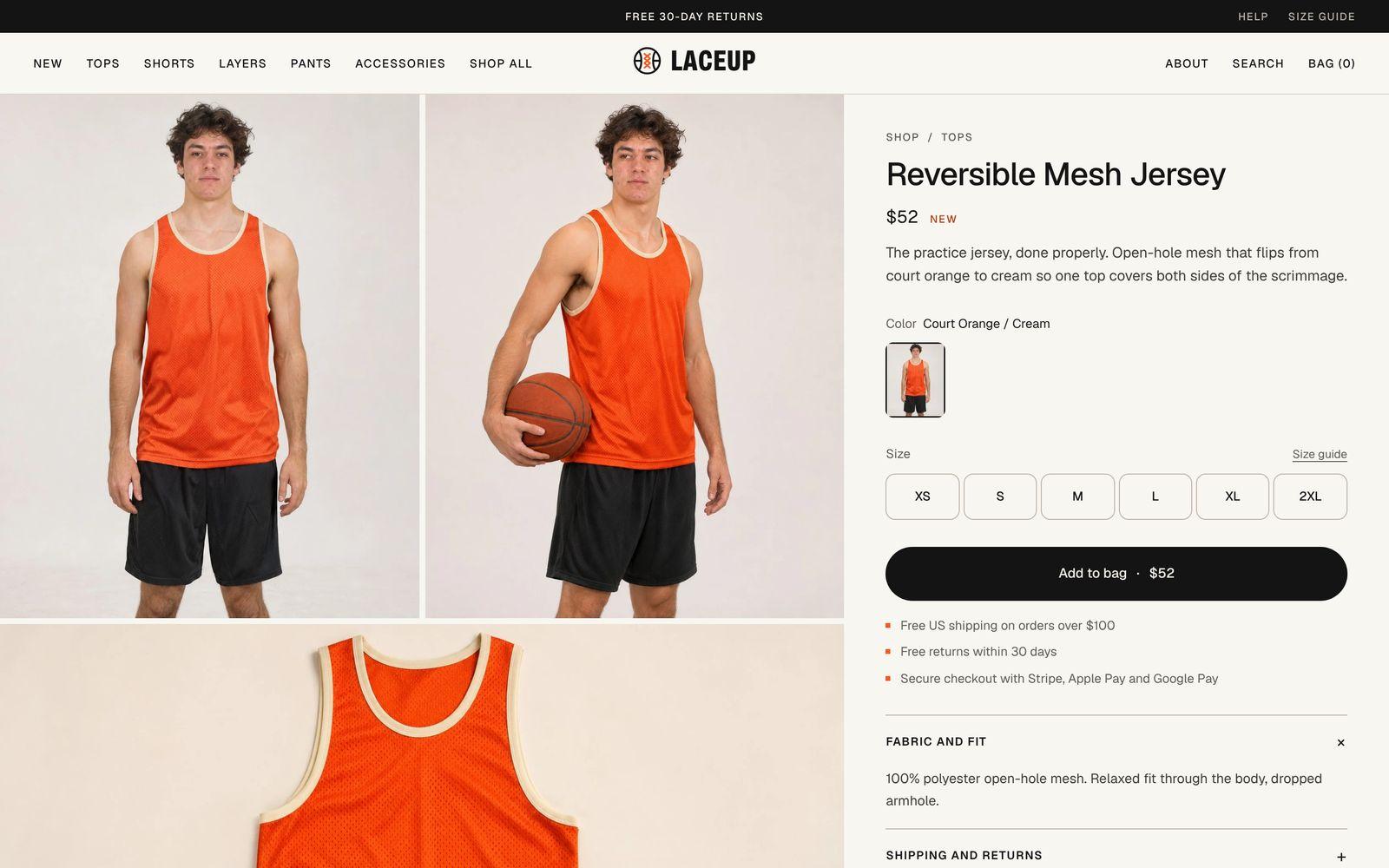
Multiply that by collection pages, search, the cart drawer and every storefront app you replace, and the weeks in a headless quote make sense.
The bottom line
Start on a Shopify theme, because it gets a store selling in days and handles the parts that are costly to get wrong. Move to a custom Next.js storefront when the brand needs a unique experience, faster pages or features a theme cannot handle, and go in knowing that some apps will need replacing and design changes will need a developer. In between sits the option many brands should look at first: keep the theme, and build the one custom tool the business is missing beside it.
Questions, answered in one line
What is headless Shopify?
Shopify keeps running products, checkout and orders, while a custom frontend such as Next.js shows the store to customers.
Is a custom storefront faster than a Shopify theme?
It can be, because the developer controls every script on the page instead of stacking theme apps.
Do I lose Shopify checkout if I go custom?
No. A headless storefront still sends customers to Shopify checkout.
Will my Shopify apps still work on a headless storefront?
Apps that run in the Shopify admin keep working, but apps that add widgets to a theme need an API-based replacement or a custom component.
Can I keep my Shopify theme and still add custom features?
Yes. A separate Next.js tool, such as a creator portal or a wholesale order form, can sit beside the theme and use the same Shopify data.
When is the wrong time to go headless?
Before the store has steady sales, because the budget does more for a new brand when it goes to product photos and marketing.
Sources
- About headless commerce Shopify
- Storefront API reference Shopify
Related articles
- How much does a restaurant website cost in 2026?
- How to take restaurant orders online without third-party fees
- Toast vs Squarespace vs a custom website for restaurants
- Google Business Profile vs website: do you need both?
Custom Next.js websites for businesses
Custom Next.js websites for small businesses, clinics, restaurants and startups. Fast, SEO-ready, built from scratch with booking, ordering or quote tools. Based in Los Angeles.
See the service