November 27, 2026 · 10 min read · Thomas Osayi
How to put a restaurant menu on your website without a PDF
How to put a restaurant menu on your website without a PDF: why PDFs fail on phones, HTML menu structure, Menu schema markup and keeping prices current.
A lot of restaurant websites still handle the menu the same way: a Menu button that opens a PDF. It feels like the safe choice because the PDF is exactly what the designer sent to the printer. On a phone, though, it is one of the worst experiences on the site, and it puts your most important content in the format that is hardest to use.
I build restaurant sites, including New York Nook, a Russian restaurant in Hollywood with reservations and pickup ordering, and the menu is always an HTML page. Here is why, how I structure it, the schema.org markup that goes with it, and how to keep prices current without calling a developer every time.
Why is a PDF menu bad on a restaurant website?
A PDF menu is bad because it is built for paper, so on a phone it makes people download a file, pinch, zoom and scroll sideways to read a single section.
Think about who opens your menu. Most of them are on a phone, often standing outside or deciding between two places in a group chat. A PDF laid out for a large printed menu shrinks to tiny text on a phone screen. Some phones open it in a separate viewer, which takes the customer off your site and away from the Reserve and Order buttons.
Other problems stack up:
- Large PDFs with photos load slowly on a cellular connection.
- Text is often small and low contrast, which is harder for anyone with weaker eyesight, and screen readers struggle with PDFs that were exported as images.
- Nobody can tap a dish to order it, and you cannot link someone straight to desserts.
- The PDF gets saved, shared and indexed, so an old version with old prices keeps circulating after you replace it.
None of this means a PDF is useless. A printable download is a fine extra for catering clients or people who like paper. It just should not be the menu.
Does a PDF menu hurt my restaurant's Google rankings?
A PDF menu will not get you penalized, but it makes your menu weaker as search content than the same text on a normal web page.
Google can read the text in many PDFs, so it is not invisible. The trouble is that the PDF is a separate document with no connection to your site's navigation, address, hours or reservation links. If someone searches for a dish and lands on the PDF, they are looking at a file with no buttons and no way to book. If the PDF was exported as a scanned image, there may be no readable text in it at all.
An HTML menu sits on your own domain as a page with a clear title naming the restaurant, the cuisine and the neighborhood, a heading for each section, dish names and descriptions as real text, and links to reserve or order. That is content search engines and AI answer tools can read, quote and send people to.
There is also a Google Business Profile angle. Google's help page for the menu editor says Google may transcribe menu data from your website, and that you can correct or delete transcribed items or opt out. A clean HTML menu gives it something accurate to work from instead of a blurry photo.
How should an HTML restaurant menu be structured?
Structure an HTML menu as a single page with one heading per section, each dish as its own block with a name, short description and price, and clear labels for dietary information.
The structure I use:
- A page title and one main heading with the restaurant name and the word menu.
- A short sticky row of section links (starters, soups, mains, desserts, drinks) so people can jump around on a phone.
- A heading for each section, then the items in that section.
- Each item with the dish name, a one or two line description, the price, and small tags like vegetarian, spicy or gluten free.
- Photos for a handful of signature dishes, compressed and lazy loaded, not a photo for every line.
- Reserve and Order buttons that stay easy to reach.
On the New York Nook homepage, the menu section shows dishes with their prices as real text, right on the page rather than behind a download.
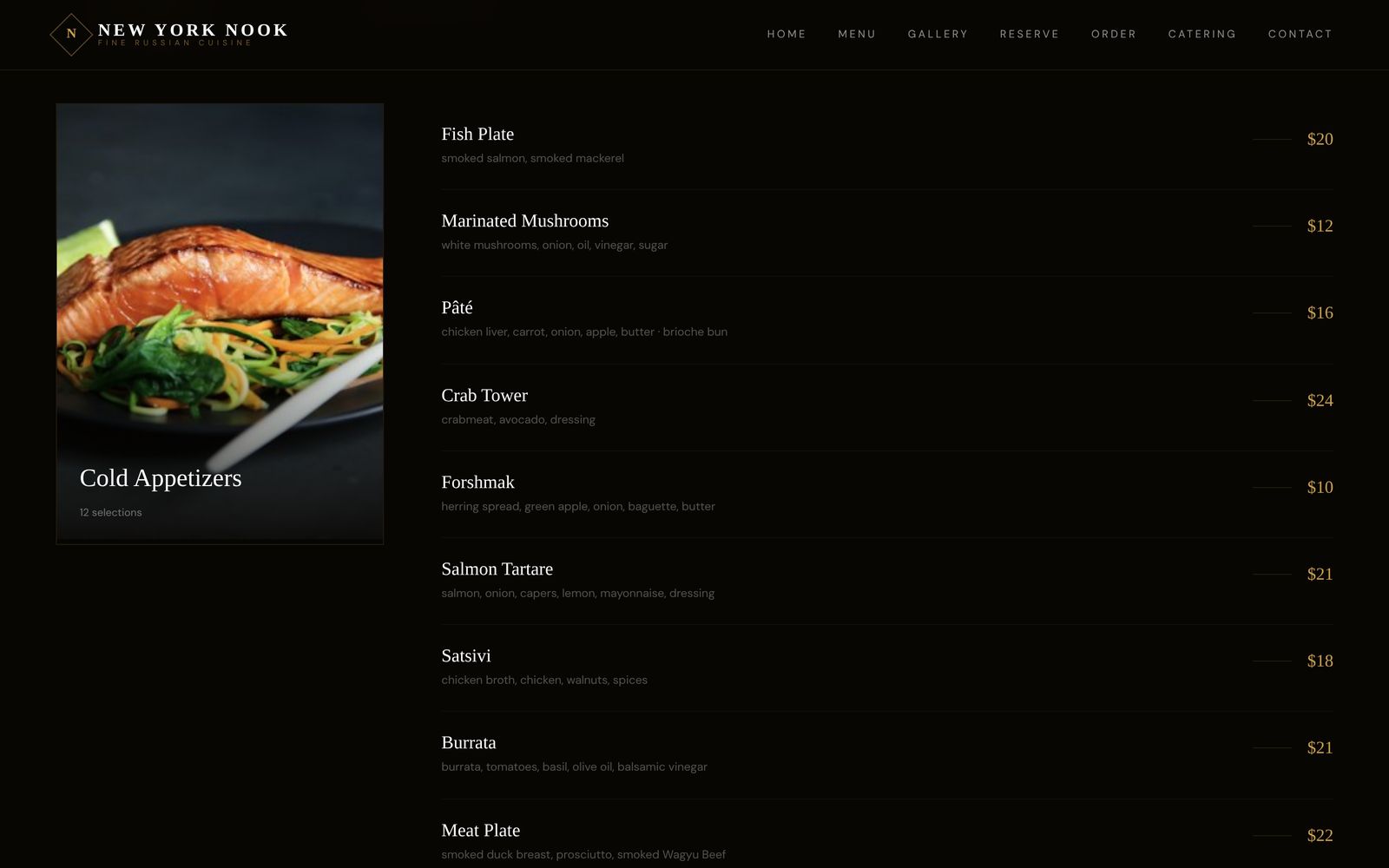
Keep the full menu on one page unless it is truly huge. One long, well organized page beats five thin ones for both phones and search. If you have separate lunch, dinner and brunch menus, use tabs or separate sections on the same page, each with its own heading and the hours it is served.
What schema.org markup should a restaurant menu use?
Use the schema.org Restaurant type with a hasMenu property pointing to a Menu, which contains MenuSection entries, which contain MenuItem entries with offers for the price.
On schema.org, hasMenu is defined on FoodEstablishment, and Restaurant is a kind of FoodEstablishment. Its value can be a structured Menu, plain text or a URL to the menu. The structured version nests like this:
- Restaurant, with name, address, telephone, opening hours and hasMenu.
- Menu, with a name such as Dinner and hasMenuSection.
- MenuSection, with a name such as Soups and hasMenuItem. Sections can nest, for example Drinks containing Wine.
- MenuItem, with name, description and offers holding the price and currency.
MenuItem also supports suitableForDiet for things like vegetarian or halal options, and menuAddOn for extras such as a side salad.
In a Next.js site I generate this JSON-LD from the same data file that renders the visible menu, so the markup and the page cannot disagree. If you hand-write the JSON and later change a price on the page, the two drift apart, which is exactly the kind of mismatch that makes structured data untrustworthy.
Treat menu markup as a way to make your data unambiguous to machines, not as a promise of a special search result. The wider picture, including LocalBusiness and review rules, is in "Schema markup for a small business: LocalBusiness, Service, FAQ and review rules".
How do I keep menu prices updated without a developer?
Keep the menu in one editable place, such as a builder's menu block, a simple content editor or an admin screen, so a price change takes a minute and shows up everywhere on the site at once.
Stale prices are the most common menu complaint. They happen because the menu lives in four or five places: the website, the PDF, Google, delivery apps and the printed menu. Each gets updated on a different day, or never.
The fix is a single source of truth for the website:
- On a hosted builder, the menu block or menu page is the source. Edit it there, not in a PDF.
- On a custom site, I store the menu as structured data (sections, items, prices, tags) and give the owner a simple editor. The page, the schema markup and the ordering menu all read from it.
- If there is online ordering, the ordering system should be the source and the website menu should read from it, so the price you show is the price you charge.
Then keep a short checklist for every price change: website, Google Business Profile, delivery apps and the print file. If you only remember one extra, make it Google, because that is where many customers see your menu first.
Should I add my menu to Google Business Profile too?
Yes, add your menu to Google Business Profile and set the menu link to your website menu page, because many people see your profile before they ever visit your site.
Google's help page for the menu editor describes how it works. From your Business Profile you select Edit menu, create sections such as appetizers or main courses, and add items with a name, description and price. Changes can take 24 to 48 hours to appear on Maps and Search. Separately, there is a menu link field in your profile's contact settings, which is where your HTML menu URL goes.
A few more details from that page are worth knowing:
- You can upload menu photos, and customers can too. If a customer photo shows an old menu, you can flag it for removal and upload a current one.
- When Google finds multiple menu sources, you can choose your preferred one in the Full menu tab.
- Google may transcribe menu data from your website, and you can correct it, delete it or opt out.
- An experimental tool can turn a menu photo or PDF into a structured menu, and you review the result before publishing.
How the profile and the website split the work in general is covered in "Google Business Profile vs website: do you need both?".
How should the menu connect to online ordering?
If you take pickup or delivery orders on your site, the ordering menu and the display menu should come from the same data, so a dish, a price or a sold-out item only has to change once.
For New York Nook, the pickup ordering page shows menu categories, a cart and pickup time slots. The display menu and the ordering menu describe the same dishes, and tying them together keeps a guest from seeing one price on the menu and another at checkout.
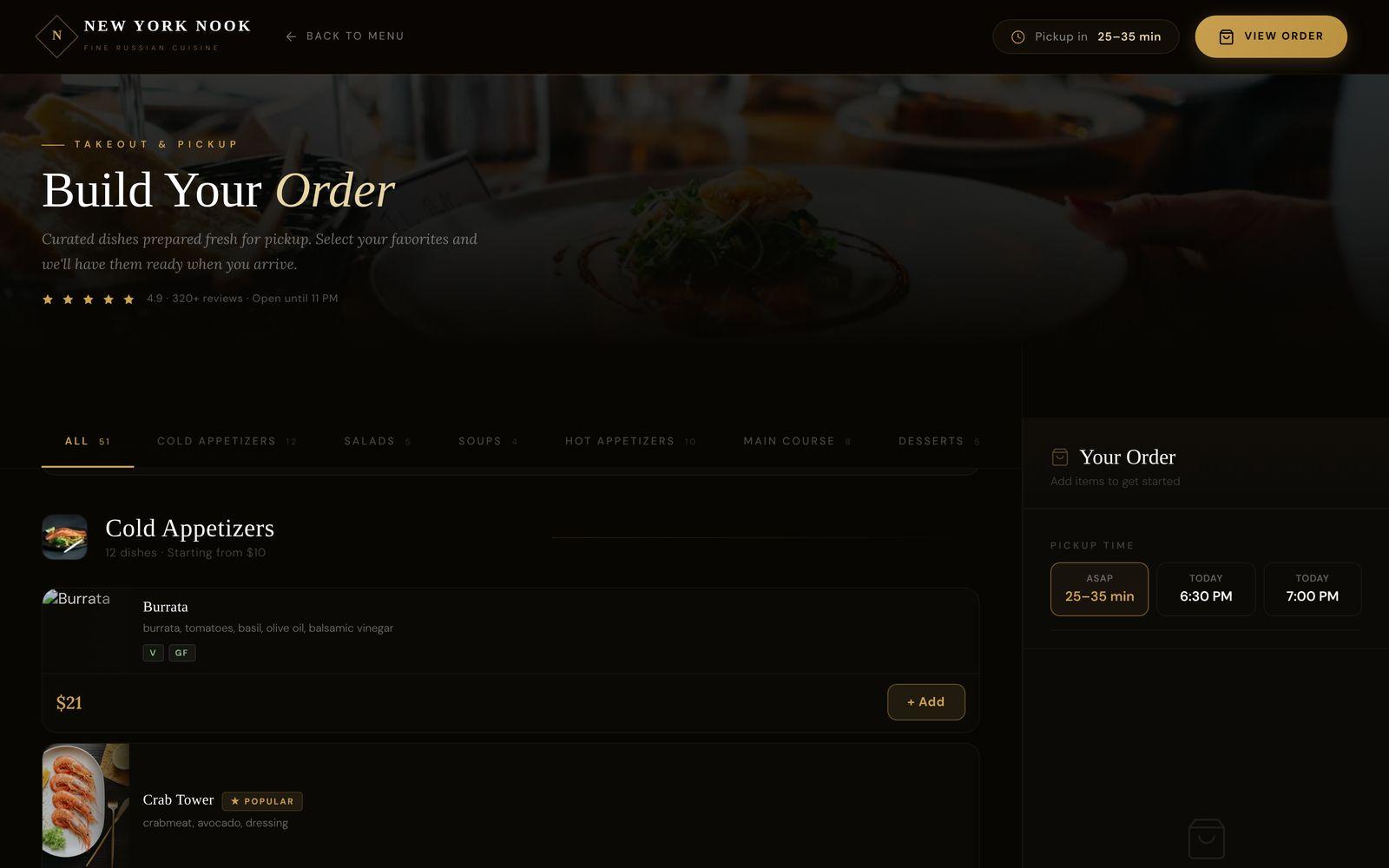
I will not repeat the ordering setup here. The tools, fees and trade-offs of taking orders yourself are in "How to take restaurant orders online without third-party fees", and what a full restaurant site costs is in "How much does a restaurant website cost in 2026?". The point for this post is simply that the menu is data, and every place that shows it should read the same data.
A worked example: converting a PDF menu to HTML
Here is an illustration with a made-up restaurant. A neighborhood taqueria has a two-page PDF menu: tacos, burritos, plates, sides, drinks and a weekend breakfast section, about 45 items in all.
The conversion goes like this:
- Type the menu into a spreadsheet with columns for section, item name, description, price and tags. This is the slowest part, usually an hour or two, and it is where you catch old prices.
- Decide the section order and which three to five dishes get photos.
- Build the menu page from that data: section links at the top, a heading per section, each item as a block, tags as small labels.
- Generate the Restaurant and Menu JSON-LD from the same data.
- Keep the PDF as an optional "Download printable menu" link near the bottom of the page.
- Update Google Business Profile with the menu link and remove outdated menu photos.
On a hosted builder, an owner can do this in an afternoon. On a custom site, a menu page with an editor fits inside a Business Site, which starts from $450 with up to five pages. If you want a rough number for a bigger build with ordering, the website cost calculator on my site gives a range.
What mistakes should I avoid with an online menu?
The most common mistakes are hiding prices, using images of text, leaving old menus live and making the menu hard to reach on a phone.
Watch for these:
- Leaving prices off to avoid updating them. People want to know roughly what dinner costs, and a menu without prices sends them somewhere else.
- Uploading the menu as a single image. It has the same problems as a scanned PDF.
- Keeping the old PDF live at its old address after you switch. Remove it or replace it, so search results stop sending people to last year's prices.
- Burying the menu behind a slider or a pop-up. Put a Menu link in the main navigation and on the homepage.
- Using tiny, light gray text for descriptions. Readable contrast matters more than a delicate look.
- Skipping dietary labels for the questions you get every night. Add clear tags, plus a line asking guests to tell staff about allergies.
The bottom line
A restaurant menu belongs on your website as an HTML page, not a PDF. Give each section a heading and each dish a name, description and price as real text, so it reads well on a phone and gives search engines and Google Business Profile accurate content. Add schema.org Restaurant and Menu markup generated from the same data as the page, keep one editable source of truth so prices change once, and update your Google menu and menu link alongside it. Keep a PDF only as an optional printable extra for the people who want one.
Questions, answered in one line
Is it bad to have a PDF menu on a restaurant website?
It is not forbidden, but a PDF is hard to read on phones, takes people off your site and is easy to leave out of date, so it works best as an optional printable download next to an HTML menu.
Can Google read a PDF menu?
Google can read text in many PDFs, but a PDF has no connection to your site navigation or reservation buttons, and a scanned image PDF may have no readable text at all.
What schema markup should a restaurant menu use?
Use the Restaurant type with hasMenu pointing to a Menu, which contains MenuSection entries, which contain MenuItem entries with offers for the price and currency.
How do I update my menu on Google?
In your Google Business Profile, select Edit menu to add sections, items, descriptions and prices, and set the menu link in your contact settings to your website menu page.
How much does it cost to have Thomas Osayi build an HTML menu?
A restaurant site with an editable HTML menu fits in the Business Site package from $450, which covers up to five pages over about 14 days.
Sources
- hasMenu Schema.org
- Menu Schema.org
- MenuItem Schema.org
- About the menu editor Google Business Profile Help
Related articles
- How much does a restaurant website cost in 2026?
- How to take restaurant orders online without third-party fees
- Toast vs Squarespace vs a custom website for restaurants
- Google Business Profile vs website: do you need both?
Custom Next.js websites for businesses
Custom Next.js websites for small businesses, clinics, restaurants and startups. Fast, SEO-ready, built from scratch with booking, ordering or quote tools. Based in Los Angeles.
See the service