November 22, 2026 · 10 min read · Thomas Osayi
Real photos vs stock photos on a business website: which should you use?
Your own phone photos, a hired photographer, stock photos or AI images: what each costs, where each works, and which to choose for a small business website.
When a client sends me material for a new site, the photos are almost always the weakest part. The copy can be rewritten in an afternoon, but if the only images available are a blurry storefront and a folder of stock pictures of smiling people in headsets, the site will look like every other template.
Photos do a specific job on a business website: they prove you are real and show what working with you looks like. Below I compare the four realistic options, your own photos, a hired photographer, stock photos and AI images, with what each costs, where each works, and how I would choose between them.
Do real photos really matter more than stock photos?
Yes, for any image that is supposed to show your business, because real photos answer the trust question and stock photos cannot.
A visitor looking at a contractor, a salon or a restaurant is trying to answer two things: is this a real place, and is the work any good? A photo of your actual crew on a job, your actual dining room or a finished project answers both at once. A stock photo answers neither, and many visitors recognise the most popular stock images because they have seen them on other sites.
Stock is not banned, but be honest about what each image is doing. A texture behind a heading, a picture of a city skyline on an "areas we serve" page, or an abstract image for a blog post is decoration, and stock is fine there. A picture labelled "our team", or placed next to a list of your services as if it shows your work, is evidence. Evidence should be real.
The places where real photos matter most are the hero section, the about or team section, galleries of work, and any page where someone is about to book or request a quote. If you only have budget for a few real photos, put them there.
What are the four options, and what does each cost?
Your realistic options are your own photos, a hired photographer, stock photos and AI-generated images, and they differ more in trust than in price.
Your own phone photos
Best for: new businesses, trades with constantly changing work, anyone on a tight budget.
Cost range: free beyond your time, plus perhaps a small tripod or a clip-on light.
Pros: real, specific and easy to update. You can photograph every finished job, which builds a gallery no photographer could match over time.
Cons: quality depends on light and care. Inconsistent framing and colour can make a gallery look messy, and a dark, cluttered photo hurts more than it helps.
A hired photographer
Best for: businesses where the space or the people are the product, such as restaurants, salons, clinics and studios, and for any site that will run for years.
Cost range: at the time of writing, Thumbtack's published data puts the national average for hiring a photographer at about $233 to $486, with an average hourly rate of $164 and a high end above $1,000. Commercial shoots with styling or multiple locations cost more.
Pros: consistent, professional images that make the whole site look finished. One half-day can cover the hero, team portraits and the space.
Cons: a one-time snapshot. Work photos go out of date, and you will still need your own photos to keep galleries fresh.
Stock photos
Best for: backgrounds, concepts, blog posts and pages where no specific photo exists.
Cost range: free libraries exist, and paid libraries charge per image or by subscription. At the time of writing, Unsplash's license allows free commercial use without attribution.
Pros: instant, high quality and cheap.
Cons: generic, often recognisable, and misleading when used as if it shows your team or work. Always read the license, especially for images showing people or trademarks.
AI-generated images
Best for: illustrations, abstract concepts and placeholder visuals while you wait for real photos.
Cost range: from free to a monthly subscription for most image tools.
Pros: fast and endlessly customisable.
Cons: the same trust problem as stock, plus visible errors in hands, text and products, and unsettled questions about ownership.
How do I take good enough photos with a phone?
Shoot in soft daylight, keep the camera level, clean the scene, and take many more photos than you need.
Phones are capable enough for website photos. Most bad phone photos fail for avoidable reasons, not because of the camera. A few habits fix most of them:
- Light. Shoot near a window or outside in open shade, not under mixed indoor lighting. Turn off the flash. For a storefront, shoot on an overcast day or early morning when the sun is not hitting the glass.
- Level and straight. Turn on the camera grid and keep vertical lines vertical. A slightly tilted wall makes a room look cheap.
- Clean the frame. Remove bins, cables, boxes and personal items. Wipe counters and lenses.
- Shoot horizontal for heroes and banners, and vertical for mobile and social. Website heroes usually crop to a wide rectangle, so leave space around the subject.
- Take a burst of each shot and pick the sharpest one later.
- Skip heavy filters. Colours should match what a customer sees in person.
For people, ask them to stand near a window, face the light and look slightly past the camera. Candid photos of someone working usually look better than stiff posed ones.
What should I photograph for my website?
Shoot a short list that covers your space, your people, your work and your process, then fill gaps later.
Here is a shot list I give clients before a build:
- One wide hero image that shows the business at its best, with room on one side for a headline.
- The exterior and entrance, so customers recognise the place when they arrive.
- The interior or the work area from two or three angles.
- The owner and team, individually and together.
- Your work: before and after pairs, finished projects, signature products or dishes.
- Your process: hands doing the work, tools, the consultation, the packaging.
- Details that show care: a tidy station, a finished edge, plating.
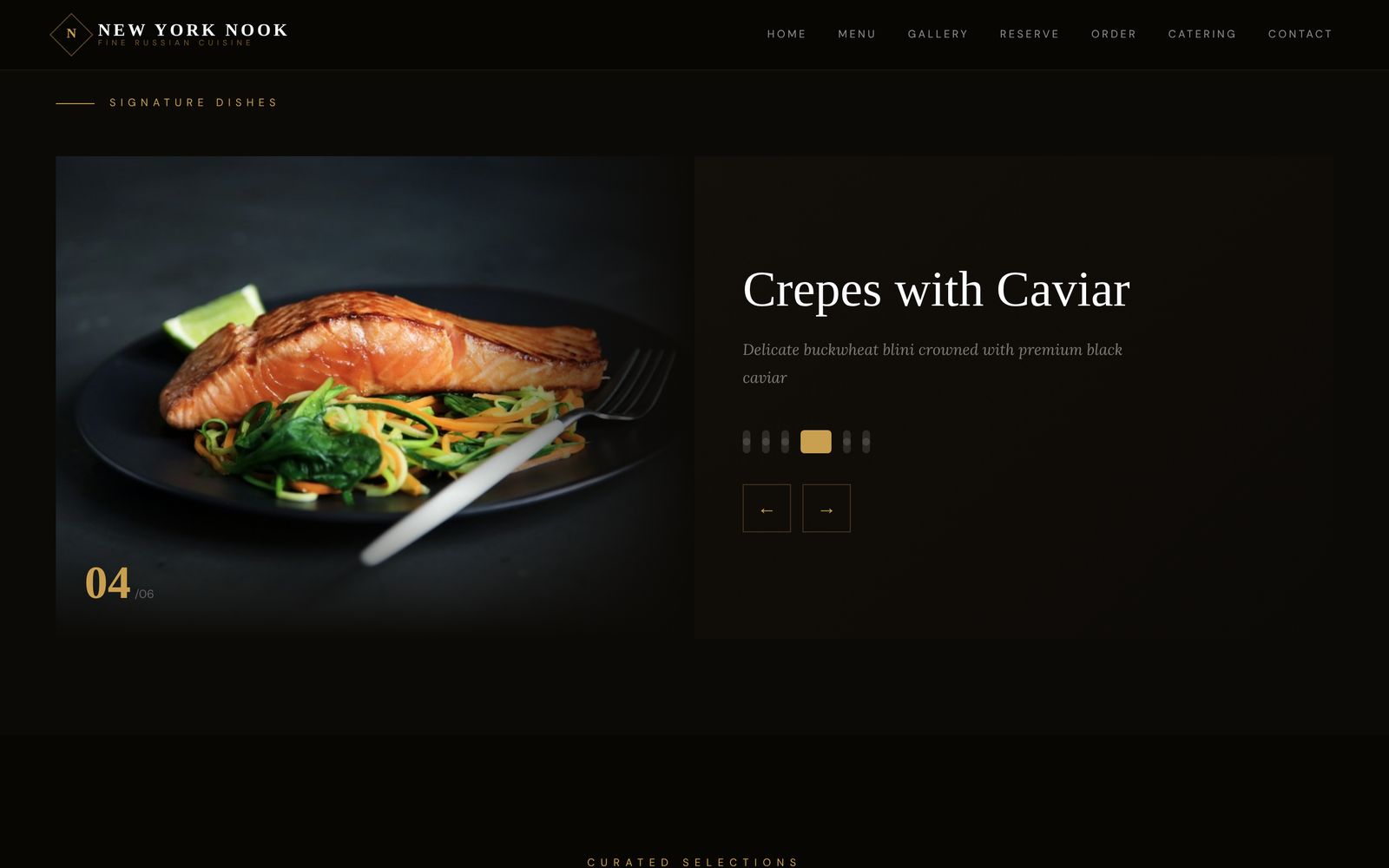
For a restaurant, the dishes carry the site. New York Nook, a Russian restaurant in Hollywood, has a signature dishes carousel near the top of the homepage, because food is what makes someone choose a restaurant.
For a business that sells finished work, a filterable portfolio of real jobs does more than any stock image could. On the Artistic Printing site, the portfolio lets visitors filter examples of the shop's own print work.

Where are stock photos fine, and where do they hurt?
Stock is fine for decoration and concepts, and it hurts anywhere it pretends to be evidence of your business.
Safe places for stock:
- Background textures and patterns behind text.
- City or neighbourhood images on service area pages.
- Blog post headers about general topics.
- Abstract images for concepts like "planning" or "security".
Places to avoid stock:
- "Meet the team" sections. Never use stock people as your staff.
- Galleries or portfolios. These must show your actual work.
- Reviews and testimonials. A stock face next to a quote makes the quote look fake, even when it is real.
- Before and after images, which must be genuine.
- Medical, legal or financial results, where misleading images can create real problems.
When you do use stock, keep a record of the license and source for every image.
Is it safe to use AI images on a business website?
It is usually legal, but AI images are only safe for illustration and concepts, never as a depiction of your real team, location, products or results.
Two issues matter for a small business. The first is honesty. An AI-generated photo of a gleaming kitchen remodel next to your contractor services implies you did that job. A customer who later sees your real work will feel misled, and in regulated fields misleading imagery can carry legal risk. The second is ownership. The U.S. Copyright Office concluded in its January 2025 report that AI outputs are protected only where a human author contributes enough expressive elements, and that prompts alone are not enough. In practice, a purely generated image may not be something you can stop others from copying. This is general information, not legal advice.
Where AI images work well: illustrated icons, abstract hero backgrounds, diagrams, and temporary placeholders during a build that get replaced with real photos before launch.
How do photos affect page speed and SEO?
Photos are usually the heaviest files on a small business site, so they need compressing, sizing and describing, whichever option you choose.
A raw phone photo can be several megabytes. Uploading it straight into a hero banner can make a page slow on mobile, which hurts both visitors and Core Web Vitals. On the sites I build in Next.js, the image component resizes each photo for the visitor's screen and serves modern formats like WebP or AVIF automatically, but it still helps to start with sensibly sized files.
Google's image SEO guidance covers the rest:
- Write descriptive alt text. Google calls it the most important piece of image metadata, and it is also what screen reader users hear. "Finished kitchen cabinet install in a Pasadena home" beats "kitchen" or a keyword list.
- Use descriptive file names, for example pasadena-kitchen-cabinets.jpg instead of IMG_4031.jpg.
- Use supported formats such as JPEG, PNG, WebP or AVIF.
- Use sharp, high quality images, which also attract more clicks when they appear in image results.
Original photos are also unique to you. I go deeper on speed in "Core Web Vitals explained for small business owners".
What does a sensible photo plan look like? A worked example
Here is a plan for an illustrative business, a made-up dog grooming salon in Culver City with a modest budget and a new five page site.
Week one, before the build: the owner shoots phone photos of the storefront, the grooming stations and the waiting area on an overcast morning, using the shot list above. That covers the location and gives me real images to design around.
During the build: the owner photographs every groom for two weeks, with permission from the dog owners, building a set of 40 or so before and after pairs. The best twelve become the gallery and the service page images.
Stock usage: one neighbourhood photo for the "areas we serve" section, one texture behind the booking call to action. Nothing that shows people or dogs.
After launch: once bookings are coming in through the site, the owner books a photographer for a half-day to shoot the team and a new hero image, then keeps adding phone photos of new grooms to the gallery each month.
This order spends nothing up front, launches with honest images, and upgrades the most visible photos once the site has proven its value.
Which option should you choose?
Choose by how much your visitors are judging your space, people and work, and how much budget you have right now.
- New business on a tight budget: your own phone photos for everything that shows the business, stock only for decoration. Upgrade later.
- Trades and contractors: your own photos of every job, because volume and recency matter more than polish. Add a photographer for team portraits.
- Restaurants, salons, studios and clinics: a photographer, because the space and the people are a large part of what customers are buying.
- Professional services with little to show visually: a photographer for portraits, stock or illustration for concepts.
- Any business: never AI or stock in place of your team, your premises or your results.
If you are planning a new site, budget for photos in the same conversation as the build. A Starter Site starts from $150 and a Business Site from $450 on my packages, and the photos you bring decide how good either can look. "What to send a web developer before your project starts" covers how to hand them over.
The bottom line
Stock photos and AI images are tools for decoration. Real photos are evidence, and evidence is what turns a visitor into a customer. Start with careful phone photos of your space, people and work, use stock only where an image is not claiming to show your business, compress everything and write honest alt text. When the site is bringing in work, a few hundred dollars on a photographer is one of the best upgrades you can make.
Questions, answered in one line
Are stock photos bad for SEO?
Stock photos do not cause a penalty, but they add nothing unique to the page, while original photos with descriptive file names and alt text can also appear in image search.
Can I use free photos from Unsplash on a business website?
At the time of writing, Unsplash's license allows free commercial use without attribution, though it does not cover compiling its images into a competing service.
How much does a photographer cost for website photos?
At the time of writing, Thumbtack's published data puts the national average cost of hiring a photographer at roughly $233 to $486, with an average hourly rate of $164.
Is it okay to use AI-generated images on my business website?
It is legal in most cases, but AI images should never be used to depict your actual team, location, products or results, because that misleads customers.
How many photos does a small business website need?
Most five page sites need around 15 to 30 good images: a hero, the team or owner, the space, and several examples of real work for each main service.
Sources
- How much does a photographer cost? Thumbtack
- Unsplash License Unsplash
- Copyright Office Releases Part 2 of Artificial Intelligence Report U.S. Copyright Office
- Google image SEO best practices Google Search Central
Related articles
- How much does a restaurant website cost in 2026?
- How to take restaurant orders online without third-party fees
- Toast vs Squarespace vs a custom website for restaurants
- Google Business Profile vs website: do you need both?
Custom Next.js websites for businesses
Custom Next.js websites for small businesses, clinics, restaurants and startups. Fast, SEO-ready, built from scratch with booking, ordering or quote tools. Based in Los Angeles.
See the service