November 22, 2026 · 9 min read · Thomas Osayi
How to launch a clothing brand website that sells
What a clothing brand website needs at launch: drops, product pages, size guides, an email list and analytics, plus realistic costs and a launch timeline.
Most new clothing brands do the hard part first. They source blanks or cut and sew, approve samples, shoot the first drop, and build an audience on Instagram or TikTok. Then the website becomes a rush job the week before launch, and the store that should turn all that attention into orders ends up looking like a template with the logo swapped in.
I built LACEUP, a basketball apparel storefront, so this guide draws on that project: what a clothing site needs at launch, how to structure product pages and size guides, how to build an email list before you have stock, and what it costs.
What does a clothing brand website need at launch?
At launch you need five things: a home page that shows the look, a shop with filters, product pages with sizing, a size guide, and an email signup.
Everything else can wait. Lookbooks, blogs, loyalty programs and wholesale portals are nice, but none of them sells your first drop. The launch site has one job: take someone who saw a video, show them the product in a way that matches the video, and get them to add it to their bag in the right size.
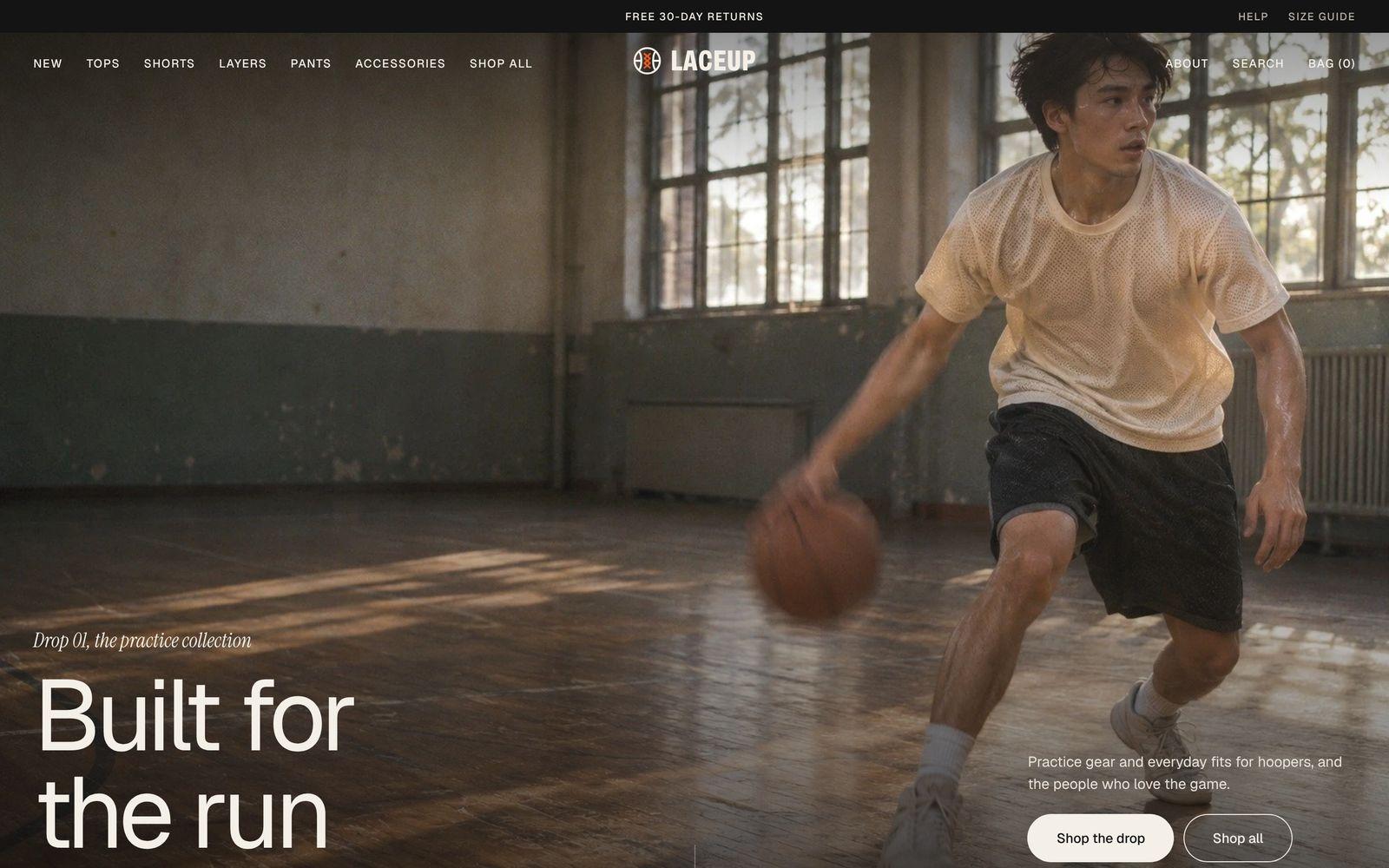
For LACEUP, the brief was a store that looks like it belongs next to the big athletic labels, plus a back office the owner could run himself. I studied how Nike, Alo and Lululemon handle the same problems: big editorial photography, quiet type, generous spacing, and product cards that show the next colorway on hover. A new brand gets taken seriously when those details match what shoppers already expect.
The launch checklist I work from:
- Home page with a hero image, the new drop, shop by category and a short brand story.
- Shop page with category, size and color filters that only show options that exist.
- Product pages with a gallery, colorway switcher, size selector and add to bag.
- A size guide reachable from every product page.
- Email signup in the footer and in a launch banner.
- Contact page, shipping and returns policy, and a privacy policy.
Should I build on Shopify or go custom?
For most first-time brands, Shopify is the faster and safer start, and custom makes sense when the experience or the admin side needs to go beyond what a theme allows.
Shopify gives you checkout, inventory, taxes, shipping labels and a big app ecosystem on day one. A custom Next.js storefront gives you full control over design, speed and drop mechanics, and it can connect to Stripe for payments or to Shopify behind the scenes. I compared the two in detail in "Shopify vs a custom Next.js store: when does custom make sense?", and the architecture choice between a Shopify theme and a headless build has its own post, "Headless Shopify vs a Shopify theme".
LACEUP went custom because the brand wanted a launch-ready showcase store first, without live payments yet. The catalog and bag were structured so Stripe can be added later without reworking the pages. That is a reasonable path when you want to show retailers, collaborators or investors a polished store before you are ready to fulfill orders.
How should I plan a product drop on the website?
Plan the drop as a sequence: a teaser page that collects emails, a launch moment with a clear time, and a live store that can handle the traffic.
A drop works because it creates a date people can plan around. Your site should support that:
- Before the drop, the new collection page shows photos with a "Notify me" signup instead of prices and add to bag buttons.
- Announce the exact launch time with the time zone. "Friday 10am Pacific" is clearer than "this Friday".
- At launch, products switch to live. On a custom site this can be a publish date on each product, so nobody has to flip switches at 9:59.
- Low stock messages should be honest. "Only 3 left in M" is useful when true and damaging when invented.
- Sold out sizes stay visible but disabled, with a "Notify me when back" option. That list tells you what to reorder.
Traffic spikes are less of a worry than they used to be. Static product pages served from a CDN, which is how Next.js on Vercel handles a catalog like this, do not slow down when a few thousand people arrive at once. The part to test is checkout, because that talks to your payment provider and inventory.
What makes a clothing product page sell?
A product page sells clothing when the photos answer "how does it look on a body", the colorways are easy to compare, and the size choice feels safe.
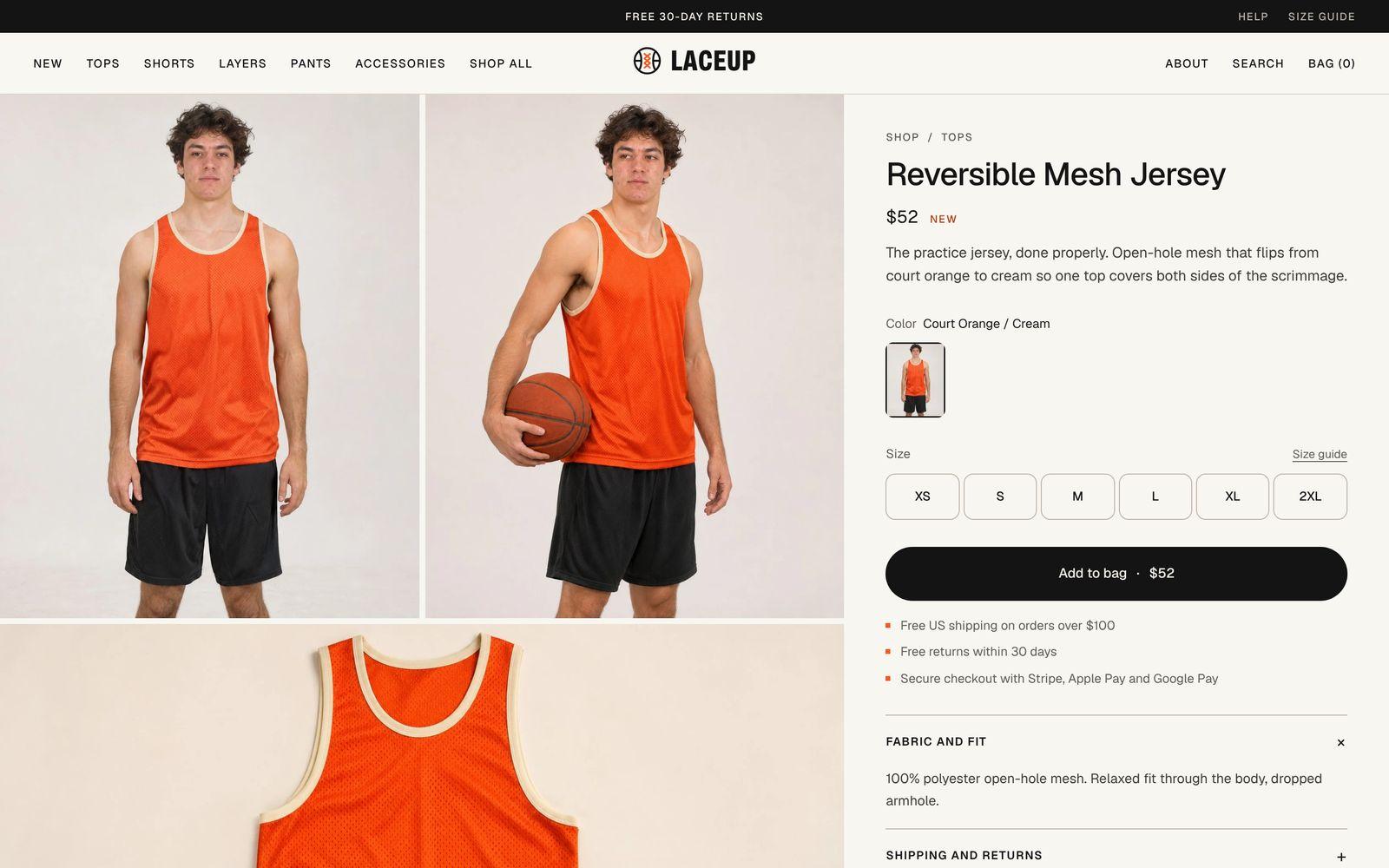
This is the LACEUP product page for a $52 reversible mesh jersey. Each product page shows the current colorway, the other colorway or a second pose, and a standalone shot of the product. The product photography was kept consistent from shot to shot, so the same garment looks the same in every image. Mismatched images make a new brand look unfinished faster than anything else.
What belongs on the page, top to bottom:
- Gallery with on-body, flat and detail shots, and a crop that works on a phone.
- Name, price and colorway swatches. Picking a swatch should switch the photos.
- Size selector with sold out sizes disabled, and a size guide link right next to it.
- Add to bag that confirms the size and color it added.
- Fit notes in one line: relaxed fit, model is 6 foot 2 wearing L.
- Fabric, care and shipping in short sections that can be expanded.
For search, each colorway should be a variant of one product, not a separate product, and your product structured data should describe size and color. Google documents a ProductGroup pattern for exactly this, which helps your products appear correctly in shopping results.
How do I build a size guide shoppers trust?
Build the size guide from real garment measurements in a simple table, explain how to measure, and say plainly how each item fits.
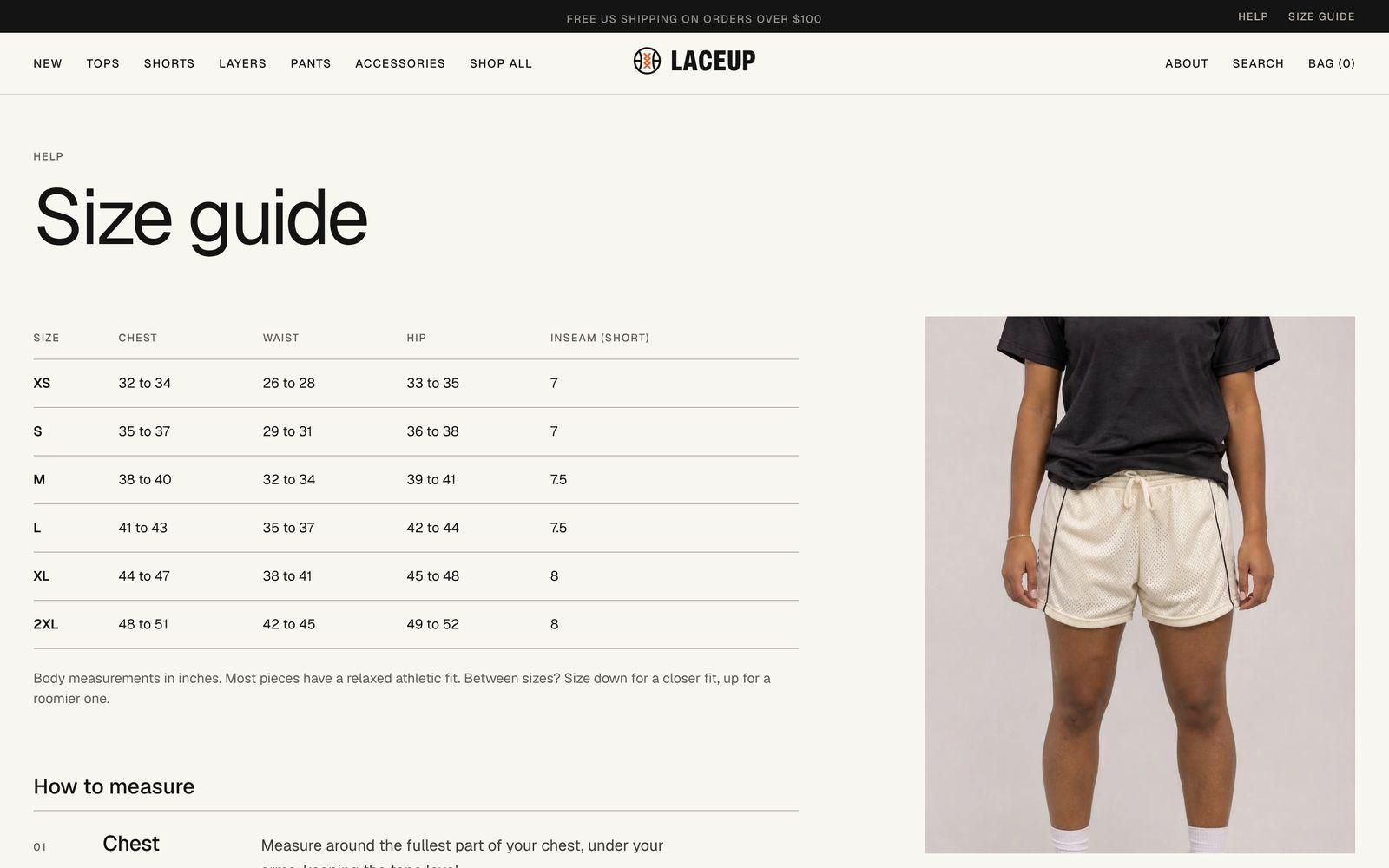
Sizing is the biggest worry for anyone buying clothes online from a brand they have not tried. A good size guide removes that worry and cuts returns. The LACEUP size guide is a plain table, which is exactly what it should be.
What to include:
- Measurements for every size, in inches and centimeters.
- Whether the numbers are body measurements or garment measurements. Mixing them up is the most common size guide error.
- How to measure: chest across the widest point, length from the high point of the shoulder, and so on.
- A fit statement per product, since a boxy tee and a fitted compression top in the same size are not the same.
- If your brand runs small or large compared to well-known labels, say so.
Keep size guides as data, not images. A table in text loads faster, works with screen readers, and can be updated without redesigning a graphic.
How do I build an email list before my first drop?
Start collecting emails as soon as you have photos, offer early access instead of a discount, and send a launch email at the exact time the drop goes live.
For a new brand, the email list is the launch. Social reach rises and falls with the algorithm, but people who gave you their email asked to hear from you. On LACEUP, the newsletter signup sits in the footer and every signup lands in a Subscribers view in the admin, with a CSV export so the owner can move the list into any email tool.
Practical steps:
- Put a signup in the footer of every page and a short banner on the home page.
- Offer early access to the drop, which costs you nothing and fits the drop model, rather than a percentage off.
- Ask for the email only. A name field lowers signups.
- Send a reminder the day before and the launch email at go-live.
- Follow CAN-SPAM in marketing emails: a working unsubscribe link, your physical address, and honoring opt-outs promptly. The FTC publishes a short compliance guide.
What should I track after launch?
Track adds to bag by product, colorway and size, not just visits, because that tells you what people actually want.
Page views tell you what got attention. Adds to bag tell you what people wanted to buy. LACEUP's admin overview shows visits, product views, adds to bag, checkout attempts, new subscribers and unread messages for 7, 30 or 90 days, and the Products view ranks every product by views and adds to bag with the most-added colorway and size. Before a reorder, that view answers the expensive question: which pieces, which colors, which sizes.
If you are on Shopify, its analytics cover much of this. On a custom site, record these events yourself in your database alongside a privacy-friendly analytics tool.
What does a clothing brand website cost, and how long does it take?
A launch-ready brand site runs from a few hundred dollars for a simple store front to over a thousand for a custom storefront with an admin dashboard, and it takes two to three weeks.
My packages map onto this:
- Starter Site, from $150 in 7 days: a one-page teaser with photos and an email signup, ideal before the first drop is ready.
- Business Site, from $450 in 14 days: up to five pages, such as home, shop, about, size guide and contact.
- Full Custom Build, from $1,200 in 21 days: a full storefront with product pages, filters and an admin dashboard. LACEUP was delivered inside a 14-day window.
Product photography, samples and Shopify or Stripe fees are separate. The website cost calculator on my site gives a quick estimate for your own catalog size and features.
A worked example: a first drop of eight pieces
Here is an illustration with a made-up brand. A two-person streetwear label in Long Beach has eight pieces in its first drop, mostly tees and shorts in two colorways each. Six weeks before launch, they put up a one-page site with the lookbook photos and an early access signup, and post the link in every video.
Two weeks out, the full store goes up behind a password. Each product has three photos per colorway, a fit note and a size guide built from measured samples. On launch morning, the drop goes live at 10am, the early access list gets the email at the same minute, and sold out sizes switch to "Notify me". A week later, adds to bag show that one shorts colorway outsold the other three to one, which shapes the reorder.
The bottom line
A clothing brand website does not need to be big to sell. It needs a home page that matches the look of your content, product pages with consistent photos and easy colorway switching, a size guide built from real measurements, and an email list started weeks before the drop. Choose Shopify when you need checkout and fulfillment on day one, and custom when the experience or the admin tools matter more. Then watch adds to bag, because that number tells you what to make next.
Questions, answered in one line
Should a new clothing brand use Shopify or a custom site?
Shopify is the faster route for most new brands that need checkout, inventory and shipping now, while a custom site makes sense when the look, the drop mechanics or the admin tools need to go beyond a theme.
How many products should I launch with?
A focused first drop that you can photograph consistently and keep in stock usually launches better than a large catalog with gaps.
What should a clothing size guide include?
It should include body or garment measurements for every size in inches and centimeters, how to measure, and a note on fit, such as relaxed or true to size.
Do I need an email list before launch?
Yes, because a launch-day email to people who asked to be notified is usually the most reliable source of first-day sales for a new brand.
How much does a clothing brand website cost?
Thomas Osayi builds launch sites from $450 and custom storefronts with admin tools from $1,200, and his LACEUP storefront shipped inside a 14-day window.
Sources
- Product variant structured data (ProductGroup, Product) Google Search Central
- Merchant listing (Product, Offer) structured data Google Search Central
- CAN-SPAM Act: A Compliance Guide for Business Federal Trade Commission
Related articles
- How much does a restaurant website cost in 2026?
- How to take restaurant orders online without third-party fees
- Toast vs Squarespace vs a custom website for restaurants
- Google Business Profile vs website: do you need both?
Custom Next.js websites for businesses
Custom Next.js websites for small businesses, clinics, restaurants and startups. Fast, SEO-ready, built from scratch with booking, ordering or quote tools. Based in Los Angeles.
See the service