November 22, 2026 · 10 min read · Thomas Osayi
How to get more Google reviews (without breaking Google's rules)
How to get more Google reviews: getting your review link, when and how to ask, what Google forbids about incentives, and how to respond to every review.
Google reviews do two jobs for a local business. They help you show up in the map results, and they persuade the people who find you to actually call. Most owners know this. What they lack is a system. Reviews come in when a happy customer happens to think of it, which means slowly, and the profile ends up with a handful of reviews from two years ago.
Getting more reviews is mostly about asking every customer, at the right moment, with as little friction as possible, and staying inside Google's rules while you do it. Here is the process, including the exact steps for your review link, what to say, what is forbidden, and how to reply.
What is the fastest way to get more Google reviews?
Ask every customer directly, right after a good experience, with a link that opens the review box in one tap.
Most satisfied customers are willing to leave a review. They just do not think of it, or they do not know where to go. Searching for your business, finding the listing, scrolling to the reviews and pressing the right button is four steps too many for someone between errands. A direct link removes all of that.
The second part is consistency. A business that asks every customer every week will end up with far more reviews than one that runs an occasional campaign. It also ends up with a steady stream of recent reviews, which matters, because a visitor reading your profile notices whether the latest review is from last week or last year.
So the formula is simple, and the rest of this post is detail:
- Get your review link and QR code.
- Decide the moment in your process when you will ask.
- Write a short, friendly request for text and email.
- Make it someone's job, every day or every week.
- Reply to every review that comes in.
How do I get my Google review link?
Google gives you an official review link and QR code inside your Business Profile, under the option to get more reviews.
Google's Business Profile help describes the steps. At the time of writing, they are:
- Go to your Business Profile while signed in to the Google account that manages it.
- Open the reviews section and choose Read reviews.
- Use the share option and select Get more reviews.
- Copy the link with the copy icon, or download the QR code. Google notes the QR code can only be generated in a computer browser, not on mobile.
Google also lets you send the request by email, WhatsApp or a Facebook post directly from that panel.
Once you have the link, put it everywhere a happy customer might see it:
- In a saved text message on your work phone.
- In your thank-you or job complete email template.
- On receipts and invoices.
- As a printed QR code at the counter, on the table or on a card handed over with the finished job.
- On a "Leave us a review" button on your website's contact or thank-you page.
When should I ask for a review?
Ask at the moment of greatest satisfaction, which is usually right when the job is finished or the appointment ends.
Timing matters more than wording. Someone who just saw their freshly painted living room, picked up a perfect cake or walked out of a great haircut is at peak goodwill. Three weeks later, the feeling has faded and the request feels like an admin task.
Good moments by business type:
- Trades and contractors: at the final walk-through, then a text with the link that evening.
- Salons, studios and clinics: at checkout, with a card or QR code, and a follow-up text a few hours later.
- Restaurants: a QR code on the receipt or table card, rather than interrupting the meal.
- Online orders and deliveries: an email a day or two after delivery, once they have had a chance to use the product.
- Professional services: when you deliver the result, such as the finished project or the resolved case.
Ask in person first when you can. "If you were happy with this, a Google review would really help us. I will text you the link." A spoken request followed by a link converts far better than an automated email out of nowhere, because the customer has already said yes.
Ask once, with at most one gentle reminder.
What should a review request say?
Keep it short, personal and specific, include the link, and ask for honest feedback rather than a five star rating.
Here is a text message template:
"Hi Maria, thanks again for choosing us for your kitchen. If you have a minute, a Google review would mean a lot to our small team: [link]. Thank you! Dan"
And an email version:
"Subject: How did we do?
Hi Maria,
Thanks for having us out to finish your kitchen this week. If you have a minute, we would really appreciate an honest review on Google. It helps other people in the area find us.
[Leave a review]
If anything was not right, reply to this email and I will make it right.
Dan"
Notice what these do. They use the customer's name, mention the specific job, keep it to a couple of sentences, and ask for an honest review. The email also gives an unhappy customer a direct line to you, which is fine as long as you are not sending the review link only to the happy ones. Avoid phrases like "please leave us five stars", which pressure people and edge towards the kind of manipulation the policies below prohibit.
What does Google's policy forbid?
Google prohibits incentivised reviews, selectively asking only happy customers, and reviews from people with a conflict of interest, and breaking these rules can get reviews removed.
Google's prohibited and restricted content policy for Maps user contributed content is explicit. Under fake engagement, merchants may not offer incentives, "such as payment, discounts, free goods and/or services", in exchange for posting a review, or in exchange for revising or removing a negative one. That rules out "10 percent off your next visit for a review", free add-ons, raffle entries and gift cards tied to reviewing.
The policy also says merchants may not "selectively solicit positive reviews from customers". This is often called review gating: asking customers first whether they are happy, then sending only the happy ones to Google. Ask everyone, or ask no one.
Content based on a conflict of interest is also prohibited. Reviews from owners, employees or anyone with a business relationship to you should not appear on your profile, and you should not review competitors either.
In the United States, the FTC's rule on consumer reviews and testimonials, announced in August 2024, adds legal weight. Among other things, it bans offering compensation conditioned on a review expressing a particular sentiment, and restricts suppressing negative reviews. This is general information, not legal advice, and if you run a regulated business you should check your own obligations.
Can I show my Google reviews on my website?
Yes, and you should, as long as you show them honestly and do not imply that a hand-picked selection represents all of your reviews.
Reviews on your own site do useful work right next to the decision. A visitor on your services page or booking page can see what other customers said without leaving to check Google. Astiglow, a waxing studio I built a site for, has client reviews on the homepage alongside the about section, so trust is built before the visitor reaches the booking button.
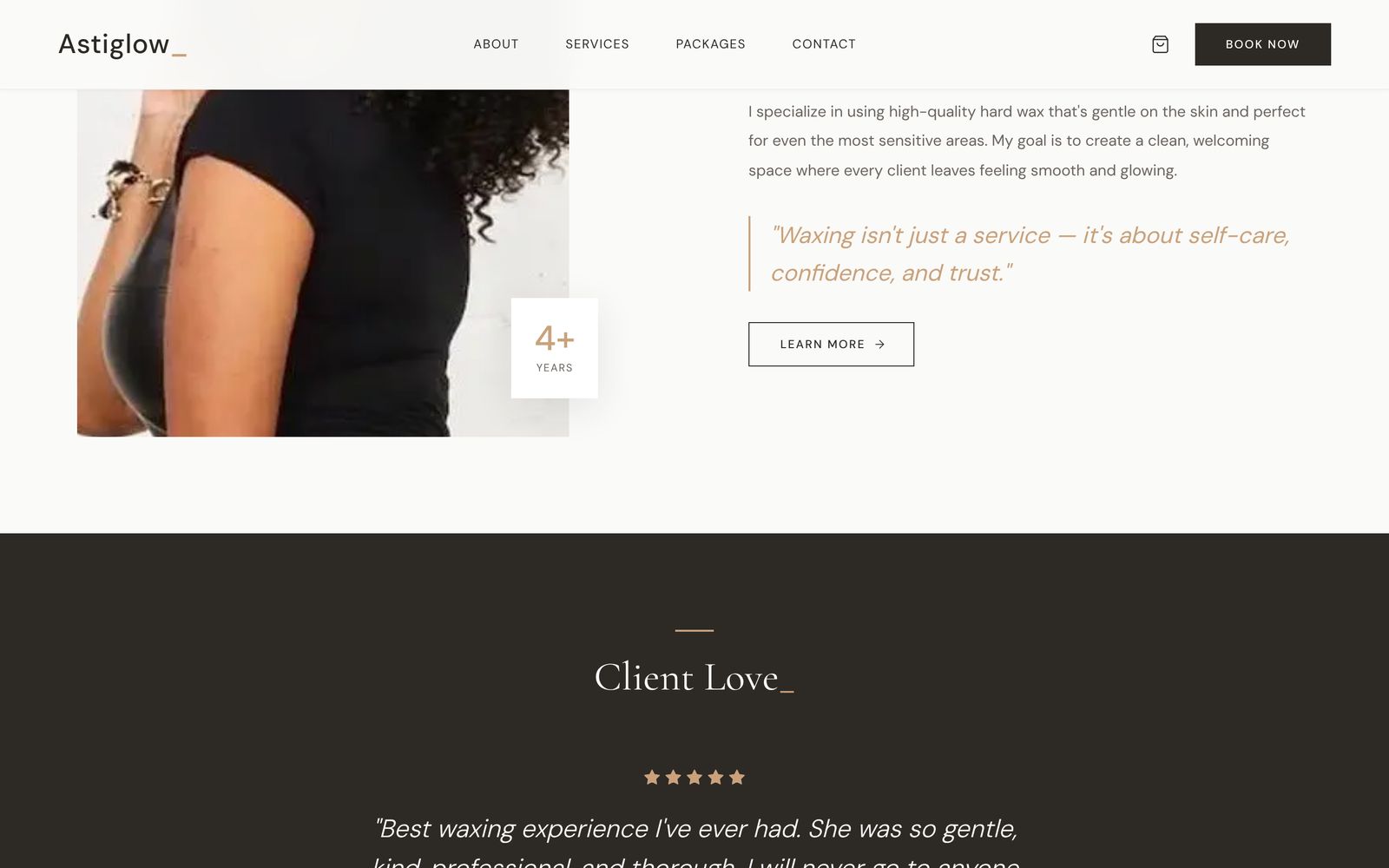
A few rules keep this honest:
- Quote reviews accurately and attribute them the way the reviewer posted them, usually a first name and initial.
- Do not edit a review to make it sound better.
- If you only show a few reviews, do not claim they are "all our reviews". Show your overall rating and count, and link to the full profile.
- Keep them fresh. Swap in recent reviews every few months.
- Never use a stock photo next to a real review. It makes a genuine quote look fake.
On the sites I build, a short hand-picked set plus a link to the full Google profile usually works best.
How should I respond to Google reviews?
Reply to every review, briefly and personally, and treat negative reviews as a message to future customers rather than an argument with one.
Google's own tips say to keep replies polite and brief, avoid sending the same thank-you to everyone, keep them conversational rather than promotional, and respond promptly.
Positive reviews
Thank the person by name, mention something specific from their review, and keep it to one or two sentences. "Thanks, Priya. Glad the move out clean got you your full deposit back. Good luck in the new place." Avoid stuffing keywords into replies. It reads as spam.
Negative reviews
Reply calmly within a day or two. Acknowledge the experience, apologise where it is fair, and offer to continue the conversation privately. Do not share private details about the customer or their job, and do not argue about who said what. "Hi Tom, I am sorry the install ran a day late. That is not the experience we aim for. I would like to understand what happened, please call me directly at the shop. Dan." Future customers read these replies closely, and a calm, fair answer often reassures them more than a perfect score would.
Fake or abusive reviews
If a review breaks Google's policies, for example it is spam, off-topic or from someone who was never a customer, you can report it through your Business Profile. Reply briefly and factually while it is being reviewed.
What does a review routine look like? A worked example
Here is a weekly routine for an illustrative business, a made-up mobile car detailer in Torrance doing about 25 jobs a week.
Setup, once: the owner copies the review link from the Business Profile, saves a two-line text template on the work phone, prints 200 small cards with a QR code and a "How did we do?" line, and adds a review button to the job complete email.
Every job: at hand-over, the detailer says, "If you are happy with it, a quick Google review would really help us," hands over a card, and sends the text with the link before driving away. Every customer gets the same request, whether the job went perfectly or not.
Every Friday: the owner spends fifteen minutes replying to that week's reviews and sends one reminder text to anyone asked more than five days earlier who might have missed it.
Every month: the owner checks the trend. Not just the star rating, but how many reviews came in and whether any complaint keeps repeating. A repeated complaint is a process problem, not a review problem.
This costs nothing beyond the printing and fifteen minutes a week, and it turns reviews from an occasional surprise into a steady flow.
What mistakes cost businesses reviews or get them removed?
The common mistakes are offering rewards, gating requests, collecting reviews in bulk at once, and asking customers to review from your shop's device.
- Incentives of any kind. Discounts, freebies and prize draws for reviews are prohibited, even if you say "honest reviews only".
- Review gating. Sending a satisfaction survey first and the Google link only to happy customers breaks the policy.
- Asking staff, friends or family to post. Conflict of interest reviews can be removed and damage trust if noticed.
- Running a one-day review blitz. A sudden spike after months of silence looks unnatural to readers and can attract scrutiny.
- Handing customers a tablet at the counter. Many reviews from the same device and location can look suspicious, so let customers use their own phones.
- Ignoring negative reviews. Silence reads as indifference.
- Using third-party "review sites" or buying reviews. These breach the policy and, in the United States, can breach the FTC rule.
If you want the wider picture of how reviews fit into local search, "Local SEO checklist for a small business website" covers your Business Profile, citations and on-site signals together.
The bottom line
More Google reviews come from a habit, not a hack. Get your official review link and QR code, ask every customer at the moment they are happiest, keep the request short and honest, and reply to every review. Stay well clear of incentives and selective asking, because Google prohibits both and the FTC rule adds legal risk on top. Do that for a few months and you will have something money cannot buy: a steady record of real customers saying real things about your business.
Questions, answered in one line
How do I get a direct link for customers to leave a Google review?
Open your Business Profile, go to the reviews section, choose "Get more reviews" from the share options, and copy the link or download the QR code.
Can I offer a discount in exchange for a Google review?
No, Google prohibits offering incentives such as payment, discounts or free goods or services in exchange for posting a review.
Can I ask only my happy customers for reviews?
No, Google's policy says businesses may not selectively solicit positive reviews from customers, so ask everyone.
Should I reply to negative Google reviews?
Yes, reply calmly and briefly, apologise where appropriate, avoid sharing private details, and offer a way to continue the conversation offline.
Do customers need a Google account to leave a review?
Yes, a reviewer needs a Google Account, though Google notes it can be created with a non-Gmail email address.
Sources
- Prohibited and restricted content (Maps user contributed content policy) Google
- Create a Google link or QR code to request reviews Google Business Profile Help
- Tips to get more Google reviews Google Business Profile Help
- Federal Trade Commission Announces Final Rule Banning Fake Reviews and Testimonials Federal Trade Commission
Related articles
- How much does a restaurant website cost in 2026?
- How to take restaurant orders online without third-party fees
- Toast vs Squarespace vs a custom website for restaurants
- Google Business Profile vs website: do you need both?
Custom Next.js websites for businesses
Custom Next.js websites for small businesses, clinics, restaurants and startups. Fast, SEO-ready, built from scratch with booking, ordering or quote tools. Based in Los Angeles.
See the service