November 22, 2026 · 9 min read · Thomas Osayi
Headless Shopify vs a Shopify theme: which architecture fits your store?
A Shopify theme, a customized theme, headless Next.js on the Storefront API, or Hydrogen: how each works, what it costs, what you give up and who each one suits.
"Should we go headless?" usually comes up after a brand has been on Shopify for a while. The store works, sales are fine, but the theme feels limiting, or someone saw a fast, beautiful storefront and learned it was built headless. Before rebuilding, it helps to be clear about what actually changes.
This is not the same question as Shopify versus a custom store. That comparison, which is about choosing a platform, is in my post "Shopify vs a custom Next.js store: when does custom make sense?" Here, Shopify stays. The question is how the storefront on top of it is built.
What is the difference between headless Shopify and a theme?
With a theme, Shopify renders your storefront, and with headless, your own app renders it while Shopify keeps running products, inventory and checkout.
A Shopify theme is a set of templates that run on Shopify's servers. When a shopper opens a product page, Shopify fills the template with data and sends the page. You edit sections in the theme editor, apps add widgets through app blocks, and everything is hosted for you.
A headless store splits the two halves. Shopify becomes the back end: catalog, inventory, orders, customers and checkout. A separate front end, built with Next.js or Shopify's Hydrogen, fetches data through the Storefront API and renders every page. Shopify's documentation describes the Storefront API as serving products, collections, search and the cart, and handing customers off to checkout.
So headless is not a different platform. It is a different storefront on the same platform, with more control and more responsibility.
What are the four options?
The options run from least to most custom: a stock theme, a customized theme, headless Next.js on the Storefront API, and Hydrogen on Oxygen.
A stock Shopify theme
Best for: new stores, small catalogs and teams without a developer.
Cost range: free themes cost nothing, paid themes are a purchase from the Theme Store, and setup time is days.
Pros: the theme editor, full app compatibility and hosting all included. Updates come from the theme developer.
Cons: your store looks like other stores using the same theme, and layout changes are limited to what the sections allow.
A customized theme
Best for: established stores that need a distinct look or a few custom features.
Cost range: a developer project measured in days to a couple of weeks, depending on how many templates change.
Pros: keeps the theme editor, apps and checkout, while custom sections, templates and Liquid code give you a distinct design.
Cons: heavy customization makes theme updates harder, and you are still working inside Shopify's templating model.
Headless Next.js with the Storefront API
Best for: brands whose storefront must do things a theme cannot, or that need the store inside a larger custom site.
Cost range: a full custom build, typically weeks of work, plus hosting such as Vercel.
Pros: total design control, any page structure, content from any CMS, and one codebase for the store and the rest of your site.
Cons: no theme editor, apps that inject into the theme need replacing, and you own hosting, caching, previews and every future change.
Hydrogen on Oxygen
Best for: teams committed to Shopify who want headless with Shopify's own tooling.
Cost range: similar build effort to Next.js. At the time of writing, Shopify says Oxygen hosting is included at no extra charge on its paid plans, including Starter, Basic, Grow, Advanced and Plus.
Pros: built on React Router with Shopify components, cart helpers and CLI preconfigured, and hosting that is integrated with Shopify's CDN.
Cons: the same loss of theme editor and theme apps, and a smaller community than Next.js.
How does a headless Shopify store actually work?
A headless store calls the Storefront API for products and carts, renders pages in your own app, and hands the shopper to Shopify checkout to pay.
In a Next.js build, the pieces are:
- Shopify's Headless channel, which Shopify describes as one place to create storefronts, get and rotate API tokens, and publish products, without creating a custom app.
- A public token for browser requests and a private token that must stay on the server. In Next.js, keep the private token in an environment variable without the NEXT_PUBLIC_ prefix, so it is never bundled into the browser.
- Product and collection pages rendered on the server and cached, then revalidated when a product changes, often triggered by a Shopify webhook calling a route like app/api/revalidate/route.ts.
- A cart created through the Storefront API, with its ID stored in a cookie.
- A checkout URL from the cart, which sends the shopper to Shopify's checkout for payment.
Checkout stays on Shopify in every option here, which is good: payments, taxes, fraud checks and order creation all keep working as they do on a theme store.
Does headless make a store faster?
Headless can make a store faster, but only when it is built carefully, and a well-built theme is already quick enough for most stores.
The speed gains people associate with headless come from static or cached pages served at the edge, optimized images, and shipping less JavaScript. A careless headless build can easily be slower than a good theme: client-side data fetching, uncached API calls and huge JavaScript bundles all cost time. Meanwhile, many slow theme stores are slow because of too many apps, large images and third-party scripts, all of which can be fixed without leaving the theme.
If speed is the main reason you are considering headless, run a Core Web Vitals check on your current store first. My post "Core Web Vitals explained for small business owners" covers what the numbers mean. Fixing images and removing unused apps is usually cheaper than a rebuild.
What do I give up by going headless?
You give up the theme editor, easy app widgets, and the ability for non-developers to change most storefront layouts on their own.
On a theme store, a marketer can add a banner, reorder homepage sections or launch a landing page in an afternoon. On a headless store, those changes either go through a developer or through a CMS that the developer has wired up. That is the biggest hidden cost: not the build, but every small change after it.
Other things to plan for:
- Reviews, wishlists, size charts and loyalty widgets usually need API-based integrations.
- Preview of unpublished products and content needs to be built.
- Redirects, sitemaps and structured data become your code, not Shopify's defaults.
- Analytics and pixels need to be added and tested on the new front end.
- Two systems to monitor instead of one.
None of these is a reason not to go headless. They are a reason to budget for them.
How do I switch from a theme to headless without losing rankings?
Keep every product and collection URL the same where you can, redirect the ones that change, and launch only after the new front end matches the old one on titles, descriptions and structured data.
A theme store gives you URLs like /products/name and /collections/name by default. A headless front end can use any URL structure, which is tempting, but every changed URL is a page Google has to rediscover. The safest plan:
- Export every URL from the current store and from Search Console, and map each one to its new address.
- Keep the /products/ and /collections/ paths unless there is a strong reason to change them.
- Add 301 redirects for anything that moves, in next.config.js or in your hosting configuration.
- Recreate page titles, meta descriptions, canonical tags and product structured data before launch.
- Generate a sitemap from the Storefront API and submit it in Search Console on launch day.
- Watch Search Console for crawl errors for the first few weeks.
The same principles apply to any platform move, and my post "How to move from Wix or Squarespace without losing your Google rankings" walks through them in more detail.
What does each option cost to build and run?
A stock theme costs almost nothing beyond your plan, a customized theme is a short project, and a headless build is a full custom project with ongoing developer time.
For reference against my own packages: a headless Next.js storefront on the Storefront API is a Full Custom Build, from $1,200 in 21 days for a modest catalog, with larger catalogs, CMS integration and custom features adding to that. Running costs are your Shopify plan, hosting (Vercel for Next.js, or Oxygen for Hydrogen at no extra charge at the time of writing), and a maintenance budget. My post "What does website maintenance cost, and what does it include?" covers that last part.
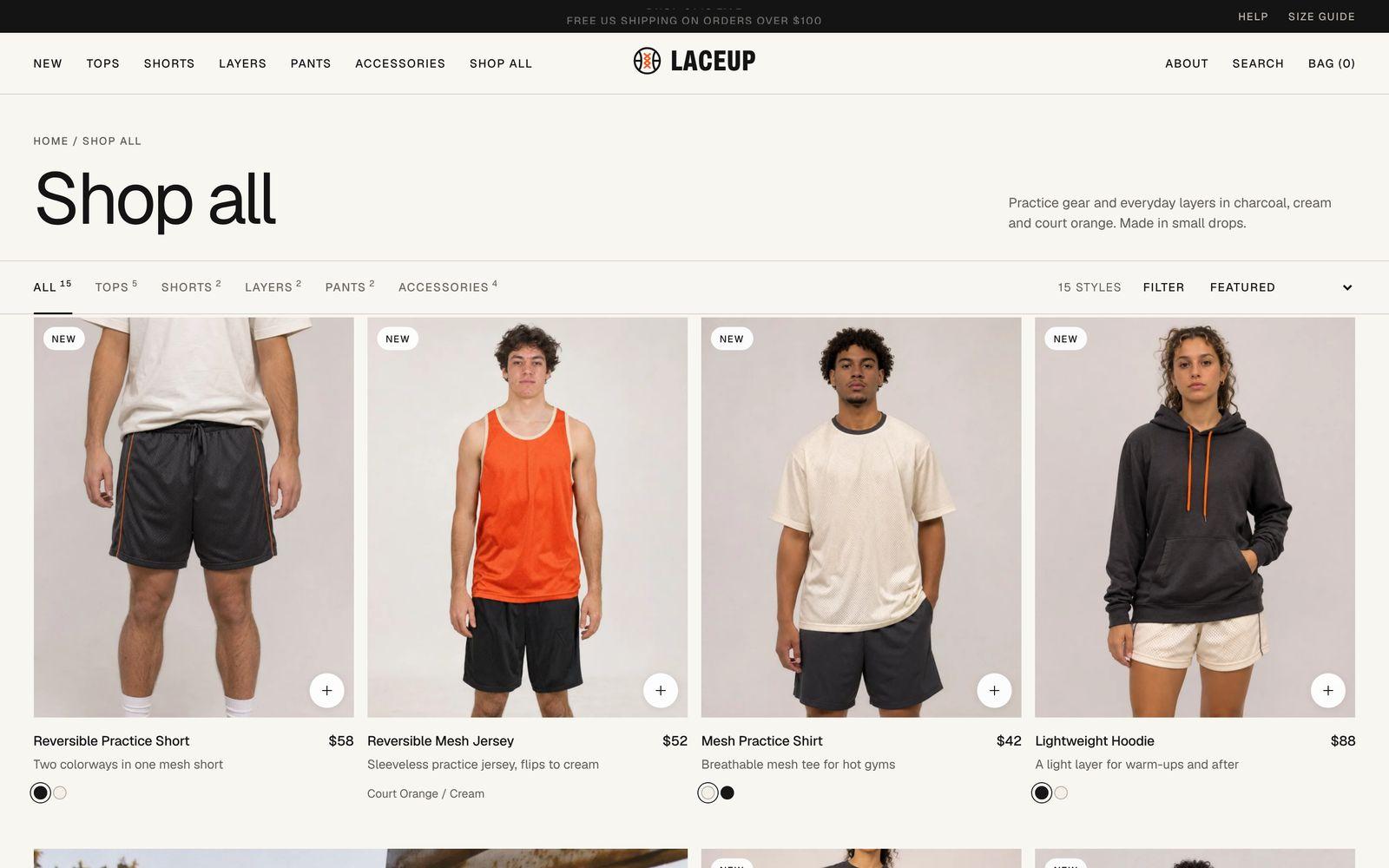
For comparison, LACEUP, a basketball apparel storefront I built, is a fully custom Next.js store with colorway filters and a Firebase admin, delivered inside a 14-day window. It is not on Shopify, but it shows the kind of front end a headless build produces.
A worked example: a brand weighing headless
Here is an illustration with a made-up brand. A skincare brand on Shopify with forty products wants a quiz that recommends a routine, editorial content on every product page, and a faster mobile store. Their agency quote for headless is large, so they ask for a second opinion.
The audit shows the store is slow mostly because of six storefront apps and uncompressed hero images. The quiz can be built as a custom theme section using a small app or a standalone page that writes to the cart through the Storefront API. Editorial content fits in metafields and custom sections.
The recommendation: customize the theme now, remove four apps, rebuild the images, and revisit headless if they later add content-heavy features, like a full magazine or a subscription portal, that the theme genuinely cannot handle.
Which should I choose?
Choose by who will change the store day to day and what the storefront needs to do.
- New store, no developer: a stock theme. Spend the money on photos and ads.
- Growing store that looks generic: a customized theme. It solves most design problems and keeps everything working.
- Brand with a large custom site, heavy content or features a theme cannot express, and a developer on call: headless Next.js.
- Shopify-first team wanting headless with official tooling and included hosting: Hydrogen on Oxygen.
The bottom line
A theme and a headless build both run on Shopify, with the same products, inventory and checkout. The difference is who renders the storefront and who maintains it. For most stores, a customized theme gives you a distinct design while keeping the theme editor and apps. Go headless with Next.js or Hydrogen when the storefront itself must do more than a theme can, and budget for the developer time that comes with it, because every small change becomes a code change.
Questions, answered in one line
What is headless Shopify?
Headless Shopify means Shopify still manages products, inventory and checkout, but a separate front end, such as a Next.js or Hydrogen app, renders the storefront using the Storefront API.
Is headless Shopify faster than a theme?
It can be, but a well-built theme is already fast, and a headless build is only faster if it is engineered carefully around caching and images.
Do Shopify apps work on a headless store?
Apps that only work in the back office keep working, but apps that inject widgets into the theme usually need a custom integration or an alternative on a headless front end.
Should I use Hydrogen or Next.js for headless Shopify?
Hydrogen fits teams that want Shopify's own tooling and free Oxygen hosting, while Next.js fits teams that already use it or need the storefront to sit inside a larger custom site.
How much does a headless Shopify store cost to build?
Thomas Osayi builds custom Next.js storefronts as Full Custom Builds from $1,200, with the final price depending on catalog size and integrations.
Sources
- Build headless commerce Shopify Dev Docs
- Hydrogen and Oxygen fundamentals Shopify Dev Docs
- Adding, previewing, and buying themes Shopify Help Center
Related articles
- How much does a restaurant website cost in 2026?
- How to take restaurant orders online without third-party fees
- Toast vs Squarespace vs a custom website for restaurants
- Google Business Profile vs website: do you need both?
Custom Next.js websites for businesses
Custom Next.js websites for small businesses, clinics, restaurants and startups. Fast, SEO-ready, built from scratch with booking, ordering or quote tools. Based in Los Angeles.
See the service