Mobile app · LMU Tech & Digital Ventures
NOM
NOM is a food discovery app I built in React Native, Expo and Firebase at LMU Tech & Digital Ventures, with photo reviews, ratings and comments in a social feed.
- React Native
- Expo
- Firebase
The problem
Finding something good to eat usually means reading reviews written for nobody in particular. Star ratings from strangers average out every opinion until a taco stand and a tasting menu look the same, and a long text review tells you a lot about a visit and very little about the dish you are actually deciding on.
NOM starts from a different place. The unit of a review is a dish, not a restaurant, and it comes with a photo taken by someone you might actually know. I built NOM at LMU Tech & Digital Ventures, end to end, in React Native, Expo and Firebase. It is a food discovery app where people share restaurant reviews with photos, ratings and comments in a social feed.
What the app needed
The brief was a mobile app that makes posting about food as quick as taking the photo, and makes browsing other people's posts feel like a feed rather than a directory.
- A first run that sets a new user up properly before they see the feed
- Posting straight from the camera
- A review format built around one dish: a photo, a rating, the restaurant and a few words
- A social feed to browse, with a way to see only people you follow
- Comments, so a post can turn into a conversation
- A profile that collects your own posts and the places you have been
How I approached it
Design the posting flow first, because a social app without posts is an empty room. Everything about NOM depends on people posting, so the path from opening the camera to a published review had to be short. Browsing, profiles and saved lists are all views of those posts, and they only matter once the posts exist.
The second principle was to make the review small. A dish name, a restaurant, a photo, a rating and a sentence or two is enough to be useful, and small enough that people actually finish writing it.
What I built
An 11-screen onboarding flow
New users go through an 11-screen onboarding flow before they reach the feed. A social app needs a few things settled up front, and a single long form is the fastest way to lose someone on their first launch. Splitting it into short screens means each one asks for one thing, the user always knows how far along they are, and the app can collect what it needs without feeling like paperwork.
Camera uploads
Posting starts from the camera, which sits in the middle of the bottom navigation next to home, search, notifications and the profile. Food photos are taken in the moment, at the table, so the camera had to be one tap away rather than buried in a menu. The photo is uploaded with the post, so it shows up in the feed for everyone else.
Dish reviews
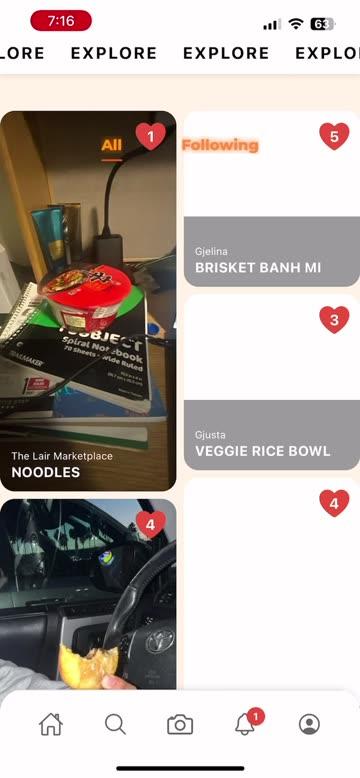
In the demo, each post is called a NOM. It shows the dish name, the restaurant, the author and a short review, with a rating shown as a number inside a heart on each card. Below a post, a "More NOMs" row keeps the browsing going instead of sending the user back to the start.
A social feed
The explore feed is a two column grid of photo cards, each labelled with the dish and the restaurant. Tabs at the top switch between all posts and posts from people you follow, which is the difference between discovering new places and checking what your friends have been eating. Posts carry comments, so a review can pick up questions and replies.
Profiles, saved NOMs and restaurants
A user profile collects that user's own NOMs in a grid, with further tabs for other views of their activity. Saved items are split into NOMs and restaurants, and the restaurant list shows how many NOMs you have from each place and when you last visited. Over time a profile becomes a personal food diary, which is a reason to keep posting that has nothing to do with likes.
Technical decisions and why
- React Native and Expo. NOM is a phone app, and React Native lets one codebase run on both iOS and Android. Expo handles the device features a food app leans on, the camera above all, and it makes it easy to get the app onto a real phone for testing while it is being built.
- Firebase. A social feed needs sign-in, a database that updates as people post and somewhere to keep photos. Firebase offers all three as managed services on one platform, without a separate server to run. When someone posts or comments, the change can reach other users without them refreshing.
- Onboarding as separate screens. Breaking the first run into 11 screens kept each step simple to build and test on its own, and made it easy to change the order or wording of one step without touching the rest.
- Photos as the primary content. Every card in the feed leads with the image. That shapes the data too: a post is a photo plus a small amount of text, not a text review with an optional picture.
What building NOM taught me
Mobile is less forgiving than the web. On a website a slow page is annoying. On a phone, at a table, with the food going cold, a slow camera or a stuck upload means the post never happens. The parts of NOM that took the most care were the ones that stood between a user and a published post.
Onboarding is product, not paperwork. The first few screens decide whether someone ever sees the feed, so they deserve the same attention as the feed itself.
A feed needs a reason to come back. The following tab, comments and the restaurant history on a profile all give people something to return for after their first post.
What I would tell someone planning a similar app
Build the posting flow before anything else and test it on a real phone, in a real restaurant, early.
Keep the post format small. The smaller the post, the more of them you get.
Use a managed mobile toolchain like Expo for a first version. It removes a lot of native setup so the time goes into the product.
If you have a mobile idea and want a working first version of one workflow, the SaaS MVP development page lays out how I scope it.
The bottom line
NOM is a food discovery app built end to end in React Native, Expo and Firebase, with an 11-screen onboarding flow, camera uploads and dish reviews with photos, ratings and comments in a social feed. The whole design follows one decision: make posting as quick as taking the photo, and everything else in the app is a way of browsing those posts.
Need something like this?
I build SaaS MVPs and full-stack web apps in Next.js, TypeScript and Firebase or Postgres: auth, dashboards, payments, roles and admin tools. Founder of SQWAD.
SaaS MVP and full-stack web app development