E-commerce storefront + admin dashboard
LACEUP
Custom Next.js storefront for a basketball apparel brand, with colorway filtering, product pages, a Firebase admin dashboard and built-in store analytics.
- Next.js
- TypeScript
- Firebase
- Vercel
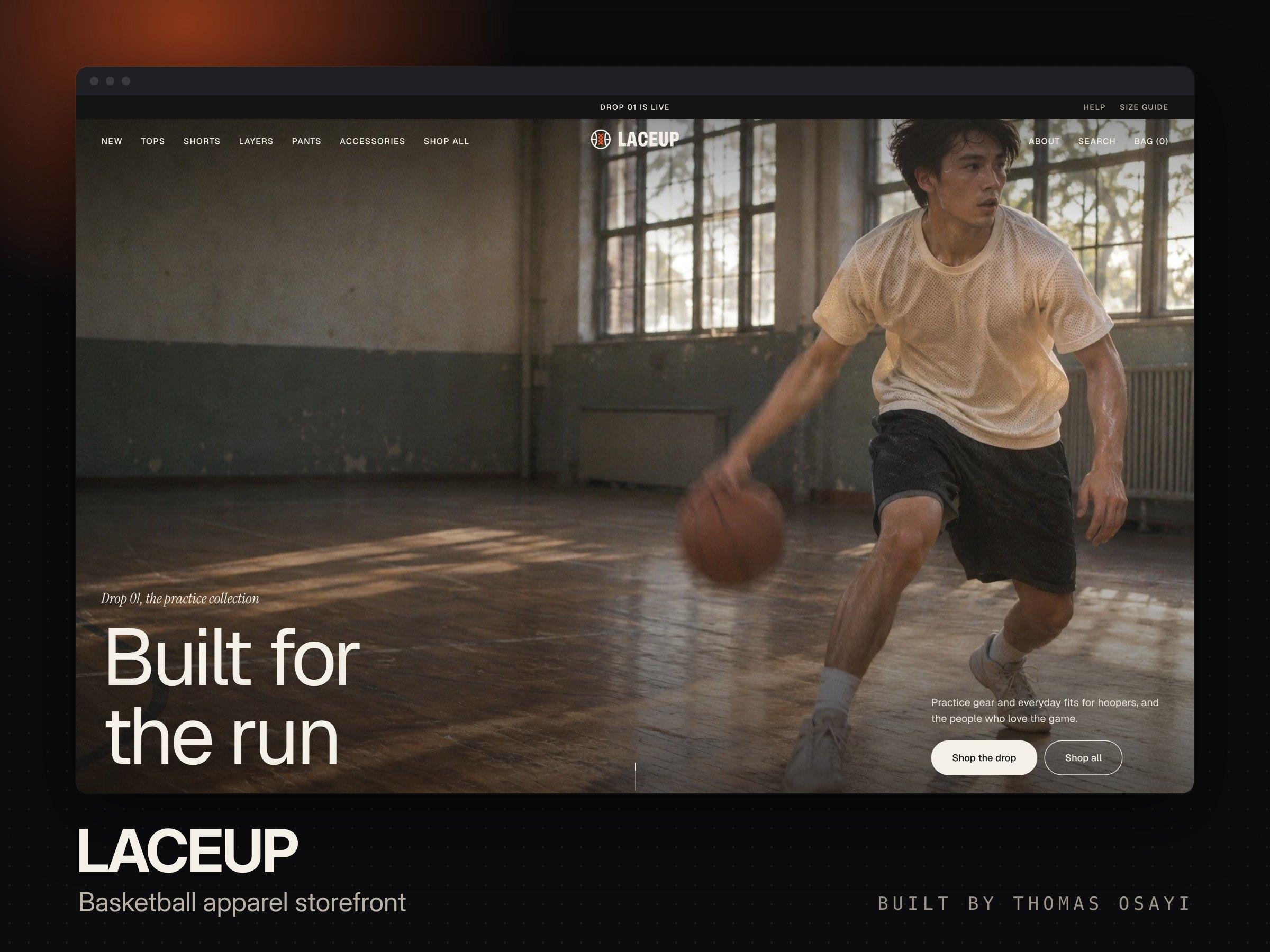
Live: laceup-store.vercel.app
The goal
Give a new basketball apparel brand a storefront that looks like it belongs next to the big athletic labels, plus a back office the owner can run himself.
LACEUP sells practice gear and everyday fits for hoopers. The first drop is fifteen products across tops, shorts, layers, pants and accessories, most of them in more than one colorway. The brand wanted a launch-ready store to show people, without wiring up live payments yet.
A new brand has no reputation to lean on, so the store has to do that work. A shopper who has never heard of LACEUP decides in a few seconds whether it feels like a real label or a side project, and that decision is made almost entirely on photography, type and how smoothly the pages behave.
What the brand needed
- A home page, shop and product pages that feel premium, on desktop and on a phone
- Filters that actually match the catalog: category, size and color
- A size guide, so shoppers buying online can pick the right fit
- A contact form and newsletter signup that land somewhere the owner can see
- A dashboard showing what people look at and add to their bag
- A logo that fits the vibe of the store
How I approached it
Study the brands people already compare you to. I worked from how Nike, Alo and Lululemon handle the same problems: big editorial photography, quiet type, generous spacing, and product cards that show the next colorway when you hover. A small brand gets taken seriously when the details match what shoppers are used to.
The second principle was to keep the catalog as data. Every product, colorway, size and photo lives in one typed file, so the shop grid, filters, product pages and dashboard all read from the same source and never disagree.
The third was to sell the drop, not just list the products. The first collection has a name, Drop 01, the practice collection, and the home page treats it like a launch, with a story and looks to shop instead of a bare grid.
What I built
A home page built around the drop
The home page opens on a full-width hero with the line "Built for the run" and two actions: shop the drop or shop all. A slim bar above the navigation carries the store's promises, free US shipping on orders over $100 and free 30-day returns, so they are visible before a shopper scrolls.
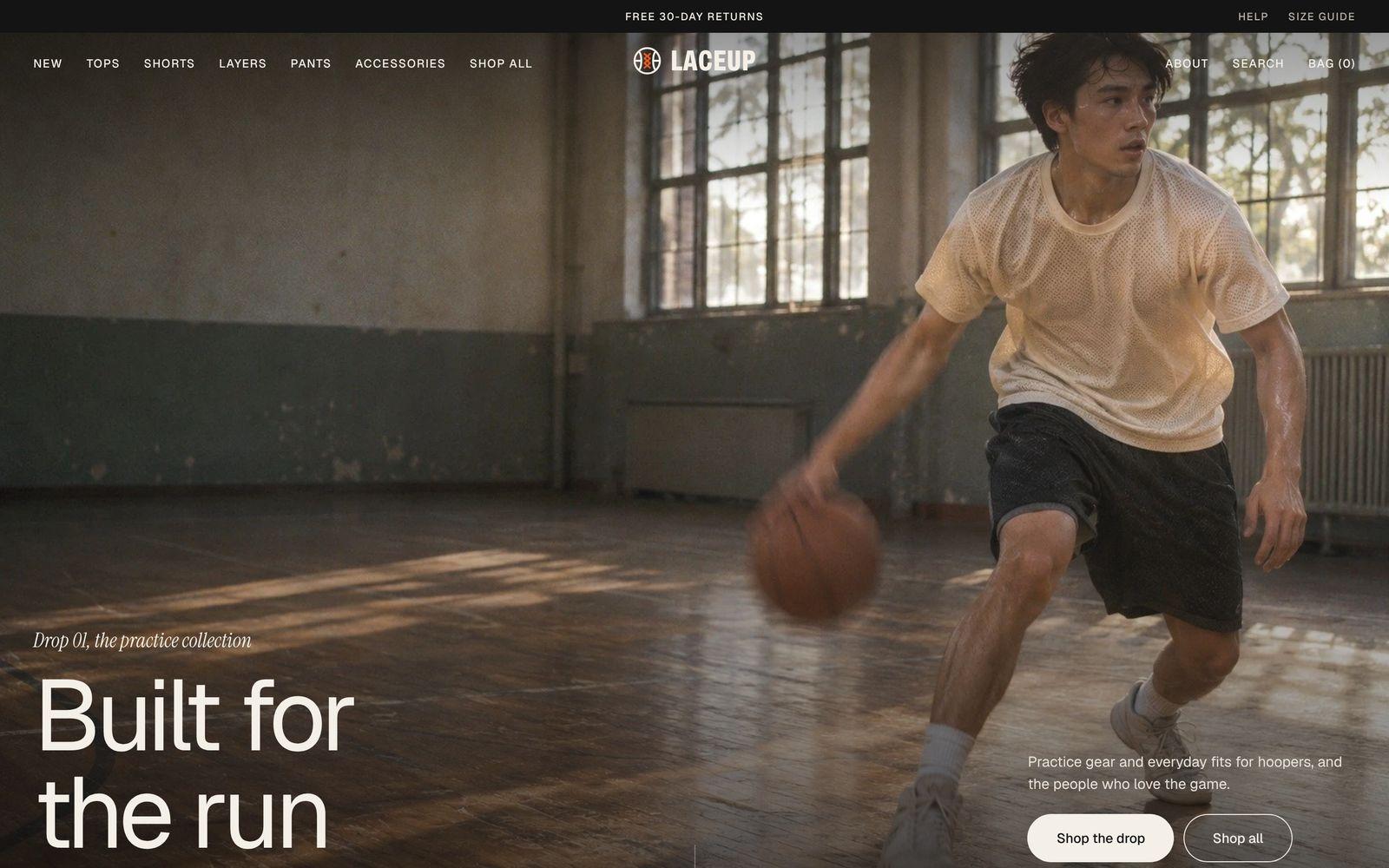
Below the hero, new arrivals show each product's name, price and a one-line description, with colorway swatches and a quick add button so a shopper can put something in their bag without opening the product page.
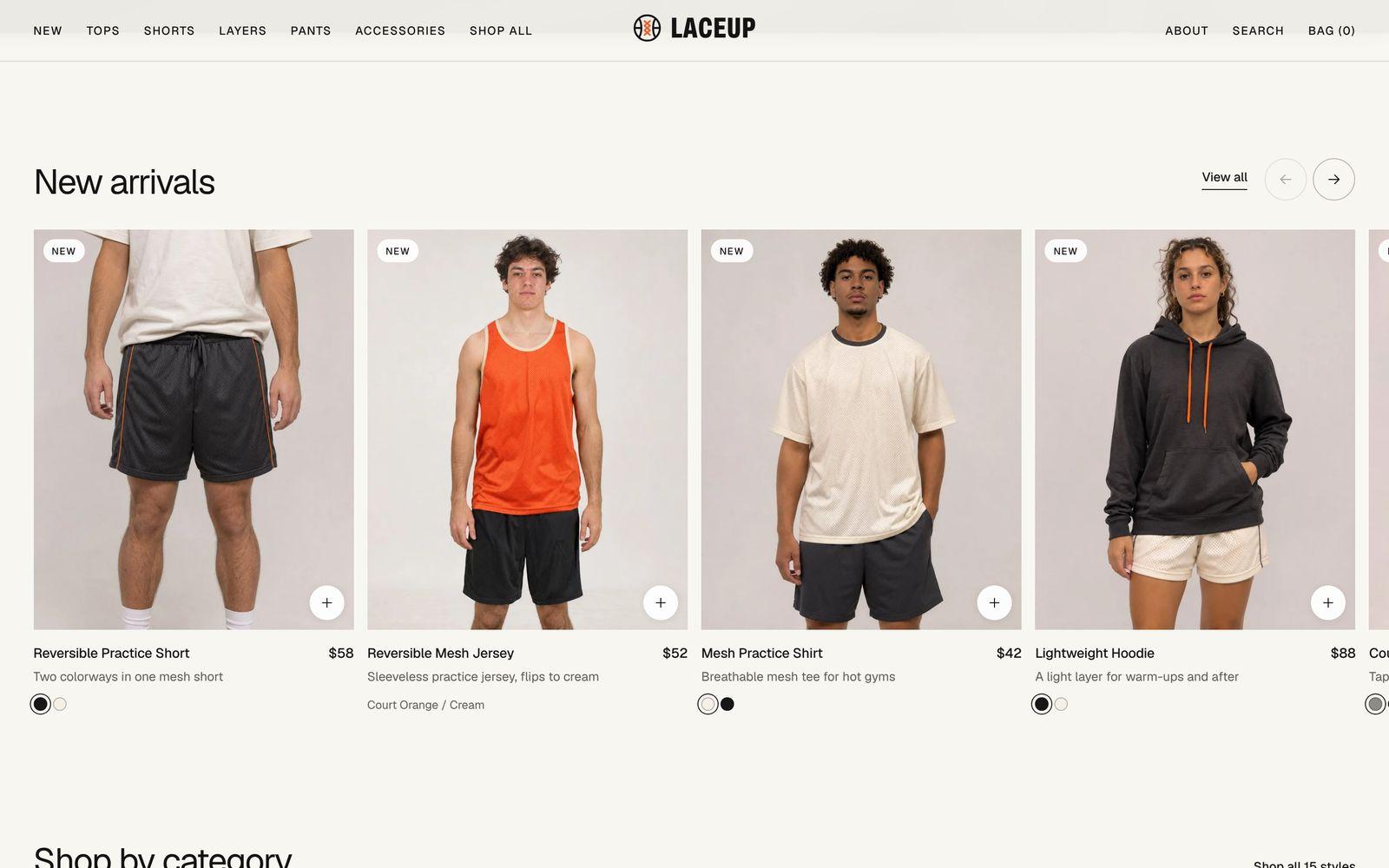
Further down, the page shops by category, then switches to an editorial "Shop the look" section. Look 01, After practice, pairs the hoodie, the reversible short and the crew socks with a line of copy about going from the last drill to the walk home. A short brand story, about the founder's frustration with practice gear that looked like a uniform, sits above the footer, where an email signup offers early access to Drop 02.
A shop with honest filters
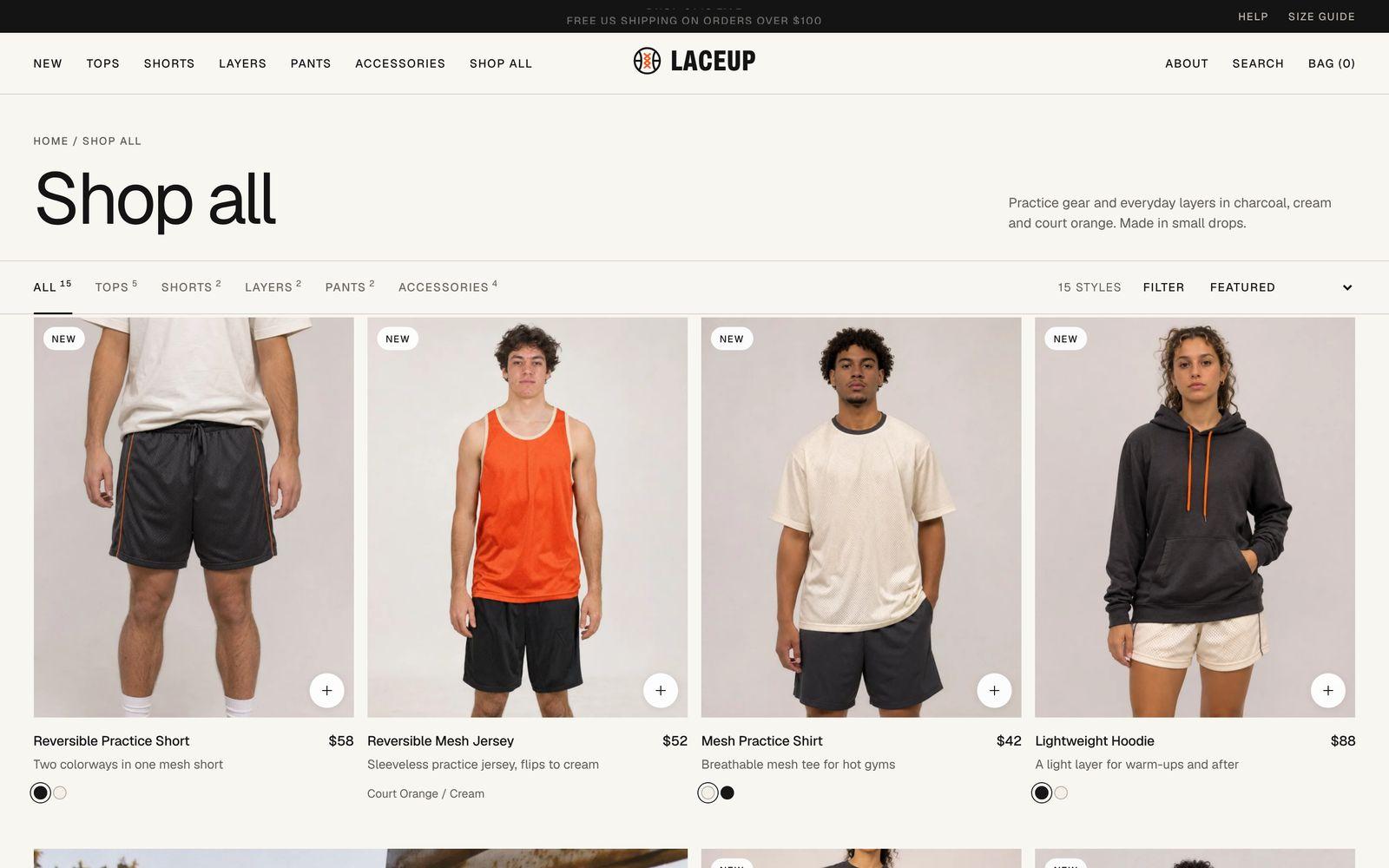
The shop lists all fifteen styles with counts by category: five tops, two shorts, two layers, two pants and four accessories. Filters only offer options that exist in the current category, show a count next to each, and disable the ones that would return nothing. Colors are grouped into families like Charcoal, Cream, Court Orange and Heather Gray, so a shopper is not choosing between six near-identical swatch names. Picking a color also switches each card to that colorway, and the category is kept in the URL so a filtered view can be shared. Sorting covers featured, newest and price in both directions.
Product pages
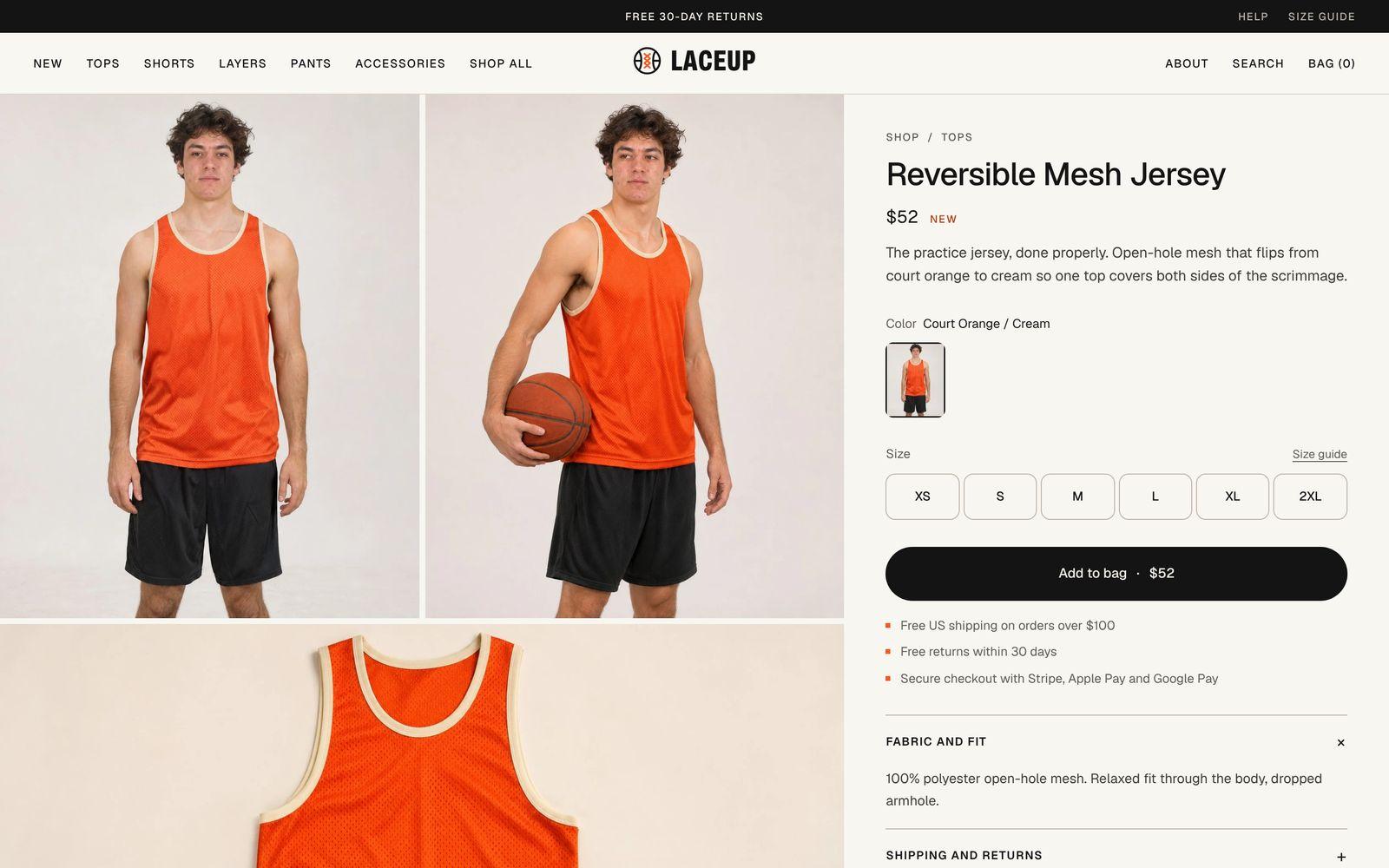
Each product page shows the current colorway, the other colorway or a second pose, and a standalone shot of the product. The product photography was generated to stay consistent from shot to shot, so the same garment looks the same in every image instead of a random mix of stock photos.
The copy is written to answer the questions a shopper has at that moment. The Reversible Mesh Jersey, for example, explains that it flips from court orange to cream so one top covers both sides of the scrimmage, and the fabric and fit section gives the material and the cut. Shipping, returns and care sit in their own sections, and a "Complete the look" row suggests pieces that go with it.
A size guide people can use
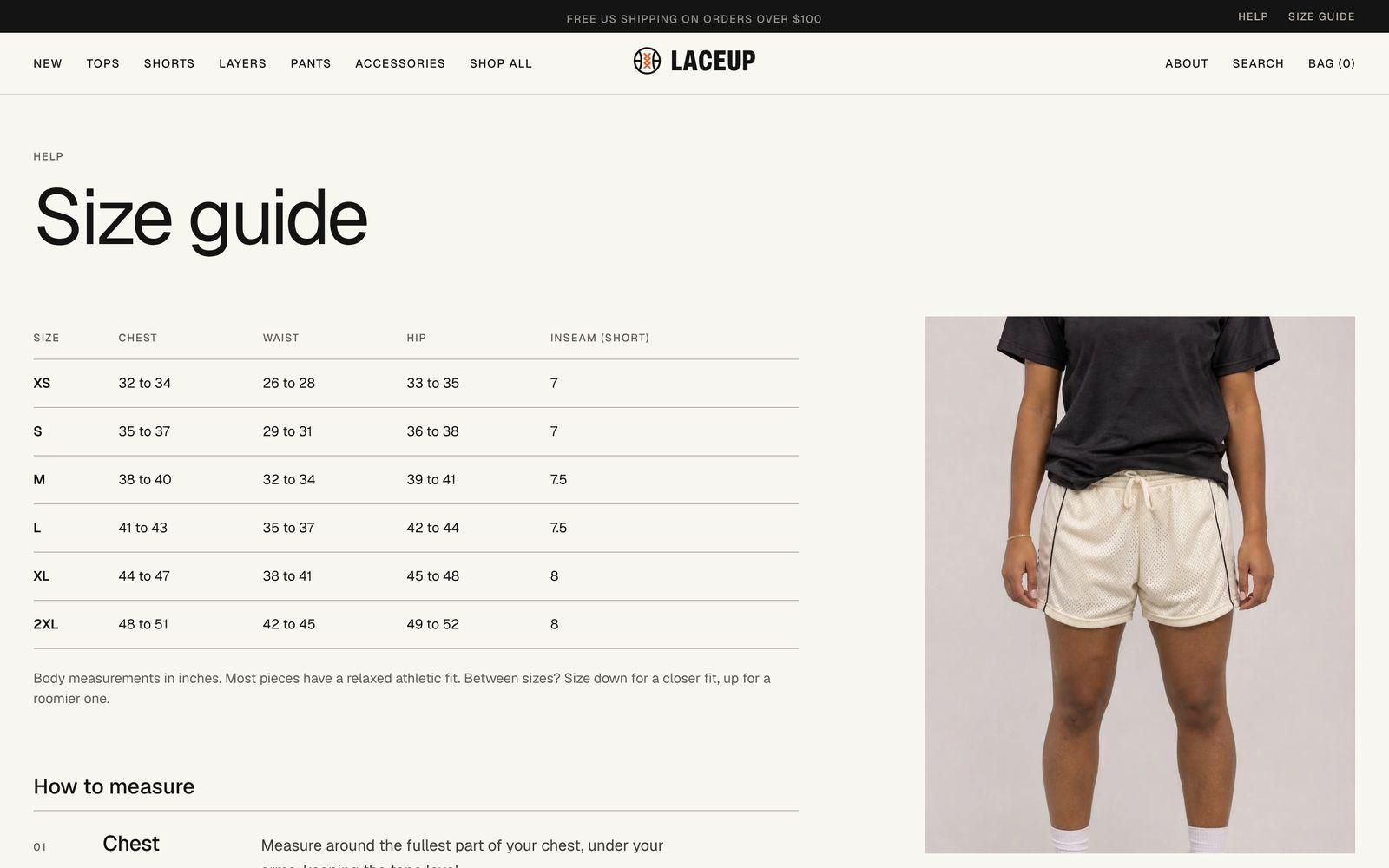
Fit is the biggest worry when buying apparel online, so the size guide is a page of its own, linked from the top bar and from every product page. It lists chest, waist, hip and short inseam in inches for XS through 2XL, explains how to take each measurement, gives a rule for shoppers between sizes, and notes the model's height and the size the model is wearing.
Mobile first, not mobile later
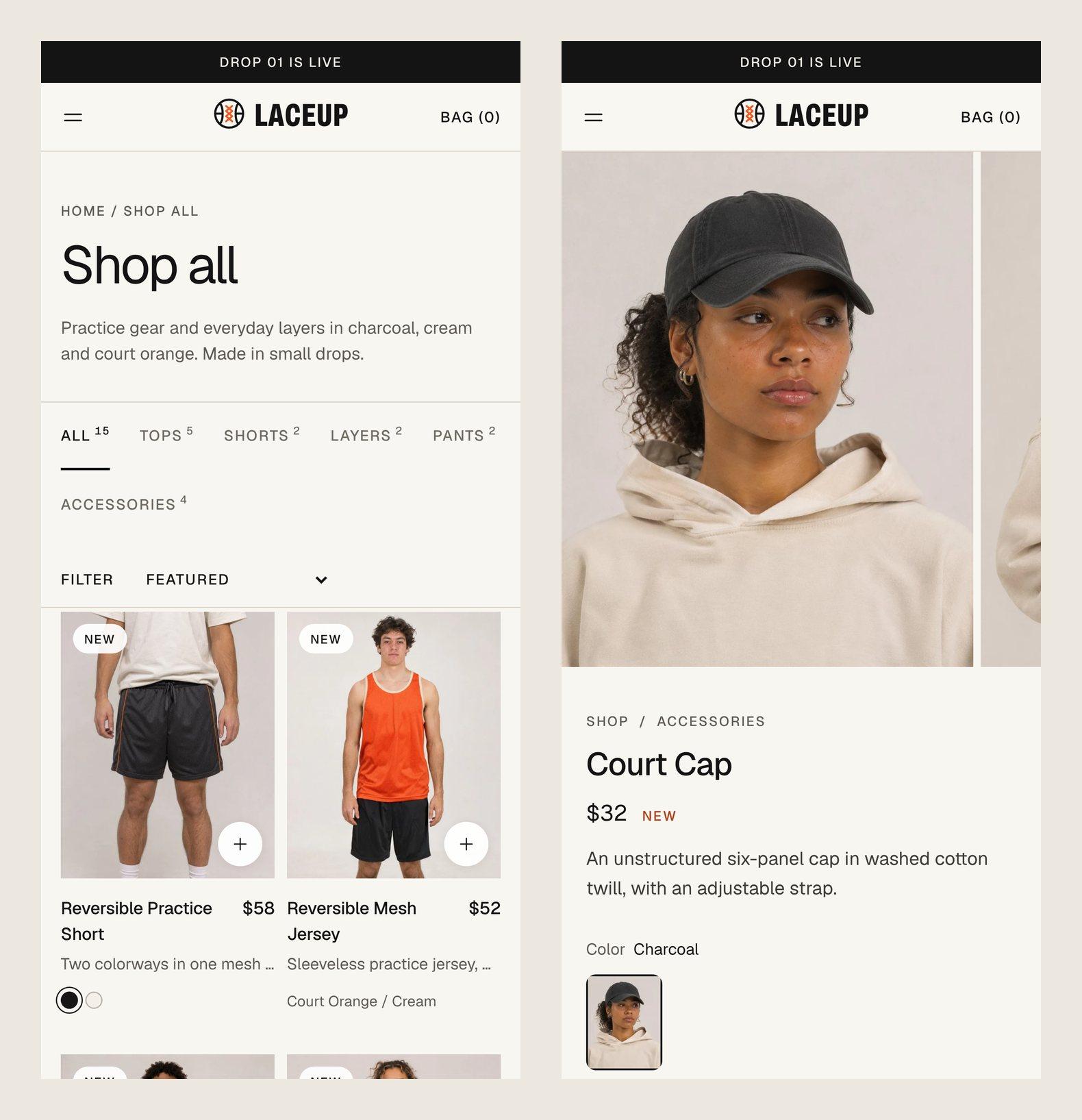
Every page was checked at phone width. The gallery swaps the wide product shot for a taller crop on mobile, so the product is never cut off.
Fast images
Photos load with blurred placeholders generated at build time and are cached for a year, so the grid never flashes empty tiles. The hover colorway image only loads once a shopper actually points at a card.
An admin dashboard on Firebase
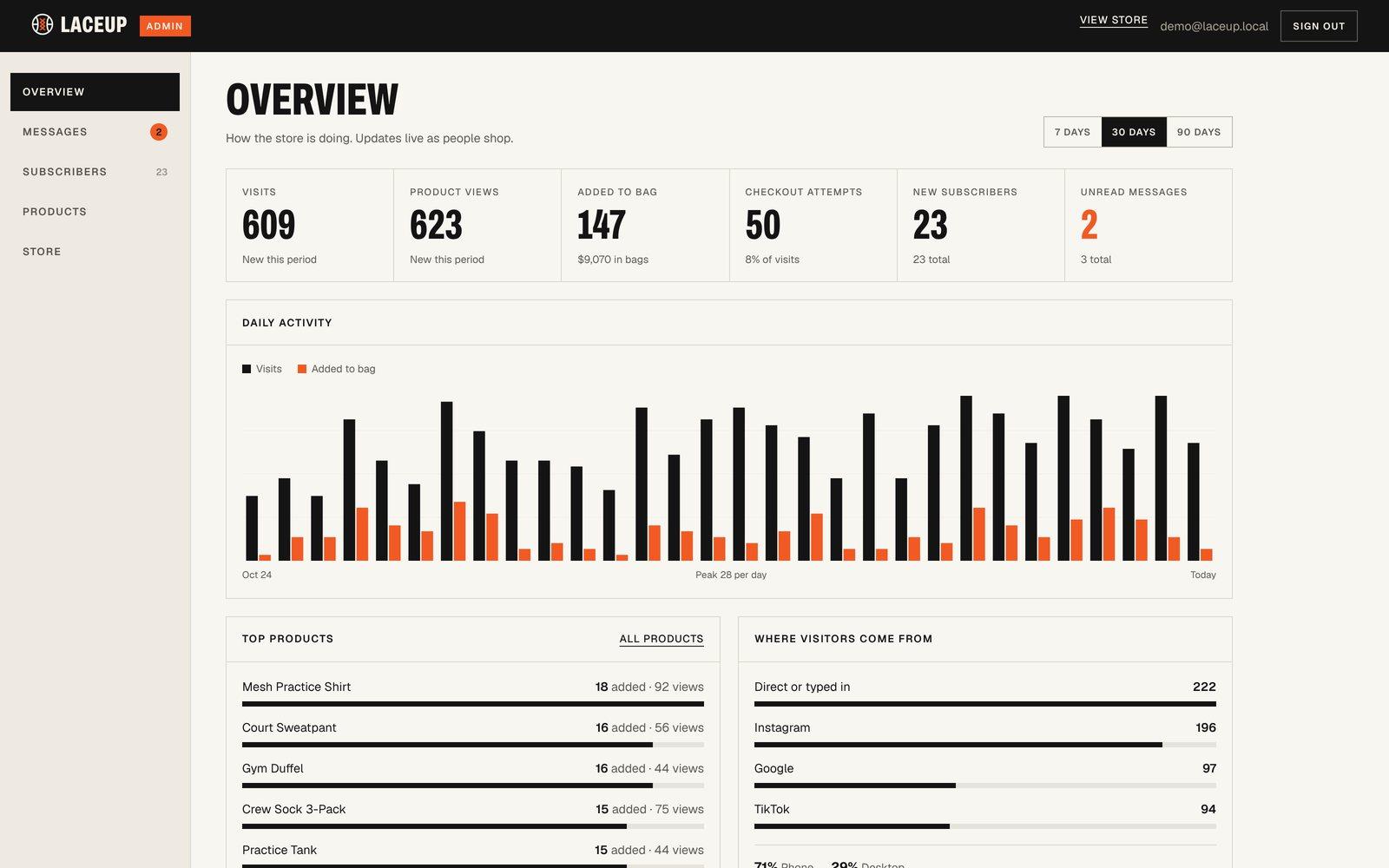
The owner signs in to a private dashboard with five sections. Overview shows visits, product views, adds to bag, checkout attempts, new subscribers and unread messages for 7, 30 or 90 days, with a daily chart, top products, traffic sources, devices and a live activity feed. Messages holds every contact form submission with search and read status, and Subscribers lists every newsletter signup with a CSV export.
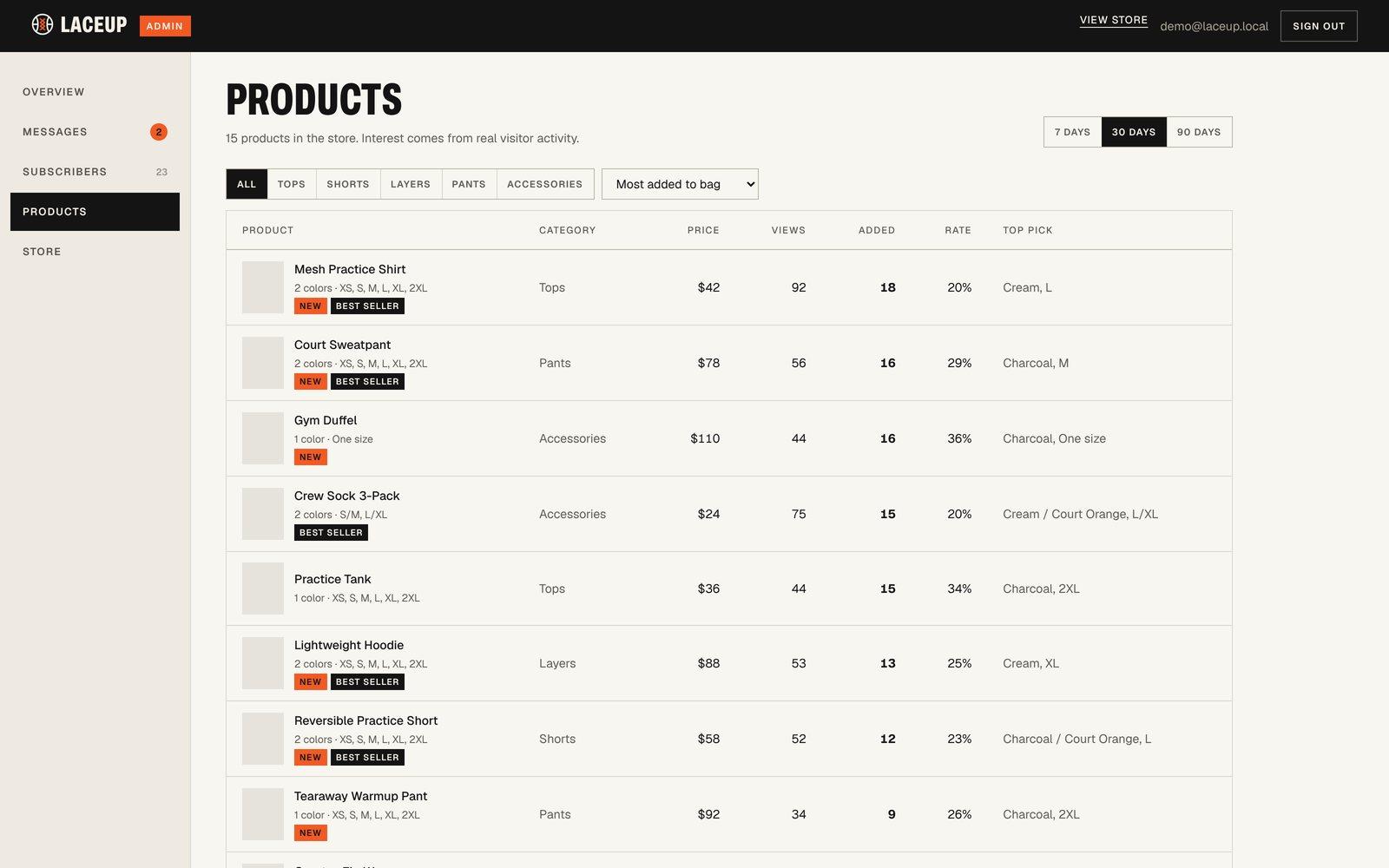
The Products view ranks every product by views and adds to bag, so the owner can see which pieces and colorways people actually want before reordering.
Technical decisions and why
- Next.js and TypeScript. Pages are pre-rendered and the catalog is typed, so a missing photo or a misspelled colorway fails the build and not the store.
- Firebase. Firestore and Firebase Auth gave the brand a database, sign-in and live updates without a server to maintain. Security rules validate every write, keep submissions private to admins, and only allow anonymous activity events with no personal data.
- First-party activity tracking. Visits, product views, adds to bag and checkout attempts are recorded straight to Firestore, which is what powers the dashboard. Vercel Analytics runs alongside it for page-level traffic.
- Filters derived from the catalog. Because the filter options are computed from the same product data as the grid, adding a new colorway or size to the catalog file adds it to the filters automatically, with the right counts. Nobody has to remember to update a separate list.
- No live payments yet. The brand asked for a showcase store first, so checkout is a demo flow. The catalog and bag are structured so Stripe can be added later without reworking the pages.
Result
LACEUP launched with a storefront, a logo and an admin dashboard, delivered inside a 14-day window. The store presents fifteen styles in four color families with filters that always return results, product pages with consistent photography, and a size guide shoppers can trust. The owner can see who is browsing, what they add to their bag and who wants to hear about the next drop, all from one login.
What I would tell a brand planning a similar store
Keep products in one structured place. Filters, product pages and reporting stay accurate when they all read from the same data.
Only show filters that return results. An empty grid after a click feels broken, even when it is technically correct.
Photograph or generate product shots consistently. Mismatched images make a new brand look unfinished faster than anything else.
Put shipping and returns where shoppers can see them before they scroll. Those two lines answer the main objection to buying from a brand you have never heard of.
Give sizing its own page with real measurements. It is the question apparel shoppers ask most.
Track adds to bag, not just visits. That is the number that tells you which products to restock.
Launch before payments if you are not ready. A polished store you can share is worth more than a half-built checkout.
Need something like this?
Custom Next.js websites for small businesses, clinics, restaurants and startups. Fast, SEO-ready, built from scratch with booking, ordering or quote tools. Based in Los Angeles.
Custom Next.js websites for businesses