November 27, 2026 · 9 min read · Thomas Osayi
Stripe usage-based billing: meters, meter events, metered prices and the edge cases
How to implement Stripe usage-based billing now: Billing Meters, meter events, metered prices, reporting usage from your app, idempotency and invoice previews.
If you learned Stripe metered billing a couple of years ago, a lot of what you learned is gone. The usage records API, where you posted a quantity to a subscription item, was removed in the 2025-03-31.basil API version. Metered prices now have to point at a Billing Meter, and your app reports usage as meter events. On top of that, Stripe's own docs now describe Metronome as its primary usage-based billing platform for new integrations.
This post is about implementing usage-based billing, not choosing it. If you are still deciding between flat, per-seat, tiered and usage pricing, read "SaaS pricing models compared: flat, per-seat, tiered, usage-based and revenue-based" first. Here I cover how meters work now, when Metronome makes more sense, how to set up the meter and price, how to report usage from your app without double-billing, what happens with late or wrong data, invoice previews and the edge cases to test. Everything was checked against docs.stripe.com on November 27, 2026.
How does Stripe usage-based billing work now?
Your app sends meter events, a meter aggregates them over the billing period, a metered price turns that total into money, and the subscription produces an invoice at the end of the period.
The pieces, in Stripe's own terms:
- A meter defines an event name, such as api_calls, and an aggregation formula. It is the thing that counts.
- A meter event is one report of usage: the event name, the customer, a numeric value, an optional timestamp and an optional unique identifier.
- A metered price is a recurring price with a usage type of metered that references the meter. It sets the rate, for example a per-unit or tiered price.
- A subscription ties the customer to the price. Usage is billed in arrears, on the invoice at the end of each period.
- Meter event summaries let you read a customer's aggregated usage for a time range.
The change from the old model matters for your code. Previously you reported a quantity against a subscription item. Now you report an event against a customer and an event name, and Stripe works out which subscription and price it belongs to. Since 2025-03-31.basil you cannot create a metered price without a meter, and the aggregate_usage and billing_thresholds parameters were removed from those endpoints. If you are maintaining an older integration, Stripe documents a migration guide and a way to keep calling the legacy API with a pinned older version, but new work should not start there.
Should I use Billing Meters or Metronome?
Use Billing Meters for straightforward pay-as-you-go or flat fee plus overage pricing, and look at Metronome if you need prepaid credits that burn down in real time, enterprise commits or live usage visibility.
Stripe's comparison page is direct about it: Metronome is the recommended starting point for all new integrations, and existing basic usage-based billing integrations do not need to migrate and remain fully supported. The differences that matter for a typical SaaS:
- Billing Meters reconciles usage at invoice time. Customers and your team cannot see live balances from Stripe mid-cycle.
- Credits on Billing Meters are reconciled at invoice time, so customers can exceed a balance during the cycle. Metronome burns credits down as usage happens.
- Metronome supports commits, minimums, ramp schedules and dimensional pricing. Billing Meters does not.
- At the time of writing, Stripe's table lists Connect, Adaptive Pricing, Workflows and the Stripe Dashboard as supported with Billing Meters but not with Metronome, and Checkout as limited with Metronome.
My honest read for an MVP: if your model is "a base fee plus a per-unit charge above an allowance", Billing Meters is well documented, works with Checkout and the Dashboard, and is enough. If you are selling prepaid AI credits that must stop at zero, or negotiating enterprise contracts with commits, talk to Stripe about Metronome before you build. The rest of this post covers Billing Meters.
How do I set up a meter and a metered price?
Create a meter with an event name, an aggregation formula and the payload keys for the customer and value, then create a recurring price with usage type metered that references it.
In the Dashboard, the Meters page has a Create meter button. Through the API, you post to /v1/billing/meters with a display name, an event_name, a default_aggregation formula, a customer_mapping and value_settings. The aggregation choices are:
- Sum: add up the values, for things like tokens, minutes or gigabytes.
- Count: count the events, for things like API calls or documents processed.
- Last: bill the most recent value in the period, for things like active seats or stored records.
By default the payload uses stripe_customer_id for the customer and value for the number, and you can override both keys. There is also an ingestion setting: raw treats every event separately, while pre-aggregated keeps only the latest event per hour or day window. Choose carefully, because after you configure a meter you cannot change anything except its display name. An event name can only belong to one meter.
For a flat fee plus overage, the subscription gets two prices: a regular recurring price for the base fee and a metered price with tiers, where the first tier up to the included allowance costs zero. Test the invoice math in a sandbox before any real customer sees it.
How should my app report usage to Stripe?
Write every billable action to your own database first, then send it to Stripe from a background job, either per event or aggregated.
I never call Stripe inline in the request that does the work. If Stripe is slow or returns an error, the customer's action should still succeed, and you should still have a record of it. A usage_events table with an ID, organization, Stripe customer ID, event name, value, occurred_at and a sent_at column is enough. A job then picks up unsent rows, sends them and marks them sent. "Cron jobs and background jobs in Next.js on Vercel" covers how to run that job.
Sending per event is simplest to reason about. Sending aggregated totals, for example one event per customer every five minutes, reduces calls. Stripe's limits at the time of writing: in live mode, the meter event endpoint allows 1,000 calls per second per account on its own limit, and one concurrent call per customer per meter. In a sandbox those calls count toward your normal rate limit. For much higher volumes, the v2 meter event streams accept up to 10,000 events per second in live mode, using short-lived session tokens that expire after 15 minutes. Most MVPs never get near that.
Handle 429 responses with retries and exponential backoff, and keep the row unsent until Stripe accepts it.
How do I avoid double-billing with idempotency?
Set the meter event identifier to a value derived from your own usage record, so a retried event is treated as a duplicate rather than new usage.
Every meter event has an identifier. If you do not send one, Stripe generates one, which means a retry after a timeout looks like a brand new event and gets billed again. The fix is to send your own: the usage_events row ID, or for aggregated reports, something like the organization ID plus the window start time. Stripe's docs recommend idempotency keys for the same reason.
This matters more than it sounds. Background jobs retry. Serverless functions time out after the request succeeded on Stripe's side. A deploy can restart a worker mid-batch. With deterministic identifiers, all of those become harmless.
What happens with late or wrong usage?
Stripe accepts events up to 35 days in the past and 5 minutes in the future, but only usage received before an invoice finalizes appears on that invoice, and cancellations are limited to 24 hours.
The details from the docs are worth knowing precisely:
- Timestamps must be within the past 35 calendar days and no more than 5 minutes in the future, the latter to allow for clock drift.
- The 35-day window decides whether Stripe accepts the event. It does not guarantee the usage lands on an invoice. Stripe may accept an event after finalization and include it in summaries without updating the finalized invoice or adding it to the next one.
- Meter events are processed asynchronously. Errors arrive as events such as v1.billing.meter.error_report_triggered and v1.billing.meter.no_meter_found, with codes like meter_event_customer_not_found and timestamp_too_far_in_past. Subscribe to them, using the thin payload style Stripe requires for these.
- To fix bad data, a meter event adjustment can cancel an event by its identifier, but only for events sent within the last 24 hours. You can also send negative values, and if total usage for a cycle goes negative the invoice shows zero.
The practical rule: get usage to Stripe quickly, alert on error events, and run your sending job well before period end.
How do I show customers their usage and upcoming invoice?
Show usage from your own database for live numbers, and use the Create Preview Invoice API when you need Stripe's calculated amount.
Because meter events are processed asynchronously, meter event summaries and upcoming invoice totals may lag behind recent events. For a usage page that updates as the customer works, read your own usage_events table. For "your next invoice will be about this much", call the Create Preview Invoice API, which replaced the old upcoming invoice methods in the same Basil release. Show it as an estimate, and say when the period ends.
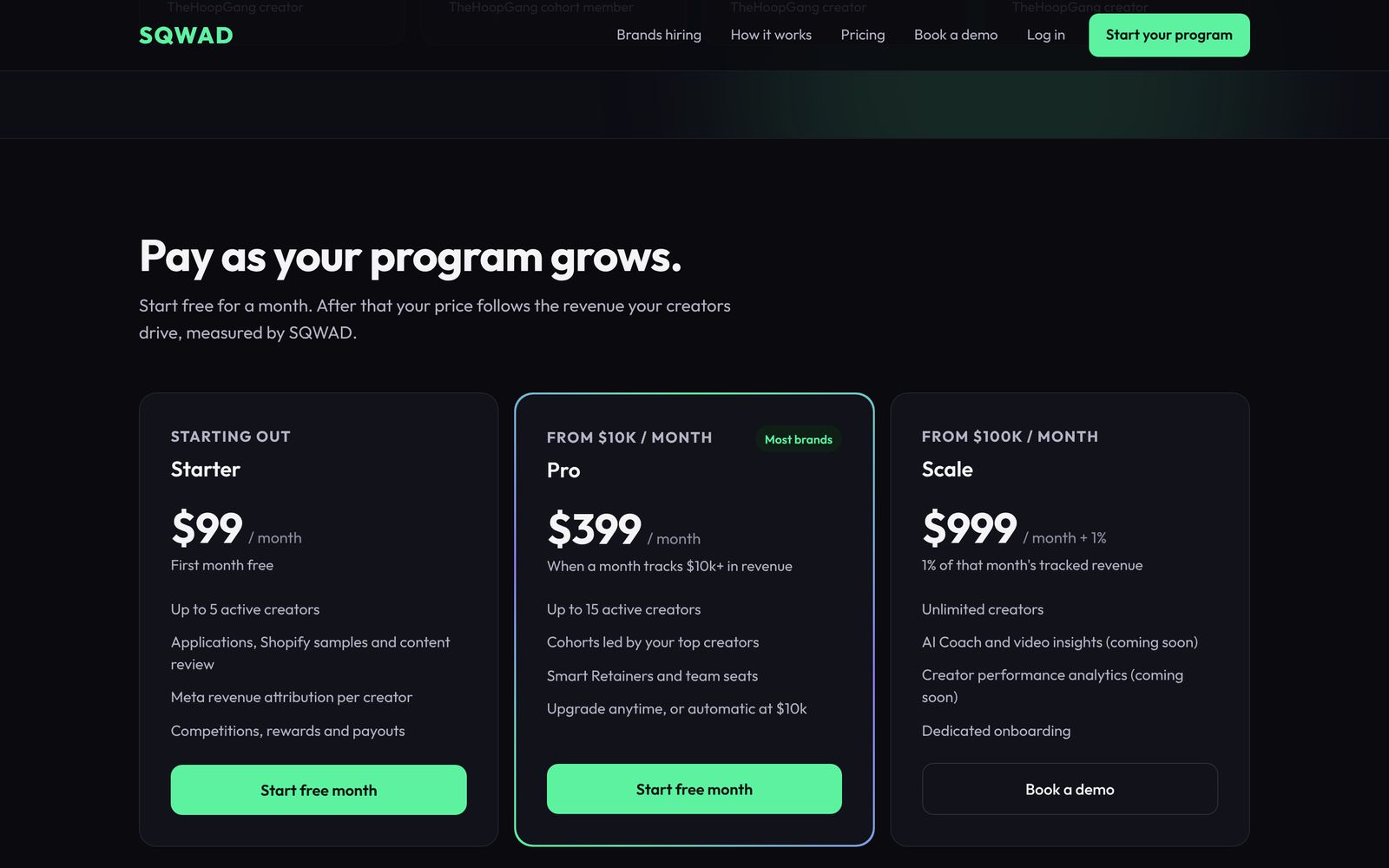
Pricing pages that charge on volume need the same clarity. SQWAD, my own SaaS, publishes Starter at $99 a month, Pro at $399 and Scale at $999 a month plus 1%, so a customer on Scale can see that part of the price follows volume.
Usage alerts help as well. Billing Meters supports usage alerts and thresholds, so you can notify a customer before a surprise bill rather than after.
What edge cases should I test before launch?
Test plan changes, cancellations, trials, missing customers and period boundaries, because those are where usage invoices go wrong.
- Upgrades and downgrades mid-cycle. Decide how base fees prorate and confirm usage stays on the right invoice.
- Cancellation. If a subscription ends at period end, usage up to then still needs to arrive before the final invoice finalizes.
- Trials. Decide whether usage during a trial is free, capped or billed, and code it explicitly.
- Customers without a Stripe customer ID yet. Hold their usage until the customer exists instead of sending events that fail with meter_event_customer_not_found.
- Time zones. Store occurred_at in UTC. Pre-aggregated windows use UTC hour and day boundaries.
- Volume spikes. Make sure aggregation keeps you under one concurrent call per customer per meter.
Use test clocks in a sandbox to move a subscription through a full period without waiting a month. As an illustration, picture a made-up document-processing API charging $49 a month including 1,000 documents, then a per-document rate above that. Its meter uses count, the subscription has a base price and a tiered metered price with a free first tier of 1,000, and a job sends events every few minutes with identifiers equal to the document IDs. Before launch, its test clock runs a month with an upgrade on day 12 and a cancellation on day 28, and the founder checks both invoices by hand. Webhooks still matter here too, so "Stripe payment went through but your app did not update? Fix the webhook" is worth a read.
The bottom line
Stripe usage-based billing today means meters, meter events and metered prices that reference a meter. The legacy usage records API is gone in 2025-03-31.basil, and Stripe recommends Metronome for new integrations that need real-time credits, commits or complex pricing, while Billing Meters stays fully supported for pay-as-you-go and overage. Record usage in your own table first, send it from a background job with deterministic identifiers, report well before invoices finalize, watch the meter error events, and use previews as estimates. Test the edge cases on a test clock before your first real customer receives a usage invoice.
Questions, answered in one line
Does Stripe still support usage records?
No, API version 2025-03-31.basil removed legacy usage records, and metered prices must now reference a Billing Meter, though older integrations can still call the legacy API with a pinned pre-Basil version.
How often should I send meter events to Stripe?
Either as usage happens or in batches, and for most MVPs a background job that sends aggregated usage every few minutes is simpler and stays well inside Stripe's live mode limit of 1,000 meter event calls per second.
How do I stop usage from being billed twice?
Give every meter event a unique identifier derived from your own usage record ID, so a retry of the same event is recognized as a duplicate instead of counted again.
Should I use Metronome or Billing Meters?
Stripe's docs recommend Metronome for new integrations and for prepaid credits, commits or real-time usage, while Billing Meters covers pay-as-you-go and flat fee plus overage and stays fully supported.
Can Thomas Osayi set up usage-based billing in my SaaS?
Yes, Stripe billing with webhooks is part of the SaaS MVP package from $1,200 over about 21 days, and usage reporting jobs can be scoped into it.
Sources
Related articles
- How to scope an MVP: one workflow, three lists and the cuts that matter
- Multi-tenant SaaS with Firestore: data layout, security rules and custom claims
- Web app vs mobile app for your MVP: which to build first
- PWA vs native app in 2026: what a web app can do on iPhone now
SaaS MVP and full-stack web app development
I build SaaS MVPs and full-stack web apps in Next.js, TypeScript and Firebase or Postgres: auth, dashboards, payments, roles and admin tools. Founder of SQWAD.
See the service