November 22, 2026 · 8 min read · Thomas Osayi
Shopify app vs standalone SaaS: which should you build for merchants?
A public Shopify app, a custom app or a standalone SaaS that connects to Shopify: costs, App Store revenue share, billing, review and who each one suits.
If your product serves Shopify merchants, you will hit this fork early: build it as a Shopify app, or build your own SaaS that connects to Shopify. The code underneath is surprisingly similar. Both install on a store through OAuth, both read orders and products, both listen to webhooks. What differs is where the product lives, who pays whom, and how customers find you.
I went the standalone route with SQWAD, my creator program software for Shopify brands, so I have lived with the trade-offs of that choice. Here is how I would choose today.
What is the difference between a Shopify app and a standalone SaaS?
A Shopify app runs inside the merchant's Shopify admin and is installed and often billed through Shopify, while a standalone SaaS runs on its own domain and uses Shopify as one data source among others.
Technically, every product that touches a store's data is an app in Shopify's eyes, because access goes through an app installation with scopes like read_orders or read_products. The difference is distribution and experience.
An embedded app opens inside the admin, looks like part of Shopify through Polaris components and App Bridge, and is found through the App Store. A standalone SaaS has its own login, its own dashboard and its own pricing page. The merchant installs it on the store once to grant access, then works on your site.
There is a third option people forget: a custom app built for one merchant. It never appears on the App Store and exists to solve one store's problem.
What are your three options?
Each option fits a different kind of product and buyer, and the costs below are build ranges based on my packages, not including your own marketing.
Public Shopify app on the App Store
Best for: tools that only make sense inside the admin, such as order tagging, product bulk editing, shipping rules or storefront widgets.
Cost range: a first version usually lands in SaaS MVP territory, from $1,200, and more once you add App Store polish, billing plans and the review cycle.
Pros: discovery through App Store search, admin recommendations and Sidekick; merchants trust it and pay on their Shopify invoice; one-click install.
Cons: you build to Shopify's requirements and review timeline, share revenue above the threshold, and compete in crowded categories where reviews and ratings decide who gets installed.
Custom app for a single store
Best for: one brand with a workflow no public app covers, like a custom fulfillment rule, an internal report or a sync with a warehouse system.
Cost range: often the smallest build, from a $250 first version for one workflow up to a full internal tool.
Pros: no listing, no public billing, no review for the App Store; scopes and features fit exactly one business.
Cons: it serves one store only, so it is not a product you can sell, and someone has to maintain it as Shopify's API versions move.
Standalone SaaS with a Shopify integration
Best for: products whose users are not all merchants, or that combine Shopify with other platforms like ad networks, email or payments.
Cost range: from $1,200 for an MVP with auth, dashboard, database and payments, and from $3,000 for a multi-role platform with several integrations.
Pros: you own billing, pricing model and customer relationship; you can serve other platforms later; no revenue share to Shopify.
Cons: no App Store traffic, so every customer comes from your own marketing, and merchants must trust a separate login and card.
How much does Shopify take from App Store revenue?
At the time of writing, most developers pay 0% on their first $1,000,000 of lifetime gross App Store revenue and 15% on revenue above that, plus a 2.9% processing fee on app billing.
The details, from Shopify's revenue share documentation:
- The $1,000,000 threshold is lifetime, not annual, and only revenue earned on or after January 1, 2025 counts toward it.
- The reduced rate applies if you earned under $20,000,000 through the App Store in the prior calendar year and your company's gross revenue is under $100,000,000. Above those limits, 15% applies to all app revenue.
- Revenue share is calculated on gross sales, and refunds are not deducted.
- There is a one-time $19 registration fee per Partner account to access the revenue share plan.
- The 2.9% processing fee plus applicable sales tax applies to all app billing, separately from revenue share.
For an early product, that is a generous deal. A $50 a month app with 200 merchants grosses $120,000 a year, which pays no revenue share, only the processing fee. The economics only start to bite at scale.
What does App Store review expect?
Listed apps must be submitted to Shopify's App Approval team and meet its requirements, which go well beyond a working feature.
The work that surprises first-time app builders:
- Protected customer data requirements. If your app reads customer names, emails or addresses, you must request access and meet data protection rules.
- Mandatory privacy webhooks. Apps handle customer data requests and redaction requests, plus shop redaction after uninstall.
- An embedded experience that feels native, with sensible loading states, errors and an onboarding that works for a merchant with zero data.
- Billing through Shopify. Shopify hosts plan selection with Shopify App Pricing and bills the merchant, which is the default path for listed apps.
- Support commitments, such as a support contact and response expectations.
Built for Shopify status is optional. It is Shopify's highest quality recognition and brings promotion, but you do not need it to list. Budget a few rounds of review feedback into the timeline either way.
How does billing work in each model?
App Store apps usually bill through Shopify, so the charge appears on the merchant's Shopify invoice, while a standalone SaaS bills directly, usually through Stripe.
Shopify billing removes friction. The merchant approves a plan inside the admin, no card form, and trials, upgrades and downgrades are handled for you. The trade-off is that Shopify sits between you and the customer's payment, and you work within its plan structures.
Direct billing gives you any model you like: seats, usage, a percentage of revenue, annual contracts or invoices. It also means building checkout, the customer portal and webhook handling yourself. I covered that side in "Setting up Stripe subscriptions for a SaaS MVP: what you actually need".
When does a standalone SaaS make more sense?
A standalone SaaS makes more sense when people other than the merchant need to log in, or when Shopify is only one of the systems your product depends on.
SQWAD is a good example of the shape. Brands sell on Shopify and advertise on Meta, and creators, who have no Shopify access at all, need their own portal to apply, submit content and get paid. An admin-only embedded app could not serve creators, and the core feature, tying each Meta ad back to the creator behind it, depends on data Shopify does not hold. So SQWAD is built as its own web app that connects to the brand's store and bills through Stripe.
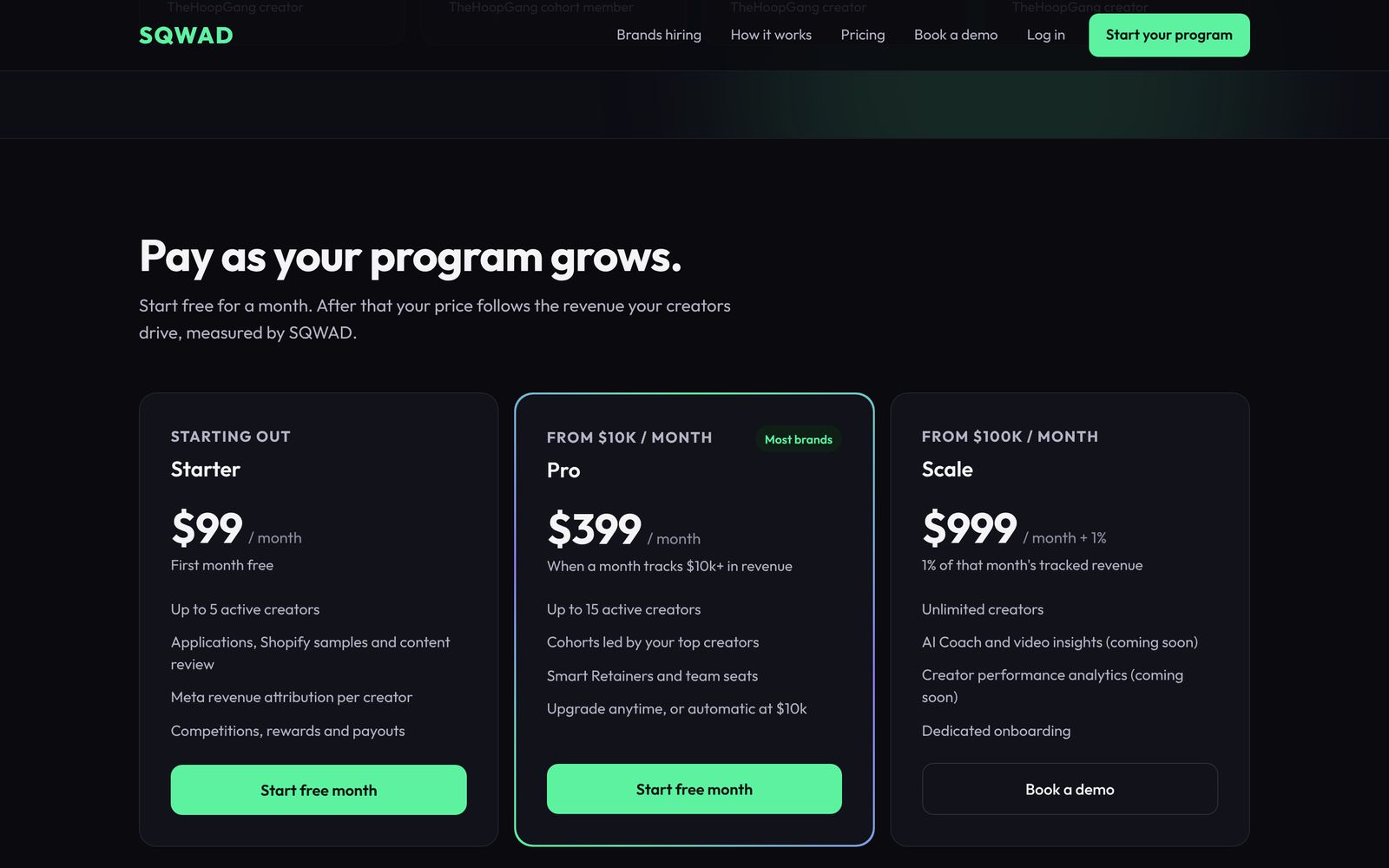
The pricing shows the other reason. A plan with a percentage of revenue creators drive is easy on your own billing and awkward to fit into a standard app plan. When your pricing model is part of your positioning, owning billing matters.
Can you start standalone and add an App Store listing later?
Yes, if you design Shopify as one integration from day one rather than spreading Shopify-specific code through the whole product.
The structure I use:
- Your own accounts and tenants, with each Shopify store attached to a tenant through an installation record holding the shop domain, access token, scopes and API version.
- A Shopify module that handles OAuth, webhooks such as orders/create and app/uninstalled, and Admin API queries, exposing plain functions like getOrders to the rest of the app.
- Core logic that never talks to Shopify directly, so adding a second platform or an embedded admin view does not touch it.
With that in place, an embedded app later is mostly a new front end that loads inside the admin and calls the same back end, plus the review work above. Going the other direction, from an embedded app to a standalone product, is usually harder, because embedded apps tend to assume the merchant is the only user.
A worked example
Here is an illustration with a made-up product, not a real client. A founder wants to build a tool that flags risky wholesale orders for Shopify stores.
Every user is a merchant or their staff, all the data is in Shopify, and the action happens on the order page. That is a public app. The founder builds an embedded MVP, prices it at $29 a month through Shopify billing, and gets discovery from App Store search for terms merchants already type.
Now change one fact: the tool also checks orders against the brand's warehouse system and sends daily reports to an outside accountant who has no Shopify login. Suddenly a standalone dashboard with its own users fits better, with Shopify as the order source. Same core logic, different home.
Which should you choose?
Choose by your users and your growth plan, not by which is easier to code, because the code is similar and the business models are not.
- Solo founder with an admin-only idea: a public app. The App Store is free distribution, and the revenue share will not matter for a long time.
- Brand that needs one internal tool: a custom app. Do not pay for listing work you will never use.
- Founder whose users include non-merchants or several platforms: a standalone SaaS, built so an App Store listing can come later.
- Agency or freelancer building for a client store: usually a custom app, or a standalone dashboard if the client's team works outside Shopify.
If you are weighing a fully custom store rather than an app, that is a different decision, covered in "Shopify vs a custom Next.js store: when does custom make sense?"
The bottom line
A Shopify app and a standalone SaaS share most of their plumbing, so decide on the business, not the code. Live inside the admin and want discovery: build a public app and enjoy 0% revenue share on your first $1,000,000. Serve one store: build a custom app. Serve people beyond the merchant or tie Shopify to other systems: build your own SaaS, keep Shopify as one clean integration, and leave the App Store door open for later.
Questions, answered in one line
Is it cheaper to build a Shopify app or a standalone SaaS?
A custom app for one store is usually cheapest, while a public App Store app and a standalone SaaS cost similar amounts to build but differ in review, billing and marketing work.
How much does Shopify take from app revenue?
At the time of writing, eligible developers keep 100% of the first $1,000,000 in lifetime gross App Store revenue and 85% above that, with a 2.9% processing fee on app billing and a one-time $19 registration fee.
Can a standalone SaaS still connect to Shopify?
Yes, it installs on the store through Shopify OAuth like any app, reads orders and products through the Admin API, and simply is not listed on the App Store.
Do Shopify apps have to go through review?
Apps listed on the Shopify App Store must pass review by the App Approval team and meet its requirements, while custom apps for a single merchant do not get listed or reviewed for the store.
Who can build a Shopify-connected SaaS MVP?
Thomas Osayi builds SaaS MVPs with auth, dashboard, database and payments from $1,200, and multi-role platforms with integrations such as Shopify from $3,000.
Sources
- Revenue share for Shopify App Store developers Shopify
- About the Shopify App Store Shopify
- Shopify Partner earnings Shopify Help Center
Related articles
- How to scope an MVP: one workflow, three lists and the cuts that matter
- Multi-tenant SaaS with Firestore: data layout, security rules and custom claims
- Web app vs mobile app for your MVP: which to build first
- PWA vs native app in 2026: what a web app can do on iPhone now
SaaS MVP and full-stack web app development
I build SaaS MVPs and full-stack web apps in Next.js, TypeScript and Firebase or Postgres: auth, dashboards, payments, roles and admin tools. Founder of SQWAD.
See the service