November 22, 2026 · 8 min read · Thomas Osayi
SaaS pricing models compared: flat, per-seat, tiered, usage-based and revenue-based
Flat, per-seat, tiered, usage-based and revenue-based SaaS pricing compared: who each fits, how hard each is to build in Stripe, and SQWAD's real public pricing.
Pricing feels like a marketing decision, but in a SaaS product it is also a data model decision. The unit you charge on has to be counted, stored, shown to the customer and sent to the billing system every month. Change the model later and you may be rewriting billing code, migrating customers and explaining a new invoice to people who liked the old one.
I set pricing for SQWAD, my own SaaS for Shopify brands that run creator programs, and I build billing into client MVPs. This comparison covers the five models founders actually choose between, what each costs to build, and how I would pick.
What are the main SaaS pricing models?
There are five common models: flat rate, per-seat, tiered, usage-based and revenue-based, and most real products blend two of them.
Stripe's own documentation groups recurring pricing into flat rate, per-seat, tiered and usage-based. Revenue-based pricing is a variant of usage pricing where the unit is money the customer earns through your product. Each model answers one question differently: what does the customer pay more for?
- Flat rate: one price for the product.
- Per-seat: a price for each user.
- Tiered: packaged plans with different limits or features.
- Usage-based: a price per unit consumed, such as API calls, messages or storage.
- Revenue-based: a price tied to revenue your product tracks or creates for the customer.
The rule that holds across all of them: charge on the unit that grows as the customer gets more value. If customers get more value as their team grows, seats work. If value grows with volume, usage works. If your product directly drives sales and you can measure them, revenue can work. When the unit and the value drift apart, customers feel overcharged or you leave money on the table.
How do the five pricing models compare?
Flat and tiered plans are simplest, per-seat suits team tools, and usage or revenue pricing suits products where value scales with volume.
Flat rate
Best for: single-purpose tools with similar customers, such as a booking page for one small business.
Build cost: the cheapest option, usually covered inside a SaaS MVP from $1,200 with one Stripe price and a subscription status check.
Pros: easy to explain, predictable revenue, one price to maintain.
Cons: small customers may find it expensive and large customers pay far less than the value they get.
Per-seat
Best for: collaboration tools where each extra user gets real value.
Build cost: a bit more than flat, because seat counts must stay in sync with team membership.
Pros: revenue grows with the customer's team and the price is easy to understand.
Cons: customers share logins to save money, and usage per seat varies wildly.
Tiered
Best for: most early products, especially when customers differ in size.
Build cost: similar to flat rate, plus feature and limit checks for each tier.
Pros: lets small customers start cheap and large customers pay more, and it gives an obvious upgrade path.
Cons: limits feel arbitrary if they do not match how customers grow, and too many tiers confuse buyers. Stripe also separates volume tiers, where one unit price applies to all units, from graduated tiers, where each band is priced separately.
Usage-based
Best for: infrastructure, messaging and AI products where cost and value both scale with volume.
Build cost: higher, because every billable event must be recorded reliably and reported to the billing system.
Pros: customers pay for what they use and small customers can start almost free.
Cons: invoices are hard to predict, which makes some buyers nervous, and metering bugs become billing bugs.
Revenue-based
Best for: products that directly create or track sales, such as attribution, commerce and marketplace tools.
Build cost: the highest, because you need trustworthy revenue tracking before you can bill on it.
Pros: price follows the value customers can see, and customers only pay more when they earn more.
Cons: customers question the numbers, revenue swings month to month, and you depend on data from other systems.
How does SQWAD price, and why?
SQWAD uses a hybrid of tiered and revenue-based pricing: brands pay the higher of the plan they pick or the tier matching the revenue their creators drive.
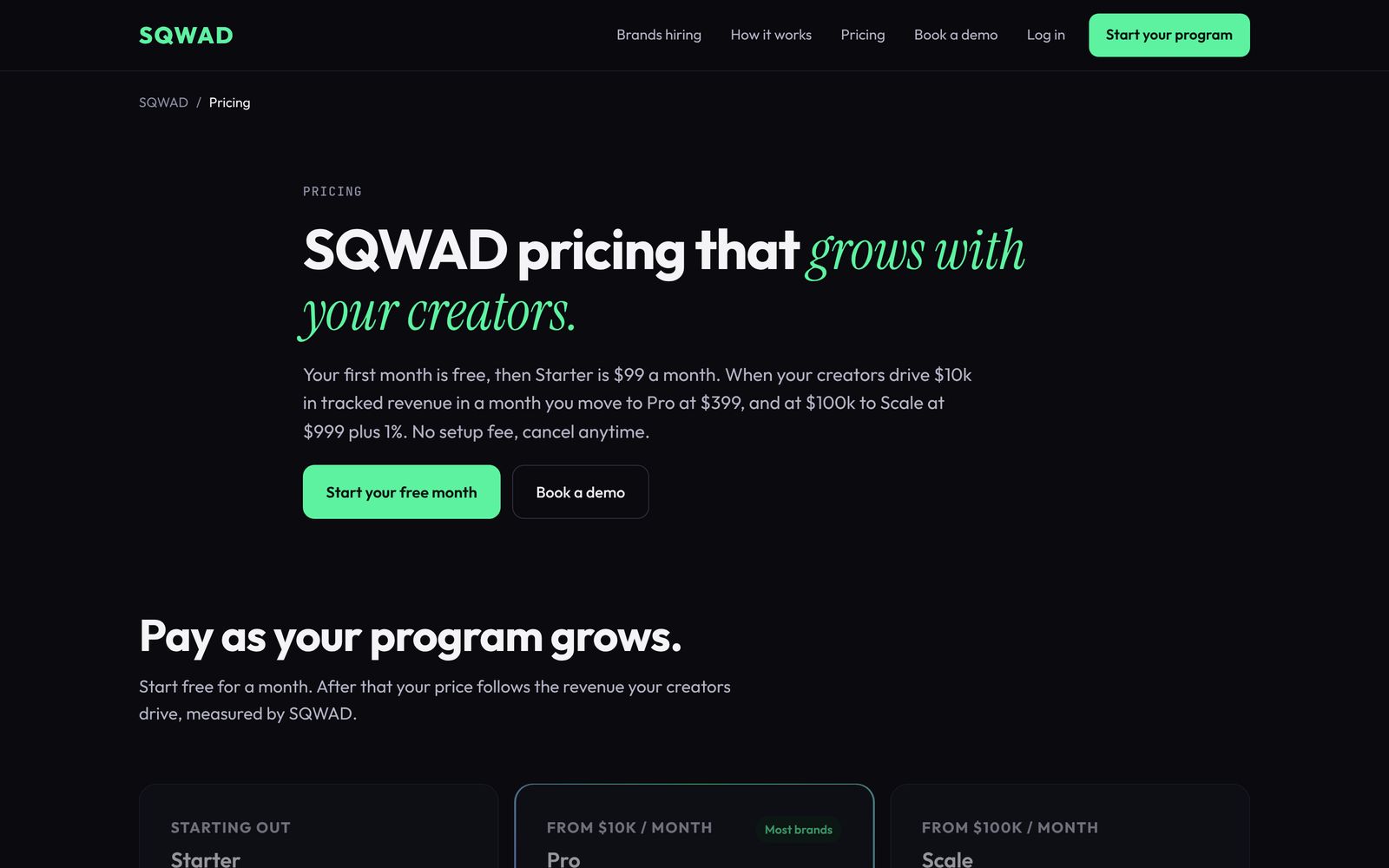
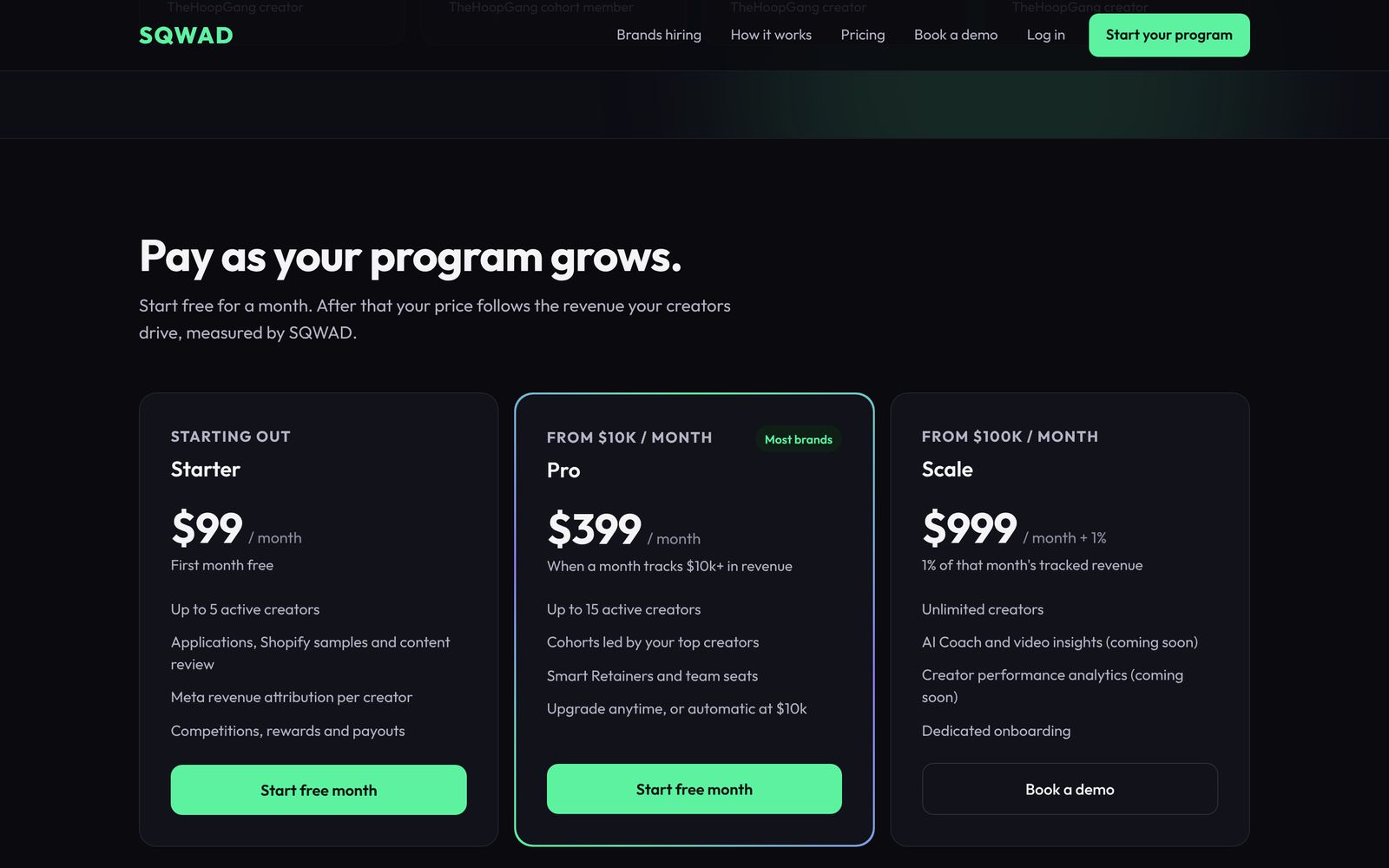
At the time of writing, SQWAD's public pricing is Starter at $99 a month for up to five active creators, Pro at $399 a month, which applies once a month tracks $10K or more in creator revenue and allows up to 15 active creators, and Scale at $999 a month plus 1% of that month's tracked revenue, which applies from $100K a month with unlimited creators. The first month is free, there is no setup fee and brands can cancel anytime.
I chose this because SQWAD's core job is showing which creator drove which sale. The product already measures the value it creates, so tying price to that number is honest: a brand whose creators drive little pays the entry price, and a brand whose creators drive six figures a month pays more. The tiers keep it predictable, and the percentage only applies at the top, where 1% is small next to the revenue being tracked.
The trade-off is that billing depends on attribution being right. If tracked revenue were wrong, the invoice would be wrong too, so the revenue numbers had to be solid before they drove billing.
How do you pick the right value metric?
Pick the unit customers already count, that grows with their success, and that your product can measure without arguments.
Good value metrics pass three tests:
- The customer understands it without explanation: users, bookings, orders, messages.
- It rises when the customer gets more out of the product, not just when they use it more inefficiently.
- You can count it from your own data, so invoices never depend on a number you cannot show.
For a scheduling tool, bookings per month passes all three. For a document tool, seats usually do. For an AI writing tool, generated words or credits track your cost, but customers may not feel more value per word, so a tiered plan with a credit allowance often works better than pure pay-per-use.
How hard is each model to build in Stripe?
Flat and tiered plans are a few days of work, per-seat adds quantity syncing, and usage or revenue pricing needs a metering pipeline you can trust.
In Stripe you model what you sell as products and how you charge as prices. Flat and tiered plans are one price per plan, plus a webhook that updates the customer's plan in your database when a subscription is created, changed or cancelled. Per-seat uses the subscription quantity, which your app must update whenever someone joins or leaves a team.
Usage pricing means sending usage to Stripe as it happens or in batches. At the time of writing Stripe's docs describe Metronome, now part of Stripe, as the recommended starting point for new usage-based integrations, with basic usage-based billing on the Meters API still supported for existing ones. Either way, you need idempotent event recording so a retried job does not bill a customer twice.
I wrote about the subscription basics in "Setting up Stripe subscriptions for a SaaS MVP: what you actually need". Whatever model you pick, store plan definitions in configuration, not scattered through components, so changing a limit is one edit.
Should you offer a free trial or a free plan?
Offer a trial when the product proves itself within a few weeks, and a free plan only when free users cost you little and spread the product.
SQWAD gives the first month free because a creator program needs a few weeks to produce attributed sales. A seven-day trial would end before a brand saw any value. Match the trial length to how long it takes a new customer to hit their first real result.
Free plans are different. They make sense when free users bring in paying users, for example through shared links or invites, and when hosting them is cheap. For B2B tools with a handful of serious buyers, a free plan mostly creates support work.
A worked example: pricing a booking SaaS for salons
This is an illustration, not a client. A founder builds booking software for salons. Some customers are a single stylist, others have six chairs.
Flat pricing at $49 would scare the solo stylists and undercharge the big salons. Per-seat pricing would push salons to share one login at the front desk. Pure usage pricing per booking would make invoices swing with the season.
The answer is tiered: Solo for one calendar, Studio for up to four, Salon for unlimited, with a booking limit on the lowest tier as a natural nudge to upgrade. It builds as three Stripe prices and a limit check, inside an MVP from $1,200. Once the founder knows how bookings grow, an add-on per extra location can come later without changing the base model.
What pricing mistakes do early SaaS founders make?
The biggest mistake is choosing a complicated model before knowing how customers actually use the product.
Others I see often:
- Pricing below cost because hosting and support were not included. "How much does an MVP cost? SaaS MVP prices and what drives them" covers the build side, but run the monthly numbers too.
- Too many tiers. Three is usually enough to start.
- Hard-coding plan names and limits across the codebase, which makes every pricing change a refactor.
- Billing on a metric the customer cannot see in the product.
- Changing prices on existing customers without notice.
The bottom line
Start with flat or tiered pricing unless your value clearly scales with volume or revenue. Choose a unit the customer understands, that grows with their success and that you can count yourself. Usage and revenue pricing can be the most honest models, as SQWAD's revenue-linked tiers show, but they only work once your measurement is trustworthy. If you want billing built into your MVP in a way that lets you change pricing later, my SaaS MVP service page explains how I scope it.
Questions, answered in one line
What is the most common SaaS pricing model?
Tiered plans, such as a starter, pro and business tier with different limits or features, are the most common because they are easy to explain and easy to build.
What is the difference between tiered and usage-based pricing?
Tiered pricing charges a set price for a package of limits, while usage-based pricing charges for the actual quantity used in each billing period.
What is revenue-based SaaS pricing?
It ties the price to revenue the product helps the customer earn, for example a percentage of tracked sales or plans that step up as tracked revenue grows.
Should an MVP launch with usage-based pricing?
Usually not, because metering adds engineering work and makes invoices harder to predict, so most MVPs launch with flat or tiered plans and add usage pricing once they understand customer behaviour.
Can I change my SaaS pricing after launch?
Yes, and most products do, but keep existing customers on their old price for a set period and announce changes well before they take effect.
Sources
- Recurring pricing models Stripe Docs
- Basic usage-based billing Stripe Docs
- SQWAD pricing SQWAD
Related articles
- How to scope an MVP: one workflow, three lists and the cuts that matter
- Multi-tenant SaaS with Firestore: data layout, security rules and custom claims
- Web app vs mobile app for your MVP: which to build first
- PWA vs native app in 2026: what a web app can do on iPhone now
SaaS MVP and full-stack web app development
I build SaaS MVPs and full-stack web apps in Next.js, TypeScript and Firebase or Postgres: auth, dashboards, payments, roles and admin tools. Founder of SQWAD.
See the service