November 25, 2026 · 10 min read · Thomas Osayi
Free trial vs freemium for a SaaS: trial length, card up front and how to build it
Free trial vs freemium for a SaaS: when each fits, how long a trial should run, card required or not, and how to set up a trial in Stripe without surprising anyone.
Every SaaS founder hits the same question right before launch: do I let people in for free, and if so, for how long? The two common answers are a free trial and a freemium plan. They sound similar, they are often lumped together, and they lead to very different products, support loads and hosting bills.
I set up billing in SaaS MVPs, so I see this decision at the point where it turns into code. This post compares the two, covers trial length and the card question without pretending there is a universal conversion number, and then shows how a trial actually works in Stripe. If you have not settled your pricing structure yet, "SaaS pricing models compared: flat, per-seat, tiered, usage-based and revenue-based" is the earlier step. This one assumes you know what you will charge and are deciding how people get to the point of paying.
What is the difference between a free trial and freemium?
A free trial gives a new user the paid product for a limited time, and freemium gives them a limited product for an unlimited time.
That one difference changes what your app has to do. With a trial, the clock is the limit. Every account starts with the full feature set, and on a set date it either converts to paid or loses access. With freemium, the product itself is the limit. A free account might get three projects, one seat, 100 records a month or no exports, and it stays free until the user hits a wall and upgrades.
The decision also changes who you are serving. A trial user is evaluating. They signed up to answer one question, does this solve my problem, and your job is to get them to that answer before the trial ends. A freemium user may never intend to pay. Some will upgrade when they grow, some will tell their colleagues, and many will simply use the free plan for years.
Hybrids exist, like a free plan plus a trial of the top tier. They can work, but they double the rules your code has to enforce, so for a first version I recommend picking one model.
When is a free trial the better choice?
A free trial is the better choice when your product shows its value within days and every user costs you real money to serve.
Most B2B tools I see from early founders fit that description. A scheduling tool for clinics, a quote builder for a print shop, a creator management dashboard for a brand: in each case a buyer can tell within a week whether it saves them time, and the customer count you need is in the dozens or hundreds, not the millions. A trial gives those buyers a deadline, which is useful. People decide when there is a date on the calendar.
A trial also keeps your costs bounded. Every account that is not paying is gone after the trial window, so you never end up hosting, emailing and supporting thousands of free accounts that will never convert.
SQWAD, the creator program software I am building for Shopify brands, uses this shape: paid tiers with the first month free, rather than a permanent free plan.
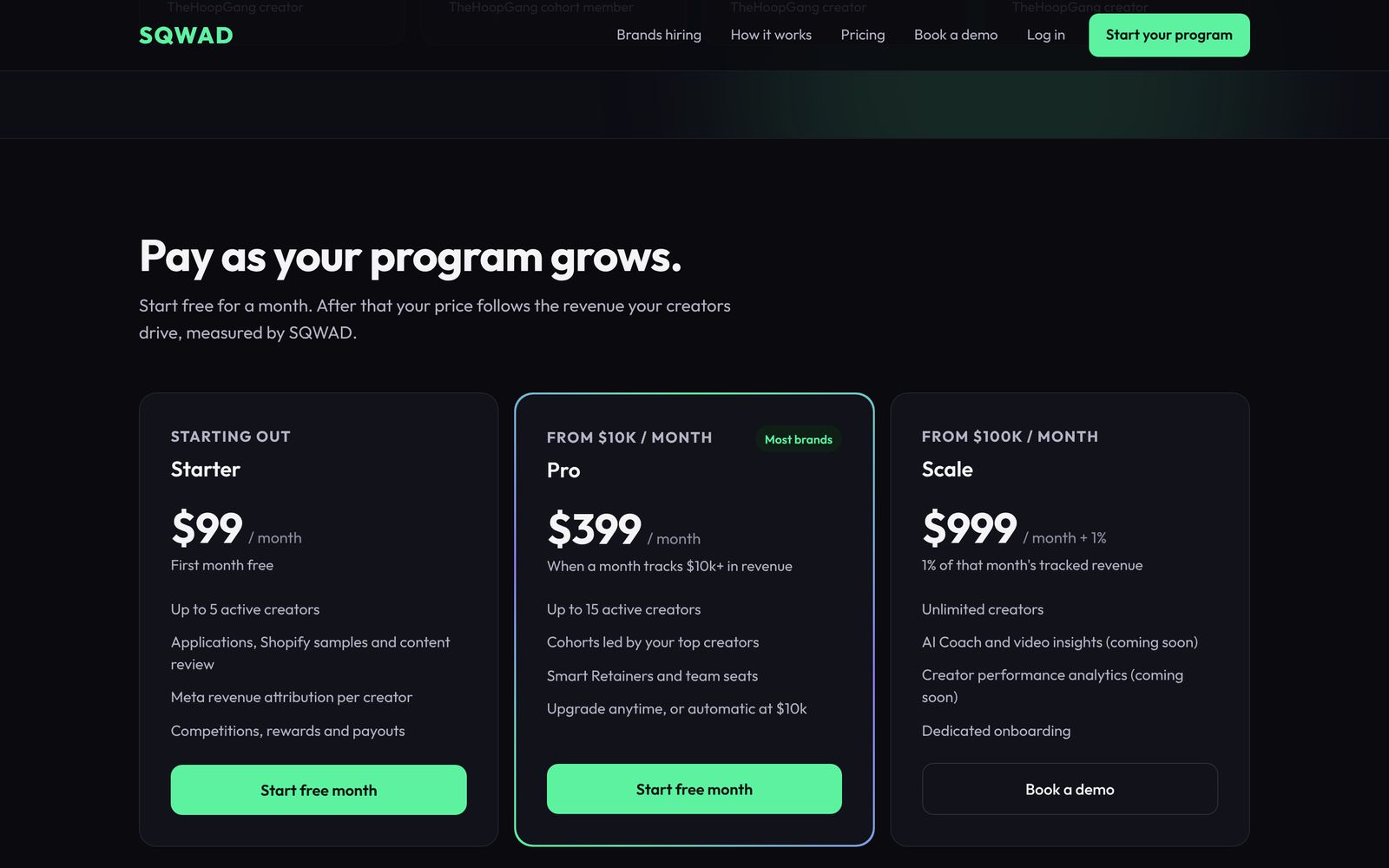
For a product where the buyer is a business and the value shows up in the first few weeks of real use, that is a simpler offer to explain and a simpler one to build.
When does freemium make more sense?
Freemium makes sense when a free user costs you almost nothing, the product gets better or spreads as more people use it, and you can afford to wait a long time for revenue.
The classic freemium products have something in common: a free user does work for the company. They invite teammates, share documents with people outside the product, or put the product's name in front of new users every time they use it. In that case the free plan is a marketing channel and its hosting cost is the marketing budget.
If none of that is true for your product, freemium is mostly a cost. Each free account still needs a database row, sign-in, password resets, transactional email, security updates and, sooner or later, a support reply. Freemium also asks a harder design question than a trial: where exactly is the line between free and paid? If the free plan is too generous, nobody upgrades. If it is too thin, nobody sticks around long enough to care. Getting that line right usually takes several rounds of real usage data, which an early product does not have yet.
So my rule of thumb is that freemium is a growth strategy for products with network effects and very low marginal cost, not a default for a first version.
How long should a free trial be?
A trial should be long enough for a typical new user to reach the first real result, and then use it once more, which for many simple B2B tools means somewhere between 7 and 14 days.
I avoid quoting a single best length, because the honest answer depends on your setup time. Work backwards from the product:
- If a new user can sign up and get a result in one sitting, a 7 day trial is enough.
- If they need to import data, invite a colleague or connect another tool, 14 days gives room for that to happen during a normal work week.
- If value only appears after a full business cycle, like a month of invoices or a payroll run, a 30 day trial is reasonable.
Longer is not automatically kinder, since a long trial invites people to put off trying the product. A shorter trial paired with a good onboarding flow often gets people to the result sooner. "How to design a SaaS onboarding flow that gets users to their first win" covers that side of it, and it matters more than the exact number of days.
Should you require a credit card to start a trial?
Require a card when you want fewer, more serious trial users, and skip the card when trust is the bigger obstacle and you need people to see the product first.
This is a trade-off between volume and intent, and you will see claims online about exact conversion rates for each option. I am not going to repeat a number here, because the figures vary widely by product and audience, and I have not seen one I would stake your pricing decision on. What I can say is what each choice does mechanically.
With a card up front, fewer people start a trial, but everyone who does has already cleared the hardest step. If they do nothing, the subscription converts to paid on the end date. That makes the reminder email before the first charge important, both for trust and for the card network rules covered below.
Without a card, more people start, many of them just looking. Nobody converts unless they come back and add payment details, so your product has to bring them back with in-app prompts, emails and a clear moment where upgrading makes sense.
For a B2B tool with a small, known audience, I lean toward no card and a short trial, because the first few customers often need to see it working before trusting a new company. For a product with lots of casual signups or abuse risk, a card up front saves real money.
How do you set up a free trial in Stripe?
In Stripe, the classic way is to create the subscription with trial_period_days or trial_end, and Stripe holds the subscription in trialing status until that date, then starts billing.
Here is how that works in practice, based on Stripe's docs at the time of writing:
- Create the subscription with trial_period_days set to the trial length. Stripe limits trial periods to 730 days.
- During the trial, the subscription status is trialing. Stripe creates a zero amount invoice when the trial starts.
- When the trial ends, Stripe creates an invoice and attempts the charge about an hour later, and a new billing period begins.
- A few days before the end, Stripe sends a customer.subscription.trial_will_end event. Use it to check for a payment method and to send your own reminder.
- To end a trial early, for example when a user clicks upgrade now, update the subscription with trial_end set to now.
If you use Stripe Checkout, pass trial_period_days inside subscription_data when creating the session. Stripe's docs now also describe a newer feature called trial offers, which can put a trial on a single subscription item and can charge an introductory price. Stripe recommends trial offers for new integrations at the time of writing, but Checkout support for them is still in private preview, so for a typical MVP using Checkout, the free trial period described above is the practical option.
Whichever you use, your app should not decide access by guessing. Store the subscription status from Stripe webhooks in your own database and check it on every request. "Stripe payment went through but your app did not update? Fix the webhook" covers the most common way that breaks.
How do you run a trial without asking for a card?
Stripe lets you start a trial with no card, and the setting trial_settings.end_behavior.missing_payment_method decides what happens if the user never adds one.
There are three options:
- cancel: the subscription is cancelled at the end of the trial, and Stripe sends customer.subscription.deleted.
- pause: the subscription pauses and stops cycling until the customer adds a card and it is resumed, and Stripe sends customer.subscription.paused.
- create_invoice: Stripe issues an invoice anyway, and the subscription goes past due if nothing is paid.
For Checkout, set payment_method_collection to if_required so the card field becomes optional, and put the trial length and end behavior inside subscription_data. To collect a card later, send the user to the Stripe customer portal when the trial_will_end event arrives.
I usually choose pause for B2B products. The account and its data stay in place, the user sees a clear "add a card to continue" screen in your app, and resuming is one step. Stripe's own docs also warn that cardless trials attract spam signups, and suggest requiring an account and a captcha before the trial starts. I agree, and I would add a limit of one trial per workspace.
What rules apply when a trial turns into a paid plan?
Card networks have requirements for trials that convert to paid, and Stripe can handle most of them if you turn on its trial reminder emails.
Stripe's compliance page for trials says that with customer emails enabled, it sends a reminder 7 days before a trial ends, or as soon as the trial starts if the trial is shorter than 7 days. The reminder includes a link to add or update payment details and a cancellation link. Receipts also show trial information and the cancellation URL, and Stripe appends trial text to the card statement descriptor. If you send your own emails instead, Stripe notes that you are still responsible for meeting the requirements.
Separately, subscription and automatic renewal laws in some places, California among them, add their own disclosure and cancellation rules. This is general information, not legal advice. Have someone qualified review your signup and cancellation flow if you are unsure.
In practice, the build checklist is short: clear trial terms on the pricing page and at checkout, a reminder before the first charge, an easy cancel button in the app or the customer portal, and no surprise charges.
The bottom line
Free trial vs freemium comes down to what you are limiting. A trial limits time and suits most early B2B SaaS products, because buyers can judge value in days and you are not paying to host people who will never pay. Freemium limits features and suits products with very cheap free users who bring in more users. Choose the trial length from how long real users take to get a result, choose card or no card based on whether you need volume or intent, and let Stripe handle the trial mechanics and reminders while your app reads the subscription status from webhooks.
Setting up trials, plans and Stripe webhooks is part of the payments work in my SaaS MVP package. If your app already exists and its billing is half wired, the "Stripe test mode to live mode: the checklist I use before taking payments" post is a good place to start.
Questions, answered in one line
How long should a SaaS free trial be?
Long enough for a typical user to reach the first real result twice, which for many simple B2B tools is 7 to 14 days, and longer only if setup genuinely takes weeks.
Should I require a credit card for a free trial?
Require one when you want fewer, more serious signups and your product is easy to evaluate quickly, and skip it when you need people to try the product before they trust you with a card.
Can I offer both a free plan and a free trial?
Yes, a common hybrid is a free plan with limits plus a time-limited trial of the paid plan, but it doubles the rules your app has to enforce, so I usually start with one.
What happens in Stripe when a trial ends without a card?
It depends on trial_settings.end_behavior.missing_payment_method: cancel ends the subscription, pause stops it until a card is added, and create_invoice sends an invoice that goes past due if unpaid.
Can Thomas Osayi set up trials and billing in my SaaS?
Yes, Thomas Osayi includes Stripe payments in the SaaS MVP package from $1,200 over about 21 days, and a trial or free plan is part of that billing setup.
Sources
Related articles
- How to scope an MVP: one workflow, three lists and the cuts that matter
- Multi-tenant SaaS with Firestore: data layout, security rules and custom claims
- Web app vs mobile app for your MVP: which to build first
- PWA vs native app in 2026: what a web app can do on iPhone now
SaaS MVP and full-stack web app development
I build SaaS MVPs and full-stack web apps in Next.js, TypeScript and Firebase or Postgres: auth, dashboards, payments, roles and admin tools. Founder of SQWAD.
See the service