November 27, 2026 · 10 min read · Thomas Osayi
Feature flags for a SaaS MVP: env flags, database flags, plan entitlements and kill switches
Feature flags for SaaS, sized for an MVP: when you need them, env and database flags vs a service, per-plan entitlements, kill switches and beta rollouts.
Feature flags sound like something big companies use to run thousands of experiments. In a SaaS MVP they do a more modest job, and it is an important one: they let you turn something off at 2 a.m. without a deploy, give one customer early access to a feature, and make sure the Starter plan does not quietly get everything the Pro plan pays for.
I build SaaS MVPs, and the flag setup I reach for first is small and lives in the app's own database. This post covers what kinds of flags a SaaS actually needs, when an environment variable is enough, how to build database flags and per-plan entitlements, how to roll out to beta users and build a kill switch, and when a service like PostHog, LaunchDarkly or Vercel Flags is worth paying for. Vendor prices were checked on November 27, 2026.
What is a feature flag, and does an MVP need one?
A feature flag is a value your code reads at runtime to decide whether a feature is on, and most MVPs need a few of them from the first paying customer.
The point of a flag is that changing it does not require changing code. Instead of deleting a half-finished export feature before launch, you ship it behind a flag set to off. Instead of shipping a new pricing page to everyone at once, you show it to your own team first. Instead of reverting a commit when a third-party API starts failing, you flip a switch and the feature stops calling it.
An MVP does not need an experimentation platform. It does need three things that are flags under the hood: a way to keep unfinished work hidden in production, a way to stop a broken feature fast, and a way to give different plans different features. If you only have one plan and no risky integrations, you can skip this until you do. The moment you add a second plan or your first external API, you have a flag problem whether you call it that or not.
What kinds of flags does a SaaS app actually use?
A SaaS app uses four kinds of flags, and keeping them separate in your head prevents most of the mess.
- Release flags hide work in progress. They are temporary and should be deleted once the feature is fully on.
- Kill switches turn off a feature or integration that is misbehaving. They are permanent, default to on, and should be checked on the server.
- Entitlements decide what a customer can use based on their plan, an add-on or a custom deal. They are permanent and tied to billing.
- Beta or targeting flags turn a feature on for a list of organizations or a percentage of them. They usually become release flags that get removed.
The mistake I see in AI-built apps is one boolean column per idea scattered across the users table, with no record of which kind each one is. Naming helps: prefix flags by type, such as release_new_editor, kill_ai_summaries and plan_csv_export, so anyone reading the code knows what they are touching.
When is an environment variable flag enough?
An environment variable is enough for a global switch that changes rarely and does not need to target anyone.
Something like ENABLE_AI_SUMMARIES=false in your hosting dashboard is the simplest flag there is. It is read on the server, it costs nothing and it is easy to understand. It is the right tool for turning off a feature in production while it stays on in preview deployments, or for disabling a payment method until the paperwork is done.
The limits are real, though. On most hosts, including Vercel, a changed environment variable only takes effect after a new deployment, so it is a poor kill switch when you need something off in thirty seconds. It is the same value for every customer, so it cannot express "on for these three beta organizations". And if the variable is prefixed for the browser, such as NEXT_PUBLIC_ENABLE_BETA, it is baked into the client bundle at build time and anyone can read it, which is fine for hiding a button and useless for protecting anything. The moment you want a per-customer or instant switch, move to the database.
How do I build database flags without a vendor?
Two small tables, one for global flags and one for per-organization overrides, cover most MVPs.
Here is the shape I use, described in plain terms rather than as a schema file:
- feature_flags: key (text, unique), enabled (boolean), description, owner, created_at and remove_by (a date, for release flags).
- flag_overrides: flag_key, organization_id, enabled, reason and created_by, with a unique constraint on the flag and organization pair.
Evaluation is one function on the server, something like isEnabled(flagKey, orgId). It checks for an override for that organization first, then falls back to the global value, then falls back to a default written in code if the row is missing. That last fallback matters: if someone deletes a row, the app should behave predictably, not crash.
Read the flags once per request and pass the result down, rather than querying the table in every component. A short in-memory cache of 30 to 60 seconds is fine for most flags. For a kill switch, keep the cache short or skip it, because the whole point is that a change takes effect quickly. Give your admin dashboard a page that lists flags and lets staff flip them, and record each change in your audit log. "SaaS admin dashboard features: what to build first and what to lock down" and "Audit logs for a SaaS app" cover those two pieces in more depth.
How should per-plan entitlements work?
Entitlements should come from a map of plan to features in your code, applied to the subscription your billing webhooks recorded, and checked on the server.
The plan itself, Starter or Pro, is a fact you store when Stripe tells you about it, as covered in "Setting up Stripe subscriptions for a SaaS MVP: what you actually need". The features each plan unlocks are a product decision, and I keep them in one file, a plain object that says Starter gets three seats and no CSV export, Pro gets ten seats and CSV export, and so on. A function like can(org, 'csv_export') reads the organization's plan, looks up the map, then checks flag_overrides for any custom deal.
Plan comparison tables on a pricing page are entitlements written for humans, and they should match the code exactly. On SQWAD, my own SaaS, the plan comparison table lists what each tier includes feature by feature.
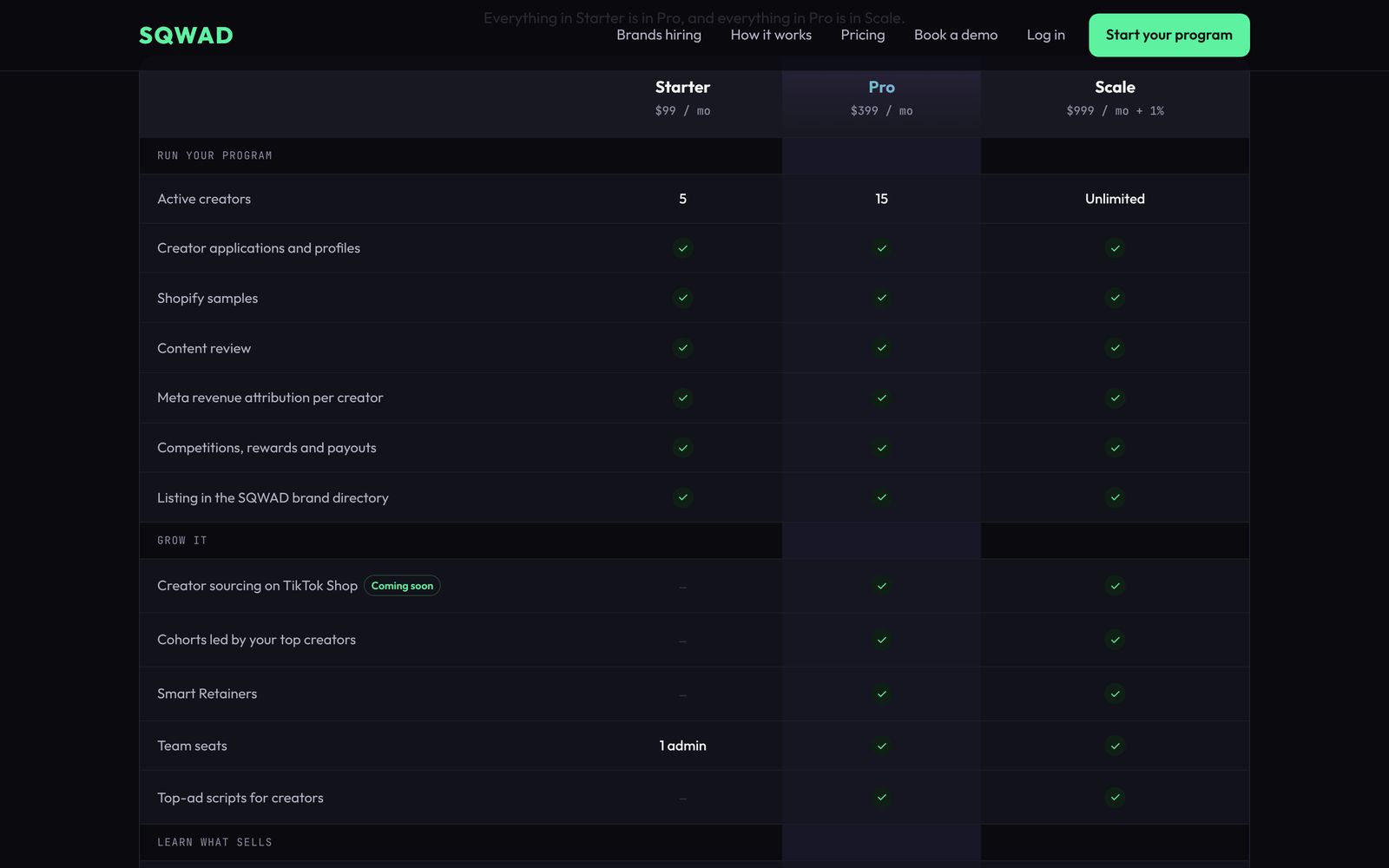
Two rules keep this safe. First, enforce every entitlement in the server route or server action, not only by hiding the button, because anyone can call your API directly. Second, decide what happens on downgrade before it happens. If a Pro customer with eight seats drops to Starter, do you block new invites, lock the extra seats or keep them until renewal? Write the answer down and code it, because the default behavior of most apps is to do nothing, which means the downgrade costs you money.
How do I roll a feature out to beta users?
Start with an explicit list of organizations, then move to a stable percentage based on a hash of the organization ID.
For a young SaaS, a beta list is just rows in flag_overrides with a reason such as "asked for it on a call". It is precise, easy to undo and easy to explain to the customer. Tell beta customers they are on a beta so a rough edge does not feel like a bug in a finished product.
When you want a percentage rollout, do not use a random number per request, because a user will see the feature, reload and lose it. Hash the organization ID together with the flag key into a number from 0 to 99 and turn the feature on when that number is below your rollout percentage. The same organization always lands in the same bucket, and moving from 10 to 25 percent keeps everyone who already had it. Roll out by organization rather than by user in a B2B app, so two people on the same team do not see different products.
As an illustration, picture a made-up scheduling tool for dog groomers shipping a new calendar view. Week one: on for the founder's own test organization. Week two: on for five friendly customers through overrides. Week three: 25 percent by hash. Week four: 100 percent, then the flag and the old calendar code are deleted in the same pull request.
What does a kill switch look like?
A kill switch is a server-side flag that defaults to on and wraps a risky call so that turning it off fails gracefully.
Good candidates are anything that depends on a third party or costs money per call: AI features, outbound email and SMS, a sync with an external calendar, a webhook to a partner. The check sits right before the call. If kill_ai_summaries is off, the route returns a friendly "summaries are paused" message instead of calling the model, and background jobs skip the work instead of retrying it forever.
Three details make a kill switch actually useful. It must take effect quickly, so read it fresh or with a very short cache. It must fail closed for spend and open for core features, meaning a broken flag lookup should stop the expensive AI call but should not lock customers out of their data. And it should be something a non-developer on your team knows how to flip, which is why it belongs on the admin page and not in an environment variable.
When should I pay for PostHog, LaunchDarkly or Vercel Flags?
Pay for a service when people who do not write code need to manage targeting, or when you want experiments and analytics tied to flags.
PostHog
Best for teams already using PostHog for product analytics who want flags and experiments in the same place. At the time of writing, PostHog includes 1,000,000 feature flag requests a month free, with no credit card required for the free plan, and charges from $0.0001 per request beyond that, falling with volume. The upside is that flag exposure and analytics share one tool. The downside is that request counts depend on how your app evaluates flags, so read PostHog's own advice on cutting flag costs before you scale.
LaunchDarkly
Best for larger teams with many services and strict release processes. At the time of writing, the free Developer plan includes 5 service connections and 1,000 client-side monthly active users, with 1 project and 3 environments, and the Foundation plan charges $12 per extra service connection and $10 per 1,000 client-side MAU billed monthly, a little less billed yearly. It is the most complete option and more than an MVP usually needs.
Vercel Flags
Best for Next.js apps already on Vercel that want flags evaluated close to the edge. At the time of writing, Hobby includes up to 10,000 flag requests per billing cycle and 100 flags, and Pro is billed at $0.03 per 1,000 flag requests. It fits naturally into a Vercel project, and it ties your flags to your host.
If you are choosing an analytics tool at the same time, "Product analytics for an MVP: PostHog vs Mixpanel vs GA4 vs Amplitude, and what to track" is the companion read.
What mistakes make feature flags a mess?
Most flag problems come from flags that never get removed, flags checked only in the browser, and entitlements mixed up with release switches.
- Leaving release flags in place after launch. Every flag doubles the paths through that code. Delete the flag and the dead branch together.
- Checking entitlements only on the client. A hidden button is not a permission. The server route must check too.
- Evaluating flags in many places with different defaults. One server function, one default per flag.
- Using flags for configuration. Prices, limits and copy belong in config or the database, not in boolean flags.
- No audit trail, so nobody can say who flipped what and when.
The bottom line
Feature flags for SaaS do not have to be a platform decision. For an MVP, use an environment variable for rare global switches, a small feature_flags and flag_overrides pair in your database for kill switches and beta lists, and a plan-to-features map checked on the server for entitlements. Hash organization IDs for stable percentage rollouts, give every release flag a removal date and log every change. Move to PostHog, LaunchDarkly or Vercel Flags when non-developers need to run rollouts or you want experiments, and check their pricing pages when you do, because request-based pricing depends on how your app evaluates flags.
Questions, answered in one line
Do I need a feature flag service for my MVP?
Usually not at launch, because a small flags table in your own database handles kill switches, beta lists and plan entitlements, and you can move to a service when non-developers need to manage rollouts.
Is PostHog free for feature flags?
At the time of writing PostHog includes 1,000,000 feature flag requests per month free, with paid requests starting at $0.0001 each beyond that.
Should feature flags be checked on the client or the server?
Check on the server for anything that protects data, money or limits, and use client checks only to hide or show interface elements that the server also enforces.
What is the difference between a feature flag and an entitlement?
A feature flag controls whether a feature is turned on at all, while an entitlement records whether a specific customer is allowed to use it based on their plan or a deal you made.
Can Thomas Osayi add plan-based feature gating to my app?
Yes, plan entitlements and kill switches are part of the billing and dashboard work in the SaaS MVP package from $1,200 over about 21 days.
Sources
- Feature flags pricing PostHog
- LaunchDarkly pricing LaunchDarkly
- Limits and Pricing for Vercel Flags Vercel
Related articles
- How to scope an MVP: one workflow, three lists and the cuts that matter
- Multi-tenant SaaS with Firestore: data layout, security rules and custom claims
- Web app vs mobile app for your MVP: which to build first
- PWA vs native app in 2026: what a web app can do on iPhone now
SaaS MVP and full-stack web app development
I build SaaS MVPs and full-stack web apps in Next.js, TypeScript and Firebase or Postgres: auth, dashboards, payments, roles and admin tools. Founder of SQWAD.
See the service