November 22, 2026 · 8 min read · Thomas Osayi
How to add multiple languages to a Next.js app (i18n with the App Router)
Next.js internationalization in practice: locale routing, translation files, next-intl setup, translating database content, dates and SEO, with a real example.
Adding a second language to an app sounds like a translation job. In practice it is mostly a routing and data job, with translation as the last step. The decisions that matter are where the language lives in the URL, where every string of text comes from, and what happens to content stored in the database.
The Hoop Gang, the streetwear brand I work with as a software engineer, is expanding to Japan and France, so this is a practical question for me rather than a theoretical one. This post covers how internationalization works in the Next.js App Router, how next-intl fits in, how to handle dynamic content, and the SEO pieces that make each language findable. If your project is a marketing site in English and Spanish, "How to build a bilingual website in English and Spanish that ranks in both" covers that case more directly.
How do you add multiple languages to a Next.js app?
Put the locale in the URL, keep every interface string in a translation file per language, load the right file on the server for each request, and translate stored content separately.
Broken into steps, a typical App Router setup looks like this:
- Choose your locales and a default, for example en, ja and fr with en as default.
- Move every route under a dynamic locale segment, such as app/[locale]/page.tsx.
- Add a proxy file that detects the visitor's preferred language and redirects paths without a locale.
- Create one message file per language, such as messages/en.json and messages/ja.json.
- Replace hard-coded text in components with lookups by key.
- Format dates, numbers and currencies by locale.
- Translate database content with its own fields or table.
- Add hreflang alternates and a language switcher.
The first four steps are plumbing and take a day or two on a small app. Replacing hard-coded strings is the slow part on an app that was not built with languages in mind, because the text is scattered through every component.
Should the language be in the URL?
Yes, for almost every app: a locale in the path, such as /ja/products, gives each language its own address that can be shared, bookmarked and indexed.
The Next.js documentation describes two options: a sub-path such as /fr/products, or a domain such as my-site.fr/products. Sub-paths are simpler because there is one deployment, one domain and one set of DNS records. Separate domains make sense when each country is really its own business, with its own prices, shipping and legal pages.
The alternative, keeping one URL and switching language with a cookie, looks tidy but causes problems. Search engines see only one language, a link shared from Japan opens in whatever language the recipient last used, and caching gets complicated because the same URL returns different content.
Detecting the browser language is still useful, but only for the first visit. The Next.js docs suggest reading the Accept-Language header in the proxy and redirecting a visitor who arrives at a path with no locale. Once someone picks a language, respect their choice over the header.
Should you use next-intl or build it yourself?
For most production apps I would use next-intl, and for a small app with a handful of pages the plain dictionary pattern from the Next.js docs is enough.
The built-in dictionary pattern
The Next.js internationalization guide shows a getDictionary function that imports dictionaries/en.json or dictionaries/nl.json on the server, a hasLocale check that calls notFound for unsupported locales, and generateStaticParams in the layout to pre-render each language. Because pages are Server Components by default, the translation files do not add to the JavaScript sent to the browser. It is simple and has no dependency, but you write plurals, formatting and the language switcher yourself.
next-intl
next-intl is listed among the libraries in the Next.js docs and adds routing helpers, message formatting with plurals, locale-aware date and number formatting, and navigation helpers that keep the locale in every link. It works in Server and Client Components, which matters once you have interactive parts.
Other options listed in the Next.js docs include next-international, paraglide-next, lingui and several hosted translation platforms. The choice matters less than picking one early and putting every string through it.
How do you set up next-intl with the App Router?
next-intl's App Router guide uses a routing config, a proxy, a request config and a layout inside the [locale] segment.
At the time of writing, the files in its setup are:
- src/i18n/routing.ts, created with defineRouting, listing the locales and the default locale.
- src/proxy.ts, which uses createMiddleware with that routing config to detect and redirect locales. The docs note this file was called middleware.ts up until Next.js 16, so older projects and tutorials use that name.
- src/i18n/navigation.ts, created with createNavigation, giving Link and redirect helpers that keep the current locale.
- src/i18n/request.ts, created with getRequestConfig, which validates the locale with hasLocale and loads that language's messages.
- src/app/[locale]/layout.tsx, which sets the html lang attribute and wraps the app.
In components you call useTranslations with a namespace, and in server code such as generateMetadata you use getTranslations. Older guides also call setRequestLocale to enable static rendering, and next-intl's docs now describe that as a legacy API, so check the version you install.
How should translation files be organized?
One JSON file per language, grouped by screen or feature, with keys that describe meaning rather than the English wording.
A key like checkout.payButton survives copy changes. A key like "Pay now" breaks the day marketing changes the button to "Complete order". Group keys by namespace (home, checkout, account, errors) so each component loads only what it uses and translators can work screen by screen.
Practical rules I follow:
- Never build sentences by joining fragments. Word order differs between languages, so use placeholders inside one message.
- Use the library's plural syntax instead of if statements. English has two plural forms, French treats zero differently from English, and Japanese usually has no plural form at all.
- Keep brand and product names out of translation unless the brand wants them translated.
- Have a native speaker review every language before launch. Machine translation is a fine first draft and a poor final one for buttons and legal text.
How do you translate dynamic content from a database?
Store translated versions next to the original, either as per-language fields or in a separate translations table, and fall back to the default language when one is missing.
Translation files only cover interface text. Product names, descriptions, FAQ answers and emails stored in your database need their own approach:
Per-language fields
Columns such as name_en, name_ja and name_fr, or a JSON field keyed by locale. Simple and fast for a few fields and a few languages.
A translations table
A table with the record ID, the locale, the field and the translated text. More flexible when languages keep being added, at the cost of a join.
Either way, write a helper that takes a record and a locale and returns the right text, falling back to English with a note for the team. Content written by users, such as reviews or creator bios, usually stays in its original language. If the products come from Shopify, its own translation features may cover product data, and your app reads the translated fields rather than storing its own copies.
Emails need the same treatment. Store each user's preferred locale on their account, and send transactional emails in that language, not in the language of whoever triggered the email.
What about dates, currency and layout?
Use the platform's locale-aware formatting for dates, numbers and money, and test layouts with real translated text, because length and line breaking change.
JavaScript's Intl APIs and next-intl's formatters handle date order, decimal separators and currency symbols per locale, so never hand-format a date string. Prices are a separate decision from language: showing yen to a Japanese visitor means real yen prices, not a converted number.
The language switcher deserves a little care as well. Label each option in its own language, so a Japanese visitor looks for the Japanese label rather than the word Japanese in English, and avoid flags, because a language is not a country. Switching should keep the visitor on the same page in the new language instead of sending them back to the homepage, which next-intl's navigation helpers handle for routes that exist in every locale. Store the choice in a cookie so a returning visitor lands in the language they picked, and on signed-in accounts save it to the profile too.
Layout needs checking too. French text often runs longer than English, which breaks tight buttons. Japanese has no spaces between words, so it needs a font with Japanese glyphs and line breaking that does not split text in awkward places.
How does The Hoop Gang handle it?
The Hoop Gang is expanding to Japan and France, and the creator portal I built for the brand already offers English and Japanese from a switch in the header.
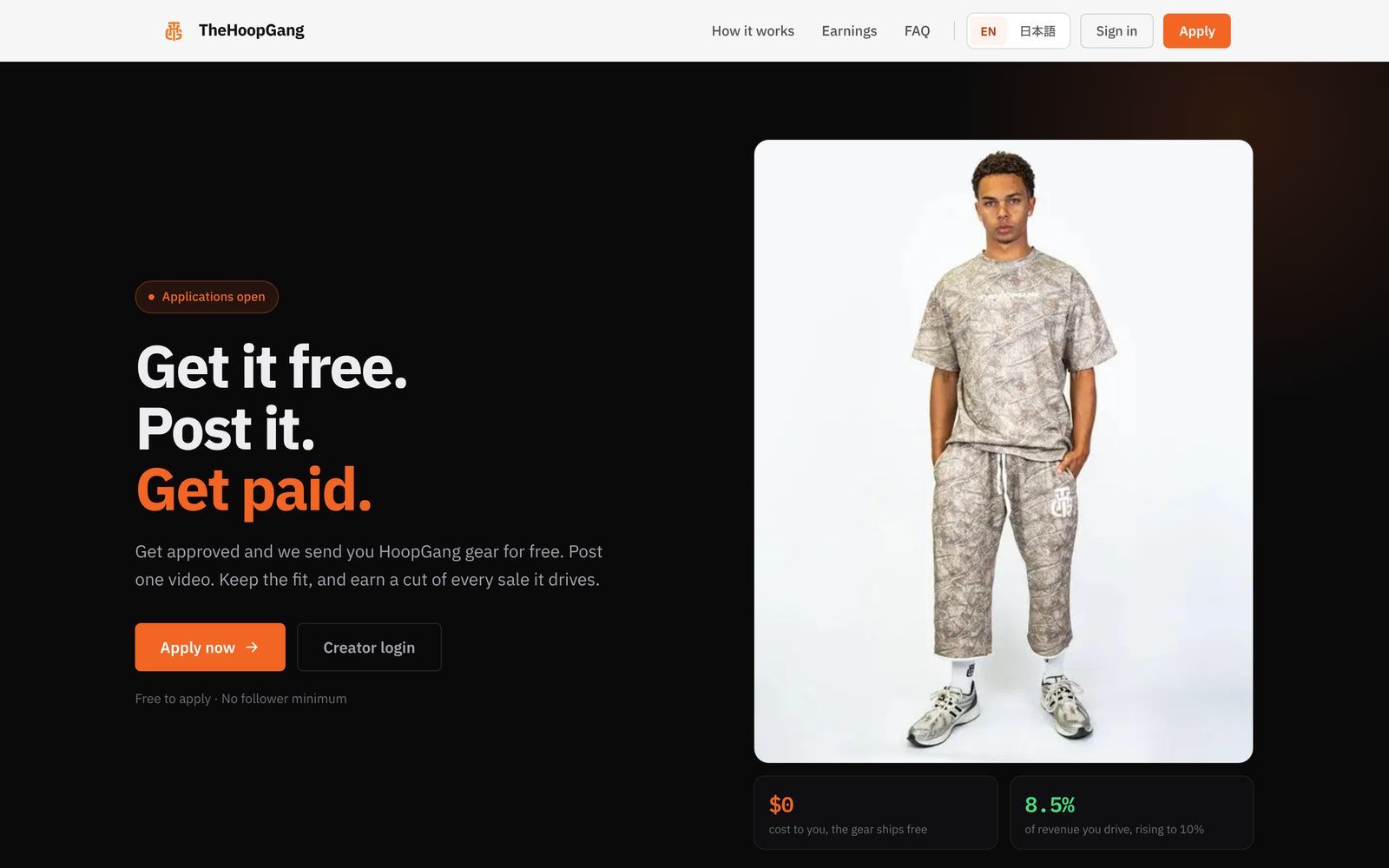
A creator in Japan can read the offer, the steps and the FAQ in Japanese before applying, which matters for a program whose whole pitch is explained on the homepage. As an illustration of how the next language would be added with the pattern in this post: add fr to the routing config, create the French message file, have a native speaker review it, translate the database-driven content, then add the new hreflang alternates and the third option in the switcher. The routing and components do not change.
How do you make each language rank in search?
Give each language its own URL, link every version to every other with hreflang, and add an x-default for visitors who match none.
Google's guidance says each language version must list itself and all other versions, using full URLs, and that the set should be identical across versions, or the annotations may be ignored. Language codes are two-letter ISO 639-1 codes such as ja and fr, optionally followed by a region such as fr-BE. Google also says it does not use hreflang or the html lang attribute to detect a page's language, so the visible content must really be translated. In Next.js, generateMetadata can return these alternates for each page, and the sitemap should list every language version.
The bottom line
Next.js internationalization comes down to locale-based routing, translation files per language loaded on the server, and a plan for database content. Use next-intl for most production apps, put the locale segment and proxy in place before translating anything, store translated fields for dynamic content, and add hreflang alternates so every language can be found. Adding a second language to a small working app can fit my Fix Plus Features package from $200, while a larger app with translated data fits a SaaS MVP build from $1,200.
Questions, answered in one line
Does Next.js have built-in internationalization?
The App Router supports localized routing through a dynamic [lang] segment and locale detection in the proxy file, but translation loading and formatting are up to you or a library such as next-intl.
Should I use subpaths or separate domains for each language?
Subpaths such as /fr/ are simplest for most apps because they share one deployment and one domain, while separate domains suit brands with distinct country businesses.
Can I just use automatic browser translation?
Automatic browser translation helps visitors read a page, but it does not give search engines a page in that language and often mistranslates product and brand terms.
How do I translate content stored in a database?
Store translated versions alongside the original, either as per-language fields or in a separate translations table keyed by record and locale, and fall back to the default language when a translation is missing.
What would Thomas Osayi charge to add languages to my app?
Thomas Osayi can add a second language to a small working app under the Fix Plus Features package from $200 in about 5 days, while larger apps with translated database content fit the SaaS MVP or Full SaaS Platform packages.
Sources
- Internationalization Next.js
- App Router setup with i18n routing next-intl
- Tell Google about localized versions of your page Google Search Central
Related articles
- How to scope an MVP: one workflow, three lists and the cuts that matter
- Multi-tenant SaaS with Firestore: data layout, security rules and custom claims
- Web app vs mobile app for your MVP: which to build first
- PWA vs native app in 2026: what a web app can do on iPhone now
SaaS MVP and full-stack web app development
I build SaaS MVPs and full-stack web apps in Next.js, TypeScript and Firebase or Postgres: auth, dashboards, payments, roles and admin tools. Founder of SQWAD.
See the service